

Table of Contents
Introduction
Engineering drawing revision control is an important part of maintaining accuracy and consistency in manufacturing. When design changes are made, the latest drawing, 3D CAD model, BOM, and manufacturing documents must remain aligned. If an outdated drawing reaches the shop floor, it can result in incorrect fabrication, material wastage, rework, production delays, and quality issues.
For companies using Solidworks and Autodesk Inventor, CAD automation can make revision management more reliable by reducing manual updates, validating document properties, and controlling the generation of production files.
Using CAD Automation with Macros, APIs, VBA, and .NET, engineering teams can establish automated workflows that help ensure only the correct and approved drawing revisions are released for manufacturing.
What Is Engineering Drawing Revision Control?
Engineering drawing revision control is the process of tracking, updating, reviewing, approving, and distributing changes made to engineering drawings and associated CAD files.
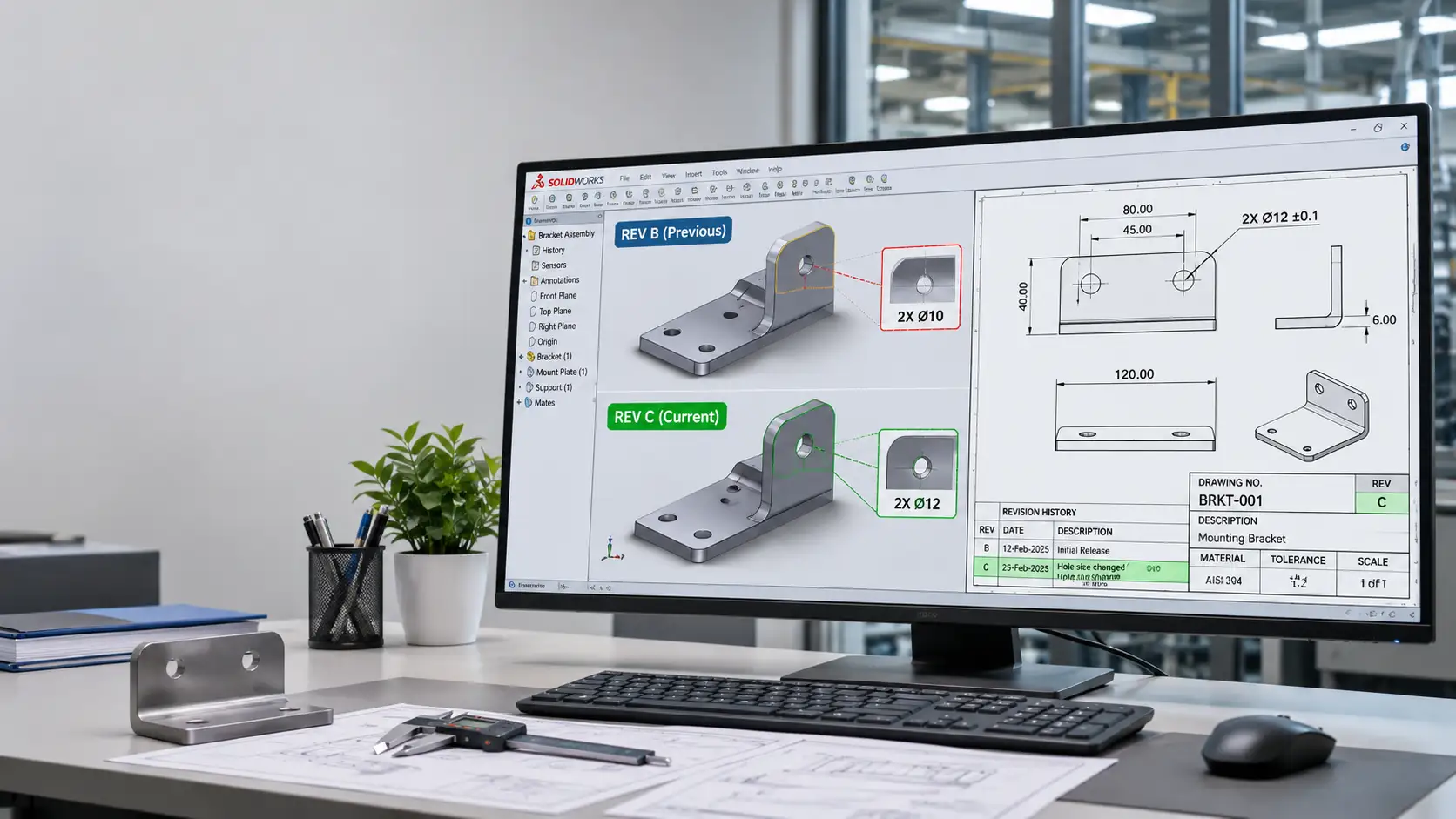
Every approved design change should have a traceable revision identifier, such as Rev A, Rev B, or Rev C, according to the company’s revision scheme.
A typical revision-controlled document may contain:
- Drawing number and part number
- Revision number or revision code
- Drawing description and project details
- Revision history and change description
- Prepared, checked, and approved information
- Release date and approval status
Revision control should cover not only 2D engineering drawings but also associated 3D models, assemblies, BOMs, DXF files, PDF drawings, and other manufacturing outputs.
Why Do Outdated Engineering Drawings Reach Production?
In many manufacturing environments, revision-related errors occur because document management still depends heavily on manual processes.
1. Manual File Distribution
Drawings are shared through emails, shared folders, or messaging platforms. Production teams may continue using previously downloaded files even after a new revision is released.
2. Inconsistent Revision Information
The revision number in the drawing title block may not match the CAD file properties, BOM, or exported PDF.
3. Uncontrolled File Copies
Multiple copies of the same drawing may exist in different project folders, making it difficult to identify the latest approved version.
4. Missed Updates in Associated Files
When a part or assembly is modified, its associated drawings and manufacturing documents may not be updated or re-released correctly.
5. Manual Exporting of Production Files
PDF and DXF files may be generated before the latest design changes are incorporated, resulting in outdated files reaching CNC machines or fabrication teams.
These issues highlight the need for a structured revision management process supported by automation.
How CAD Automation Improves Engineering Drawing Revision Control
CAD automation helps standardise repetitive document management activities within engineering workflows. Instead of depending entirely on engineers to update properties, rename files, and export drawings manually, macros and APIs can perform these tasks using predefined rules.
1. Automated Revision Property Management
Solidworks and Inventor support custom document properties that can store information such as part numbers, drawing numbers, revision codes, descriptions, and approval status.
Using APIs and macros, these properties can be read, validated, and updated automatically.
For example:
- Retrieve the current revision from document properties.
- Validate drawing and model revision information.
- Update title block fields using linked properties.
- Populate revision descriptions and dates.
- Flag missing or inconsistent revision information.
In Solidworks, this can be implemented using the Solidworks API with VBA macros or .NET applications.
In Autodesk Inventor, the Inventor API can access and manage document iProperties, including custom properties used for revision tracking.
Implementing CAD automation solutions can help engineering teams standardise drawing updates, validate document properties, and reduce repetitive manual tasks involved in managing engineering documentation.
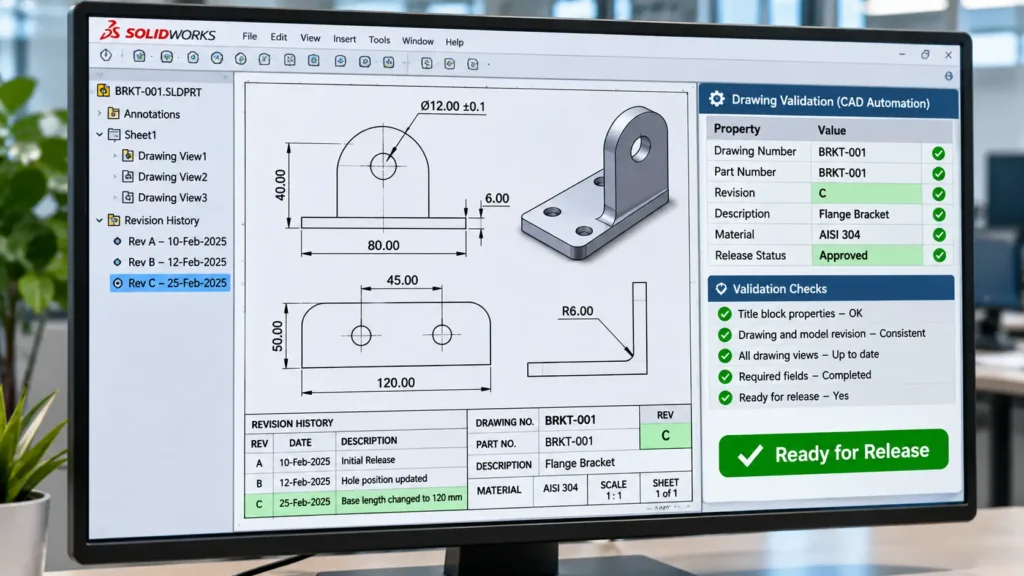
2. Automated Drawing and Model Validation
A drawing may reference a model that has been modified after the drawing was last updated. In such situations, the drawing should be checked before it is released.
CAD automation can perform validation checks such as:
- Identifying missing or unresolved model references.
- Checking whether drawing views require updates.
- Comparing revision properties between models and drawings.
- Verifying mandatory title block information.
- Checking whether required approval fields are completed.
For example, an automated validation routine can prevent a drawing from proceeding to the export stage if its revision information is missing or its associated model requires an update.
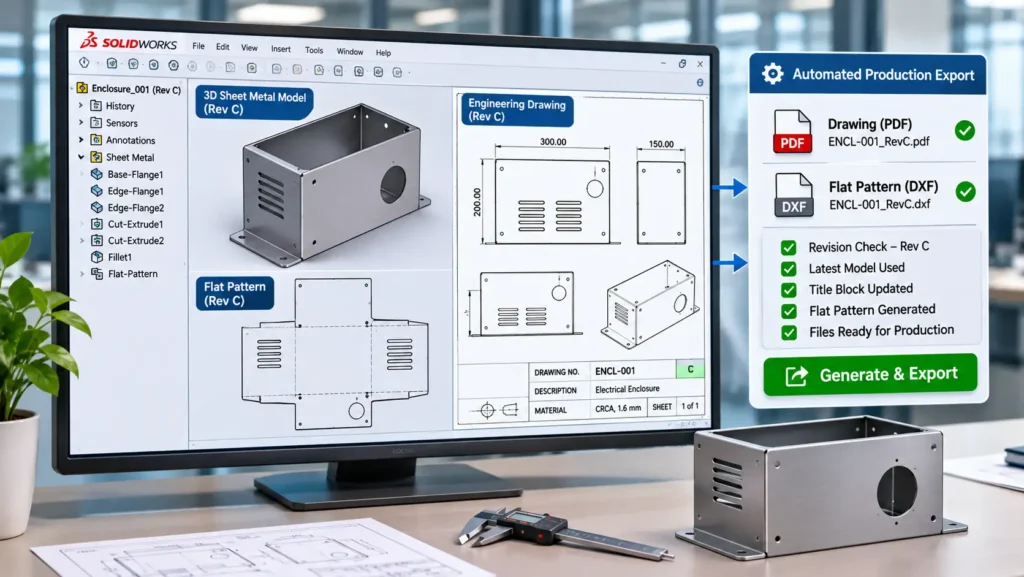
3. Controlled PDF and DXF Generation
Production teams frequently use PDF drawings for reference and DXF files for laser cutting, punching, and other CNC manufacturing processes.
Generating these files manually can introduce revision errors.
Using Solidworks API or Inventor API automation, companies can create controlled export workflows that:
- Select drawings based on predefined release conditions.
- Generate PDF files from approved drawings.
- Export DXF files from the correct sheet metal configuration or flat pattern.
- Apply standardised file naming conventions.
- Store exported files in designated revision-specific or release folders.
- Maintain export logs for traceability.
An important consideration is that exporting a file does not automatically make it approved. The automation should first verify the document’s release status and revision information.
4. Automated File Naming and Folder Management
A standardised file naming convention makes engineering documents easier to identify and manage.
For example:
PartNumber_Description_Revision.pdf
A CAD automation macro can retrieve the required document properties and generate filenames automatically.
It can also organise exported files into predefined project, part number, or revision folders.
This reduces naming inconsistencies and helps prevent confusion between working files and released production documents.
5. Revision Checks Before Production Release
A production release workflow should include validation before documents are made available to manufacturing.
An automated process can verify:
- Whether the drawing has a valid revision number.
- Whether the associated model and drawing information is consistent.
- Whether the drawing has been updated and saved.
- Whether the required approval status is available.
- Whether the PDF or DXF export corresponds to the approved revision.
If any mandatory condition fails, the process can stop the export or flag the document for engineering review.
This creates a more controlled transition from design changes to manufacturing documentation.
Role of Solidworks and Inventor APIs in Revision Automation
Both Solidworks and Autodesk Inventor provide APIs that allow developers to interact with CAD documents, properties, drawings, assemblies, and export functions.
| Automation capability | Solidworks | Autodesk Inventor |
|---|---|---|
| Document properties | Custom Properties API | iProperties API |
| Drawing access | Drawing Document API | DrawingDocument API |
| Model and drawing references | Document and component APIs | Referenced Documents API |
| Drawing updates | Rebuild and drawing view operations | Update and drawing operations |
| PDF/DXF export | Export APIs | Translator and export APIs |
| Custom automation | VBA macros, VB.NET, C# | VBA, VB.NET, C# |
VBA Macros: Suitable for automating repetitive tasks within the CAD environment, such as updating properties, validating drawing information, and exporting files.
.NET Applications and Add-ins: Useful for developing more structured automation solutions, including custom interfaces, multi-document processing, validation tools, and integration with external databases or document management systems.
The choice between VBA and .NET depends on workflow complexity, integration requirements, maintainability, and the scale of automation.
Using Solidworks API automation, engineers can develop custom macros to validate drawing properties, update title block information, automate document processing, and generate production files based on predefined rules.
Revision Control with PDM and PLM Systems
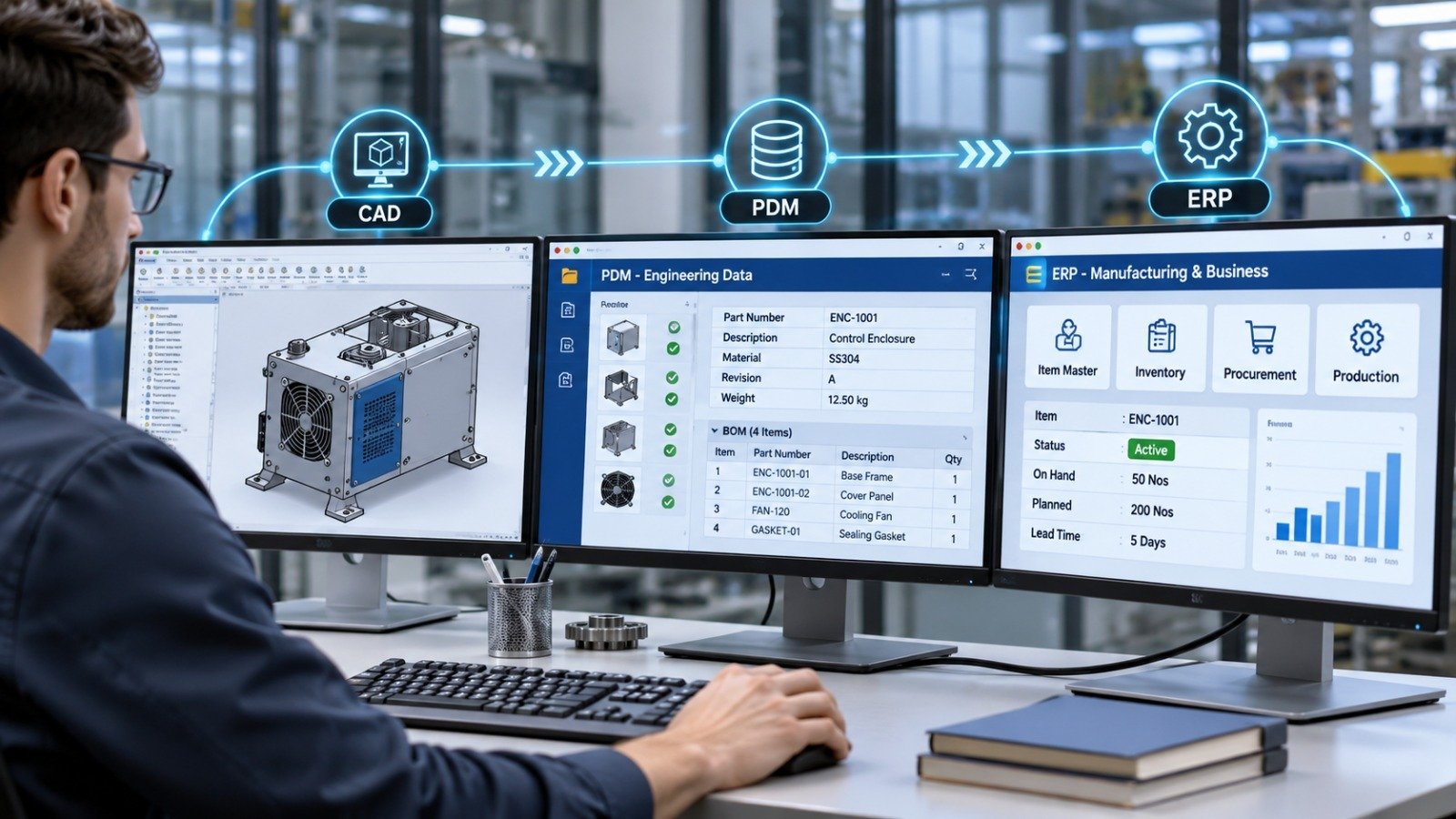
While CAD macros and APIs can automate document-level checks and file generation, a complete revision control process may also require a Product Data Management (PDM) or Product Lifecycle Management (PLM) system.
A PDM system helps manage CAD files, references, versions, access permissions, and engineering approval workflows.
For example, a typical controlled workflow may look like this:
- Design Modification: Engineer modifies the CAD model or drawing.
- Revision Update and Validation: Properties, references, and drawing status are checked.
- Engineering Review and Approval: Authorised personnel review and approve the change.
- Controlled Release: Approved revision is released through PDM/PLM.
- Production Documentation: PDF, DXF, BOM, and other approved manufacturing outputs are generated or distributed.
CAD automation can support this process by connecting document properties, validation routines, export operations, and PDM workflows.
For Solidworks users, automation can also be developed around Solidworks PDM to extract metadata, automate BOM exports, and support file approval and release processes.
The important distinction is that a CAD macro alone does not provide a complete revision-controlled environment. Revision authority, access permissions, approval records, and released-file management should remain governed by the appropriate PDM/PLM workflow.
Best Practices for Implementing Automated Revision Control
Before implementing CAD automation, manufacturing companies should establish consistent document management rules.
Some important considerations include:
- Define revision standards: Establish a consistent revision numbering system and define when a revision should change.
- Standardise document properties: Use common property names for part numbers, drawing numbers, revision codes, and approval status.
- Maintain model-drawing relationships: Ensure drawings reference the correct models and configurations.
- Validate before exporting: Rebuild and check drawings before generating production files.
- Separate working and released files: Avoid allowing unapproved design files to enter production folders.
- Maintain revision history: Record what changed, who approved it, and when the revision was released.
- Test automation workflows: Validate macros and API applications against different document types, configurations, and project scenarios.
These practices help create a repeatable engineering documentation process and reduce the possibility of outdated drawings reaching manufacturing.
How Immersiv Techsphere Supports CAD Automation
At Immersiv Techsphere, we develop customised CAD automation solutions to simplify repetitive engineering and documentation activities.
Our focus is on automating practical workflows in Solidworks and Autodesk Inventor using APIs, VBA macros, and .NET development.
Our CAD automation capabilities include:
- Solidworks API and VBA macro development.
- Autodesk Inventor API automation.
- Custom .NET applications and CAD add-ins.
- Automated drawing generation and title block updates.
- Custom property and revision information management.
- Automated PDF, DXF, STEP, and other file exports.
- BOM generation and engineering data extraction.
- Solidworks PDM workflow and metadata automation.
- Integration of CAD data with Excel and external business systems.
Each automation solution is developed around the company’s existing engineering standards, document structures, and manufacturing requirements.
The objective is to reduce repetitive manual work, improve documentation consistency, and create more reliable workflows between engineering and production.
Frequently Asked Questions (FAQs)
Engineering drawing revision control is the process of tracking and managing changes to engineering drawings and associated CAD documents. It ensures that the correct, approved revision is available to engineering, quality, and manufacturing teams.
Yes. Solidworks API and VBA macros can read, validate, and update custom properties used for revision information. They can also automate title block updates, drawing checks, and document exports based on predefined rules.
Yes. Autodesk Inventor API can access document properties and iProperties, update drawing information, inspect document references, and automate PDF and DXF generation as part of a revision-controlled workflow.
Version control generally tracks saved iterations of a file during design development. Revision control identifies formally designated design revisions, usually associated with review, approval, and release. A new saved version does not necessarily represent a new released engineering revision.
CAD automation can reduce this risk by validating revision properties, checking drawing references, and restricting production exports to documents that meet defined release conditions. For stronger control, it should be integrated with PDM or PLM approval and distribution workflows.
Yes. Both platforms provide APIs that support automation development. VBA is suitable for focused macro-based tasks, while .NET using VB.NET or C# is useful for more structured applications, add-ins, and external integrations.
Conclusion
Engineering drawing revision control is not just about updating a revision number in a title block. It involves maintaining consistency between CAD models, drawings, BOMs, and manufacturing files throughout the design and release process.
By combining CAD Automation, Solidworks API, Autodesk Inventor API, VBA macros, .NET applications, and PDM integration, manufacturers can reduce manual document handling and establish more reliable revision management workflows.
Automating these processes helps engineering teams maintain document consistency and minimise the risk of outdated information being used in production.
The goal is simple: ensure that manufacturing teams work with the correct and approved engineering documentation.
Have a Project in Mind?
Need help with 3D animation, industrial visualization, HSE training animation, or product visualization? Tell us about your project and our team will get back to you.