

Table of Contents
Introduction
Industrial facilities receive visitors for several reasons, including client meetings, equipment inspections, technical discussions, audits, project reviews, and business visits. Although these visitors may not be directly involved in plant operations, entering an active industrial environment exposes them to potential workplace hazards.
A visitor unfamiliar with the facility may not recognise moving equipment, vehicle routes, restricted areas, overhead lifting activities, hazardous substances, or emergency evacuation arrangements.
This makes Visitor Safety Induction an important part of industrial safety management. Before entering an operational area, visitors should understand the site’s safety rules, potential hazards, required Personal Protective Equipment (PPE), and the actions expected from them during an emergency.
However, communicating these requirements through lengthy documents, printed instructions, or verbal briefings can sometimes make complex industrial environments difficult to understand.
This is where 3D safety animation can make a difference.
By recreating the facility and demonstrating actual workplace situations, 3D animation helps visitors understand what to expect, which areas to avoid, and how to behave safely before entering the site.
Why Is Visitor Safety Induction Important?
Unlike employees, visitors may have limited knowledge of the facility’s layout, equipment, operating procedures, and emergency arrangements. Even a short visit can involve exposure to hazards that are not immediately visible or familiar.
For example, a visitor walking through a manufacturing plant may encounter forklift movement, overhead cranes, automated machinery, temporary maintenance activities, or chemical processing areas.
Without appropriate instructions, visitors may unintentionally enter restricted zones, walk through vehicle operating routes, or fail to recognise emergency warning signals.
An effective visitor induction helps address these risks by communicating:
- Site-specific hazards: Identifying potential risks associated with the facility and the areas visitors may access.
- PPE requirements: Explaining which protective equipment is required, such as safety helmets, safety shoes, high-visibility jackets, and safety glasses.
- Restricted areas: Showing locations where visitors are not permitted without special authorisation.
- Movement and access rules: Explaining designated pedestrian routes, entry points, vehicle movement areas, and escort requirements.
- Emergency procedures: Communicating alarm signals, evacuation routes, emergency exits, assembly points, and reporting arrangements.
- Visitor responsibilities: Explaining the importance of following instructions, staying with authorised personnel, and reporting unsafe conditions.
The UK Health and Safety Executive (HSE) also recommends communicating relevant site rules and providing suitable induction for occasional and one-time visitors. The level of induction should be proportionate to the nature of the visit and the risks involved.
How 3D Animation Improves Visitor Safety Induction
Traditional induction methods remain useful, but they may not always communicate the spatial relationship between visitors, equipment, restricted areas, and potential hazards.
3D animation provides a way to demonstrate these situations visually.
Here are six practical ways it can improve visitor safety awareness.
1. Visualising the Industrial Facility Before Entry
Visitors may not understand the layout of an industrial facility simply by reading a list of safety instructions.
A 3D animation can recreate the facility entrance, reception area, production floor, equipment zones, pedestrian pathways, and emergency exits.
A typical sequence can demonstrate:
- The main entrance and visitor registration area.
- Designated pedestrian walkways.
- Vehicle movement routes.
- Production and processing areas.
- Restricted access zones.
- Emergency exits and assembly points.
A virtual walkthrough helps visitors become familiar with the general site environment before physically entering it.
This is particularly useful for large manufacturing plants, oil and gas facilities, warehouses, chemical processing units, and construction sites.
2. Demonstrating PPE Requirements
Personal Protective Equipment requirements can vary depending on the facility and the areas being visited.
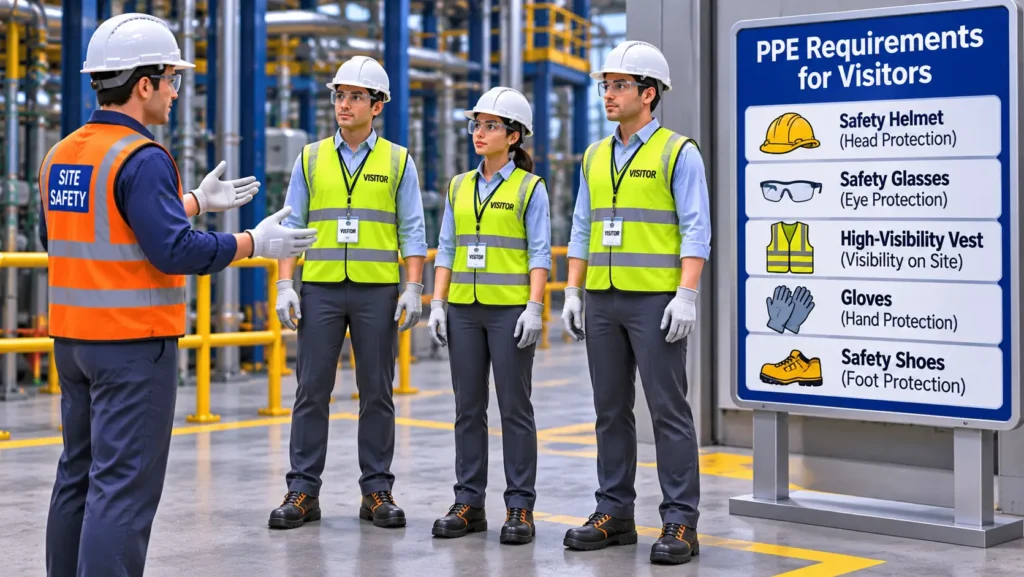
For example, a visitor entering a manufacturing workshop may require safety shoes, a helmet, safety glasses, and high-visibility clothing.
A visitor entering a chemical processing area may require additional protective equipment depending on the identified hazards and site-specific risk assessment.
Through 3D animation, each PPE item can be demonstrated individually, showing:
- Correct helmet positioning.
- Appropriate safety footwear.
- Proper use of safety glasses.
- High-visibility clothing requirements.
- Additional protective equipment where necessary.
The animation can also compare correct and incorrect PPE practices to make the instructions easier to understand.
3. Identifying Restricted Areas and Workplace Hazards
Visitors may not recognise the potential dangers associated with operating industrial equipment.
For example, an area that appears to be an ordinary walking route may be close to a forklift operating zone or an overhead lifting operation.
3D animation can recreate these scenarios and visually identify potential hazards.
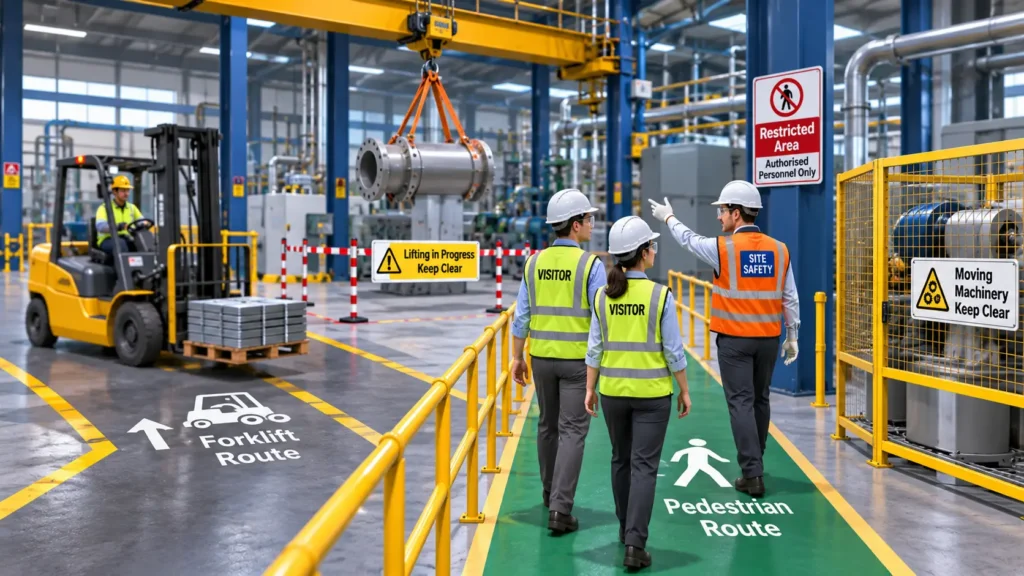
Examples include:
| Workplace hazard | What the animation can demonstrate |
|---|---|
| Forklift movement | Safe pedestrian routes and vehicle operating zones |
| Overhead lifting | Exclusion zones and the importance of staying clear of suspended loads |
| Rotating machinery | Machine operating areas and restricted access |
| Electrical equipment | Electrical hazard zones and access restrictions |
| Chemical storage | Hazardous material areas and access precautions |
| Working at height | Areas below elevated work and falling-object risks |
Instead of simply telling visitors to stay away from hazardous areas, the animation can demonstrate why these restrictions exist.
4. Explaining Safe Movement Within the Facility
One of the important aspects of visitor safety is ensuring that people move through the facility using designated routes.
Visitors may need to understand where they can walk, which entrances they can use, and when an escort is required.
A 3D animation can demonstrate a typical visitor journey:
- Arrival at the facility entrance.
- Registration at the reception or security office.
- Completion of the visitor safety induction.
- Collection and verification of required PPE.
- Movement through designated pedestrian pathways.
- Entry into authorised areas with an assigned escort.
- Departure through the designated exit.
The animation can also show incorrect actions, such as walking through vehicle routes, entering production areas without permission, or leaving an assigned escort.
This makes visitor responsibilities clearer before the actual site visit.
5. Demonstrating Emergency Response Procedures
Visitors may be unfamiliar with the facility’s emergency alarms, evacuation routes, and assembly points.
During an emergency, this lack of familiarity can make it difficult to respond quickly and follow the correct instructions.
3D safety animation can demonstrate different emergency situations, including:
- Fire alarms and evacuation procedures.
- Chemical leakage or gas release.
- Emergency shutdown situations.
- Medical emergencies.
- Evacuation through designated routes.
- Reporting to the assembly point.
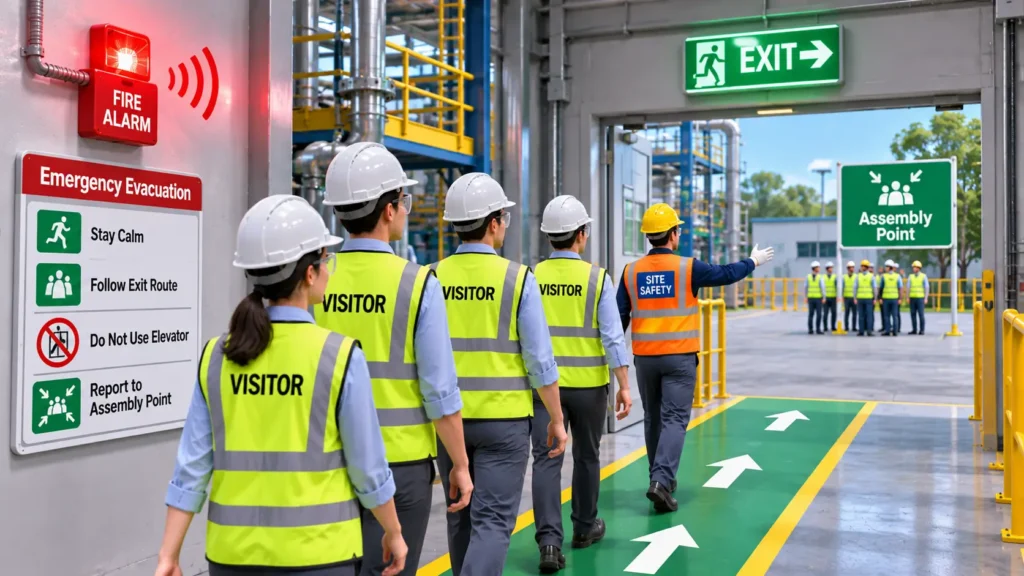
For example, an animation can show a fire alarm being activated, visitors stopping their activities, following the designated evacuation route, avoiding restricted or hazardous areas, and reporting to the assigned assembly point.
The animation can also explain whom visitors should contact and why they must not return to the facility until authorised.
The scenarios should reflect the facility’s approved emergency response plan rather than generic evacuation assumptions.
6. Creating Consistent Induction Across Different Visitors
Industrial facilities receive different types of visitors, including clients, suppliers, auditors, consultants, delivery personnel, and technical representatives.
Each group may have different access requirements and exposure to workplace hazards.
A standardised 3D visitor induction video can communicate the common site rules consistently.
Additional instructions can be provided depending on the visitor’s purpose, authorised access area, and risk exposure.
The same animation can be used across reception displays, visitor registration systems, induction kiosks, and digital training platforms.
Voiceovers, subtitles, and multilingual versions can also help communicate essential safety information to visitors with different language backgrounds.
What Should a 3D Visitor Safety Induction Animation Include?
The content of an induction animation should be developed around the facility’s actual layout, hazards, and visitor access requirements.
A practical visitor safety induction animation may follow this sequence:
| Sequence | Animation content | Training objective |
|---|---|---|
| 1. Introduction | Facility overview and safety expectations | Introduce visitors to the site |
| 2. Entry Procedure | Registration and authorisation | Explain access requirements |
| 3. PPE Requirements | Correct protective equipment | Demonstrate required PPE |
| 4. Site Layout | Pedestrian routes and authorised areas | Explain safe movement |
| 5. Hazard Awareness | Vehicles, machinery, lifting and chemical hazards | Identify potential risks |
| 6. Restricted Areas | Warning signs and access limitations | Prevent unauthorised entry |
| 7. Emergency Procedures | Alarms, evacuation and assembly points | Explain emergency response |
| 8. Visitor Responsibilities | Escort requirements and reporting procedures | Reinforce expected behaviour |
The duration and level of detail should depend on the facility’s complexity, the nature of the visit, and the hazards visitors may encounter.
For example, a short escorted office visit may require a brief safety orientation, whereas a visit to an operational manufacturing plant may require a more detailed induction.
Where Can Visitor Safety Induction Animation Be Used?
3D visitor safety induction can be adapted for different industrial environments.
Manufacturing Plants: Demonstrate production floor hazards, machinery movement, forklift routes, pedestrian access, and PPE requirements.
Oil and Gas Facilities: Explain restricted process areas, hazardous zones, vehicle movement, emergency alarms, and evacuation procedures.
Chemical and Pharmaceutical Industries: Visualise chemical storage areas, process equipment, exposure risks, access restrictions, and emergency response arrangements.
Warehouses and Logistics Facilities: Demonstrate forklift movement, loading and unloading zones, pedestrian walkways, storage areas, and vehicle safety rules.
Construction Sites: Show site access procedures, working-at-height hazards, lifting operations, falling-object risks, PPE requirements, and designated visitor routes.
Power Plants and Utilities: Explain electrical hazard zones, equipment access restrictions, operational areas, and emergency evacuation procedures.
How to Develop a Site-Specific Visitor Safety Induction Animation
An effective induction animation should represent the actual facility rather than rely entirely on generic industrial visuals.
A structured development process helps ensure that the animation communicates the intended safety information accurately.
Step 1: Collect Site Information
Gather relevant information such as:
- Facility photographs and videos.
- Plant layouts and floor plans.
- Equipment drawings.
- Site access and pedestrian route plans.
- PPE requirements.
- Restricted area details.
- Emergency response procedures.
Step 2: Identify Visitor-Specific Hazards
Review the hazards visitors may encounter based on their authorised access areas and the purpose of their visit.
Step 3: Develop the Script and Storyboard
Convert the site rules and safety procedures into a logical sequence of visual scenes.
Step 4: Create the 3D Environment
Develop the facility layout, equipment, machinery, buildings, access routes, and relevant workplace elements.
Step 5: Animate Safety Scenarios
Demonstrate visitor movement, PPE usage, hazard identification, restricted areas, and emergency response actions.
Step 6: Technical and Safety Review
Review the animation with the facility’s EHS team or relevant safety personnel to verify that the visual representation matches approved site procedures.
Step 7: Finalise and Deploy
Integrate voiceovers, subtitles, safety labels, and branding before deploying the animation through reception displays, induction kiosks, or digital training platforms.
The animation should also be reviewed and updated whenever significant changes occur in the facility layout, access arrangements, hazards, or emergency procedures.
How Immersiv Techsphere Supports Visitor Safety Induction
Immersiv Techsphere develops customised 3D HSE and EHS animations for industrial safety communication and training.
Our approach combines 3D modelling, industrial environment visualisation, animation, and engineering understanding to convert site-specific safety procedures into structured visual content.
For visitor safety induction, we can develop animations covering facility walkthroughs, PPE requirements, restricted areas, workplace hazards, safe movement, and emergency response procedures.
The objective is to help organisations communicate important safety information through realistic visual demonstrations before visitors enter operational environments.
Explore our HSE Animation Services to understand how 3D animation can support industrial safety training and awareness.
Final Thoughts
Visitor safety begins before someone enters an industrial facility.
Visitors may not be familiar with the equipment, processes, restricted areas, or emergency arrangements within the workplace. Providing clear instructions before site entry helps them understand the environment and their responsibilities.
3D visitor safety induction animation offers a practical way to communicate this information through realistic visual demonstrations. From PPE requirements and pedestrian routes to workplace hazards and emergency evacuation, animation can help make site-specific safety instructions easier to understand.
When integrated with visitor registration, safety briefings, supervision, and established EHS procedures, 3D animation becomes a valuable component of a broader visitor safety management approach.
For industrial organisations, the goal is not simply to introduce visitors to the facility but to ensure they understand how to enter, move through, and leave the workplace safely.
Frequently Asked Questions (FAQs)
Visitor Safety Induction is a process of communicating workplace safety rules, potential hazards, PPE requirements, access restrictions, and emergency procedures to visitors before they enter an industrial facility.
3D animation visually demonstrates the facility layout, workplace hazards, pedestrian routes, PPE requirements, and emergency procedures. It helps visitors understand site-specific safety instructions before physically entering the workplace.
An industrial visitor safety induction video should cover entry procedures, PPE requirements, site layout, pedestrian routes, restricted areas, workplace hazards, emergency alarms, evacuation procedures, assembly points, and visitor responsibilities.
Yes. Customised animations can be developed using facility layouts, photographs, equipment drawings, site-specific hazards, and approved safety procedures to represent the actual industrial environment.
Some general safety information, such as site rules, PPE requirements, restricted areas, and emergency procedures, can be shared. However, contractor induction may require additional information about work permits, task-specific hazards, equipment operation, and work responsibilities. Separate or supplementary modules should be developed according to the level of risk and site access.
Have a Project in Mind?
Need help with 3D animation, industrial visualization, HSE training animation, or product visualization? Tell us about your project and our team will get back to you.