

Table of Contents
How Artificial Intelligence, 3D Assets, Blender Automation, and Post-Production Are Reshaping Industrial Animation
Introduction
Industrial visualization has traditionally been a highly specialized process.
A typical project might begin with engineering drawings, CAD files, STEP assemblies, Revit models, photographs, reference videos, and technical documentation. These inputs then pass through several stages: 3D cleanup, modeling, texturing, rigging, animation, lighting, rendering, compositing, editing, voice-over, and final delivery.
The process can produce highly accurate and impressive results, but it can also be time-consuming.
Today, a new workflow is emerging.
Instead of treating 3D, AI, automation, and post-production as separate technologies, production teams can combine them into a single pipeline.
At the center of this approach is Blender, supported by generative AI and increasingly by MCP-based automation, creating a workflow where AI can assist not only with content generation but also with repetitive operations inside the 3D environment.
The result is not simply “AI-generated animation.”
It is something more powerful:
“An intelligent hybrid production pipeline where engineering-accurate 3D assets provide the foundation, AI accelerates creative production, automation handles repetitive operations, and human artists maintain technical and visual quality.”
Why Industrial Animation Is Different
Industrial animation is not the same as conventional entertainment animation.
When creating a fictional cinematic environment, small inaccuracies may not matter.
In industrial visualization, they can matter enormously.
A machine may need to have the correct:
- Dimensions
- Components
- Assembly relationships
- Materials
- Access points
- Operating positions
- Maintenance areas
- Human interaction points
- Equipment clearances
For example, if an animation demonstrates how a worker performs maintenance on a machine, the position of the access panel, location of the bolts, worker’s reach, PPE, and surrounding clearance may all need to correspond to the actual equipment.
This creates an important principle:
AI can generate visual content, but engineering data should remain the source of truth.
That is why the future of industrial visualization is unlikely to be completely AI-generated.
Instead, it will be AI-assisted and 3D-controlled.
The Traditional Industrial Animation Pipeline
A conventional workflow might look like:
Engineering Data → CAD / STEP / Revit / FBX / OBJ → 3D Model Cleanup → UV & Materials → Scene Assembly → Rigging → Animation → Lighting → Rendering → Compositing → Video Editing → Voice-over / Sound → Final Delivery
Each stage often requires different software, different specialists, and significant manual interaction.
For a large industrial project, artists may repeatedly perform tasks such as:
- Renaming objects
- Creating collections
- Assigning materials
- Searching for objects
- Setting cameras
- Creating lighting setups
- Adjusting visibility
- Preparing render settings
- Exporting assets
- Checking scenes
These tasks may be necessary, but they do not necessarily require creative decision-making.
This is where automation becomes valuable.

Enter the Hybrid AI + 3D Workflow
A modern pipeline can instead look like:
Engineering Data → 3D Asset Preparation → Blender → AI-Assisted Asset Generation → MCP Automation → Animation → AI-Assisted Visual Development → Rendering → Post-Production → Final Industrial Film
The difference is significant.
AI is no longer being used only to create an image.
It can become part of the production pipeline itself.
Why Blender Is at the Center
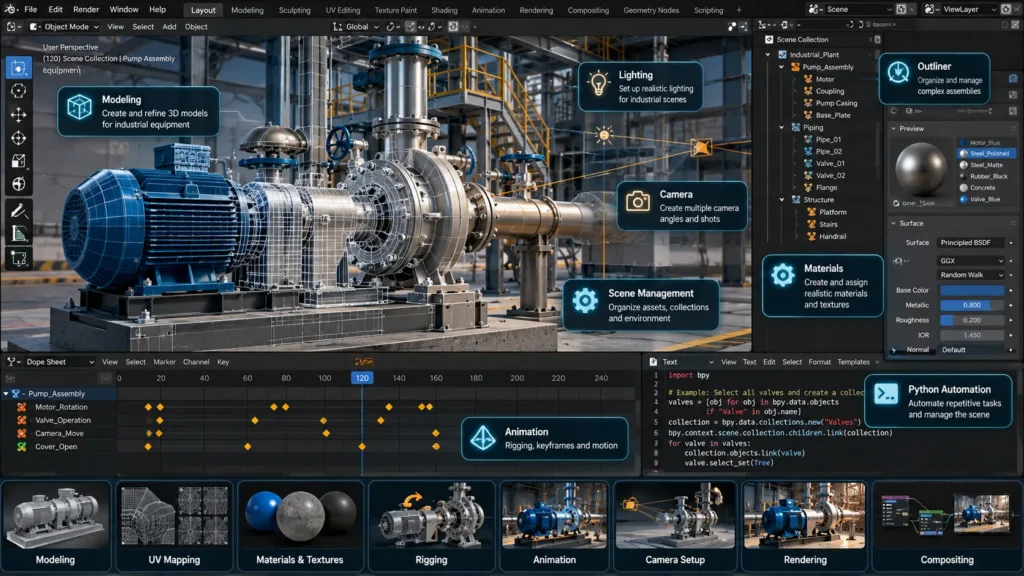
Blender is particularly interesting for industrial visualization because it brings many capabilities into one environment.
It can handle:
- Modeling
- Materials
- UVs
- Rigging
- Animation
- Camera systems
- Lighting
- Rendering
- Geometry processing
- Python automation
- Compositing
- Scene management
Blender can also work with many common industrial formats through appropriate import/export workflows.
For industrial teams, another advantage is programmability.
Blender can be controlled through Python, which means repetitive operations can be automated.
This creates the foundation for AI-driven workflows.
What Does MCP Add?
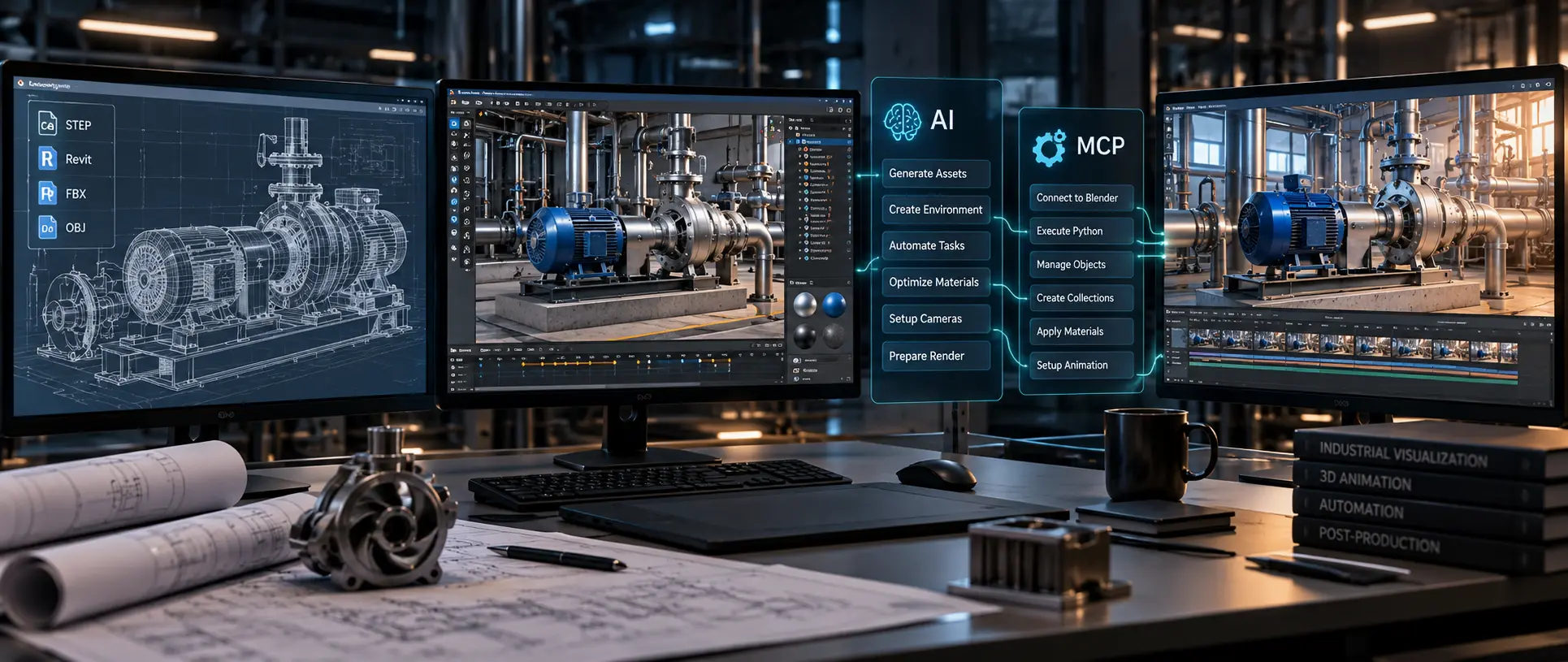
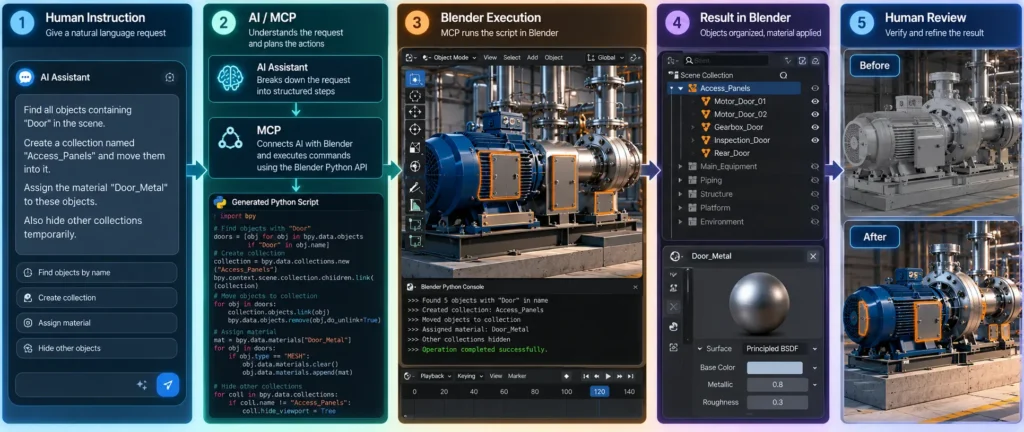
MCP — Model Context Protocol — can be thought of as a structured way for an AI system to interact with external tools and applications.
In a Blender workflow, an MCP-based integration can allow an AI assistant to communicate with Blender through defined tools or actions.
Instead of the artist manually performing every operation, they can describe a task at a higher level.
For example:
“Find all objects containing ‘Panel’ in their names and assign the Panel_Metal material.”
A conventional workflow might require:
- Searching the Outliner.
- Selecting objects.
- Checking names.
- Selecting the material.
- Assigning the material.
- Repeating the operation.
An automated workflow could convert the instruction into a sequence of Blender operations.
The important concept is not that AI magically understands Blender.
The important concept is that AI can translate human instructions into structured actions that Blender can execute.
From AI Assistant to AI Production Assistant
This changes the role of AI.
Instead of asking:
“Generate an image of a factory.”
We can ask:
“Prepare the Blender scene for the factory animation.”
Or:
“Find all maintenance access panels, create a collection called Maintenance_Panels, assign the approved material, and position the camera for an inspection shot.”
The second request is much closer to actual production work.
This is where MCP-based workflows become particularly interesting.
Examples of Blender Tasks That Can Be Automated
Scene organization:
- Find objects by name
- Create collections
- Move objects between collections
- Rename objects
- Identify duplicate objects
- Identify unused objects
- Identify hidden objects
Material management:
- Search for objects using a keyword
- Assign materials
- Replace material slots
- Identify missing materials
- Standardize material names
Scene analysis:
- Count objects
- Count vertices
- Count faces
- Count triangles
- Identify high-poly objects
- Identify empty collections
- Identify objects with missing textures
Camera setup:
- Create cameras
- Position cameras
- Aim cameras toward selected objects
- Generate multiple viewpoints
- Set focal lengths
- Prepare shot-specific cameras
Animation preparation:
- Set visibility
- Create keyframes
- Organize animation collections
- Bake animation
- Prepare animation clips
- Configure timeline ranges
Rendering:
- Configure render resolution
- Select render engine
- Configure output settings
- Prepare render passes
- Organize output directories
This doesn’t eliminate the artist.
It eliminates unnecessary repetitive clicking.
The Role of Generative AI
Generative AI adds another layer to the workflow.
It can be particularly useful for elements that do not need to be engineering-accurate.
Environment development:
- Industrial interiors
- Factory surroundings
- Warehouses
- Offices
- Roads
- Landscapes
- Offshore environments
- Construction sites
Characters:
- Character concepts
- Clothing variations
- PPE references
- Worker profiles
- Character turnaround development
Visual development:
- Camera compositions
- Lighting styles
- Mood
- Color palettes
- Cinematic framing
- Storyboard concepts
Post-production:
- Image enhancement
- Background generation
- Rotoscoping
- Cleanup
- Upscaling
- Subtitle generation
- Voice processing
- Audio cleanup
However, there is a critical distinction.
AI-Generated Does Not Mean Engineering-Accurate
This is one of the biggest lessons for industrial visualization.
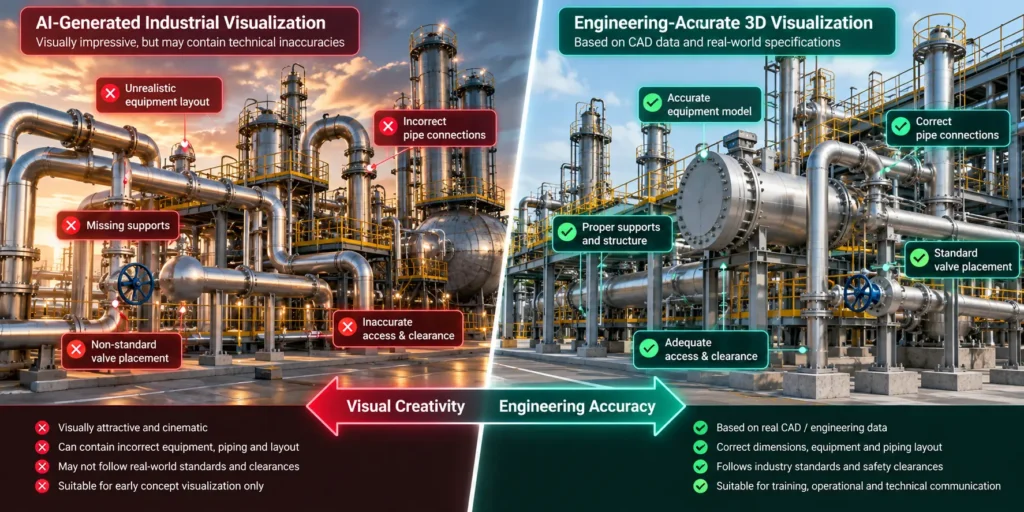
Suppose an AI image generator creates a chemical processing plant.
The image may look spectacular.
But look closely and you may find:
- Pipes connecting incorrectly
- Impossible valves
- Incorrect flange
- Missing structural supports
- Inconsistent machinery
- Incorrect dimensions
- Random equipment
- Impossible access paths
For a marketing image, this might be acceptable.
For a technical animation, it can be dangerous.
Therefore:
Use AI for visual creativity. Use 3D for technical truth.
This distinction should define the industrial AI workflow.
The Hybrid Asset Strategy
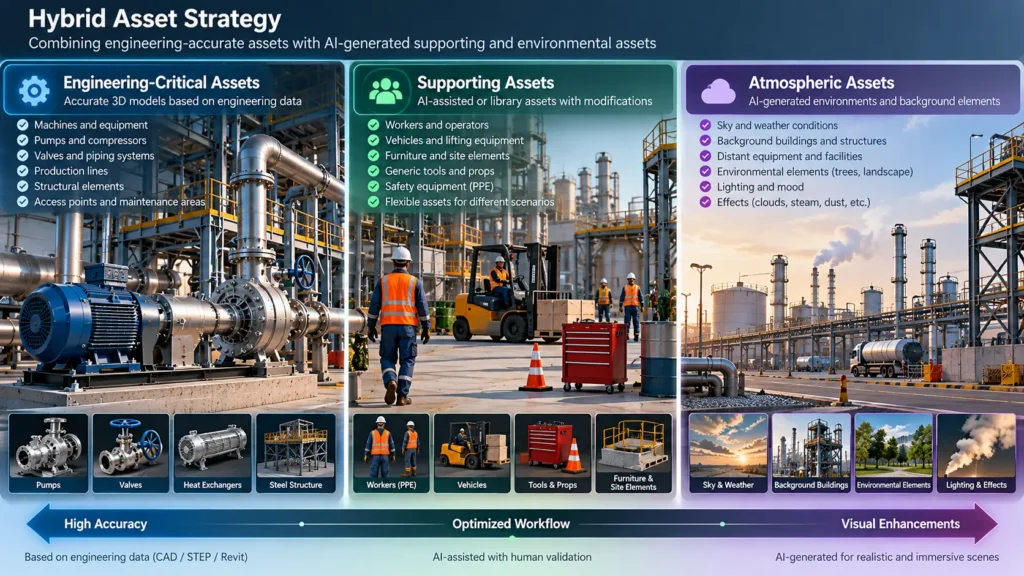
A useful way to classify assets is into three categories.
Category A: Engineering-Critical Assets
These should primarily remain 3D:
- Machines
- Equipment
- Pumps
- Valves
- Production lines
- Structural elements
- Safety equipment
- Mechanical components
Category B: Supporting Assets
These can use a combination of 3D and AI:
- Workers
- Furniture
- Vehicles
- Generic tools
- Background equipment
- Environmental elements
Category C: Atmospheric Assets
These can often benefit heavily from AI:
- Sky
- Background environment
- Distant buildings
- Environmental effects
- Conceptual backgrounds
- Cinematic transitions
This approach allows the production team to spend precision where precision matters.
Case Study: AI-Assisted Industrial Maintenance Animation
Consider a hypothetical industrial equipment manufacturer that wants a three-minute maintenance training video for a large production machine.
The client provides:
- STEP files
- 2D engineering drawings
- Equipment photographs
- Maintenance documentation
- Safety instructions
- PPE requirements
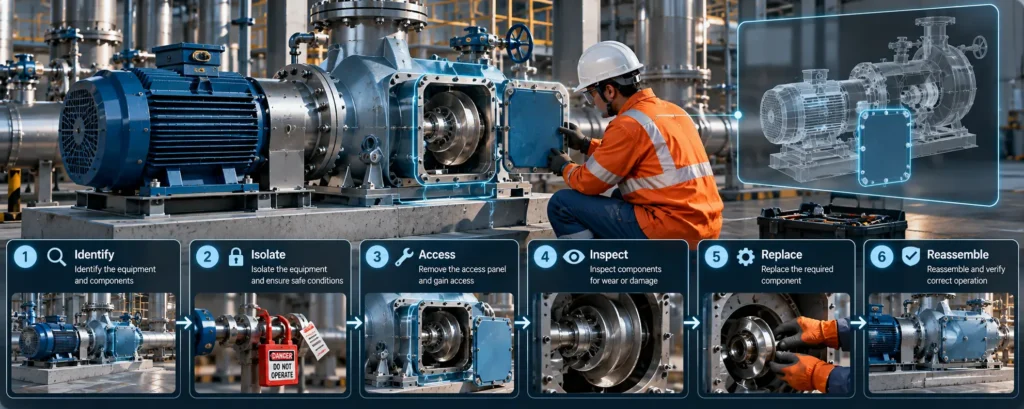
The objective is to show:
- Machine identification
- Shutdown procedure
- Lockout/tagout
- Access panel opening
- Component removal
- Inspection
- Replacement
- Reassembly
- Safety verification
Phase 1: Engineering Data
The STEP assembly is imported into the 3D workflow.
The initial model contains hundreds or thousands of objects.
Some objects have names such as:
- Part_001
- Part_002
- Part_003
- Panel_A
- Panel_B
- Bolt_001
- Bolt_002
- Pump_Main
- Motor_01
Manually organizing these objects would take considerable time.
An AI-assisted workflow can help classify the scene based on object naming, hierarchy, geometry, and predefined rules.
For example:
“Identify all objects containing ‘Panel’ and place them into a collection called Access_Panels.”
The result is a structured scene.
Phase 2: Automated Material Assignment
Suppose the project has an approved material library containing:
- Painted Steel
- Stainless Steel
- Rubber
- Glass
- Aluminum
- Safety Yellow
- Safety Red
- Concrete
Instead of manually assigning materials object by object, an automated workflow can use naming rules.
For example:
Panel → Painted_Steel
Pipe_SS → Stainless_Steel
Rubber → Rubber_Black
Guard → Safety_Yellow
The artist can then review the results rather than performing every assignment manually.
Phase 3: AI-Assisted Environment Creation
The engineering model alone may not provide the complete visual environment.
The project may require:
- Factory floor
- Walls
- Ceiling
- Lighting
- Safety markings
- Background machinery
- Workers
- Warning signs
Rather than modeling every background element from scratch, AI-generated references can be used to develop the environment.
The final production scene can combine:
Accurate machine + 3D environment + AI-assisted background elements + AI-assisted characters
This produces a visually rich scene without compromising the accuracy of the primary equipment.
Phase 4: Character and PPE Integration
Characters are another area where AI can significantly accelerate production.
A safety video may require:
- Male operator
- Female technician
- Supervisor
- Maintenance engineer
The AI workflow can help develop the visual appearance of these characters.
However, the final character must still maintain consistency.
Important elements include:
- Helmet
- Safety glasses
- Gloves
- Safety shoes
- High-visibility clothing
- Correct uniform
- Company branding
The character can then be integrated into Blender and animated using appropriate rigging and animation workflows.
Phase 5: AI + MCP + Blender
Now the workflow becomes more interesting.
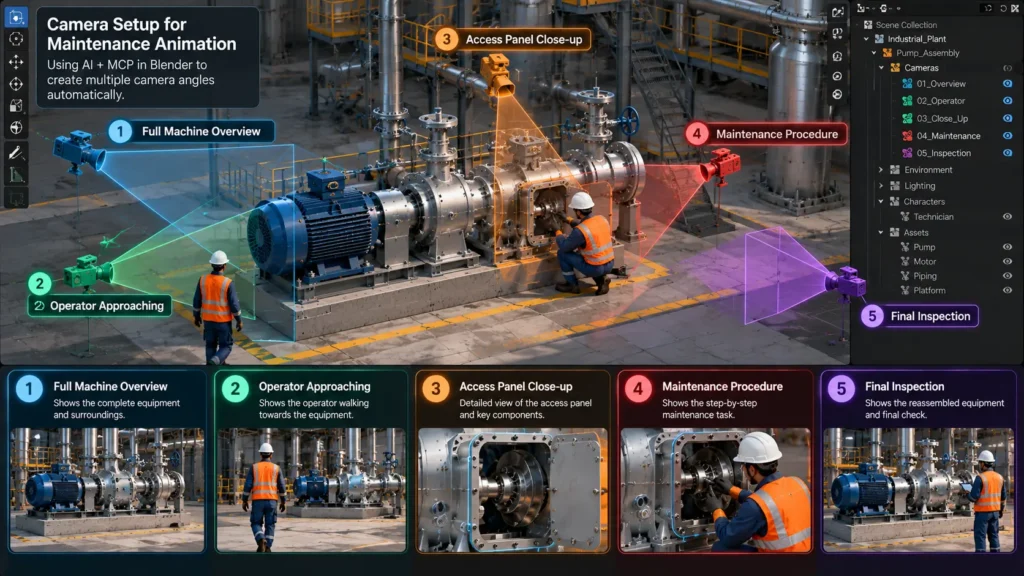
Imagine the artist needs five camera shots:
Shot 01: Full machine overview
Shot 02: Operator approaching machine
Shot 03: Close-up of access panel
Shot 04: Maintenance procedure
Shot 05: Final inspection
The AI layer can assist with preparing the Blender scene according to these requirements.
An MCP-connected workflow could potentially:
- Create cameras
- Select relevant objects
- Position cameras
- Organize cameras into collections
- Configure scene visibility
- Set render parameters
- Prepare shot ranges
The artist then reviews and adjusts the results.
Animation
Once the scene is prepared, animation becomes the next stage.
Industrial animation frequently requires very specific movements.
For example:
Machine Panel opens → Worker isolates equipment → Worker removes bolts → Panel is removed → Internal component becomes visible → Technician performs inspection → Component is replaced → Panel is reinstalled → Machine is restored
This can be created through traditional keyframe animation, procedural systems, rigging, physics, or a combination.
AI can assist with planning and automation, but final animation should remain under artistic and technical control.
AI for Camera and Shot Development
One of the most overlooked applications of AI is camera planning.
Industrial animation can sometimes become visually repetitive.
Every shot becomes: Wide shot → medium shot → close-up.
AI-assisted planning can help generate alternative visual approaches.
For example:
- Establishing shot: complete facility
- Technical shot: complete machine
- Interaction shot: operator interacting with equipment
- Detail shot: specific component
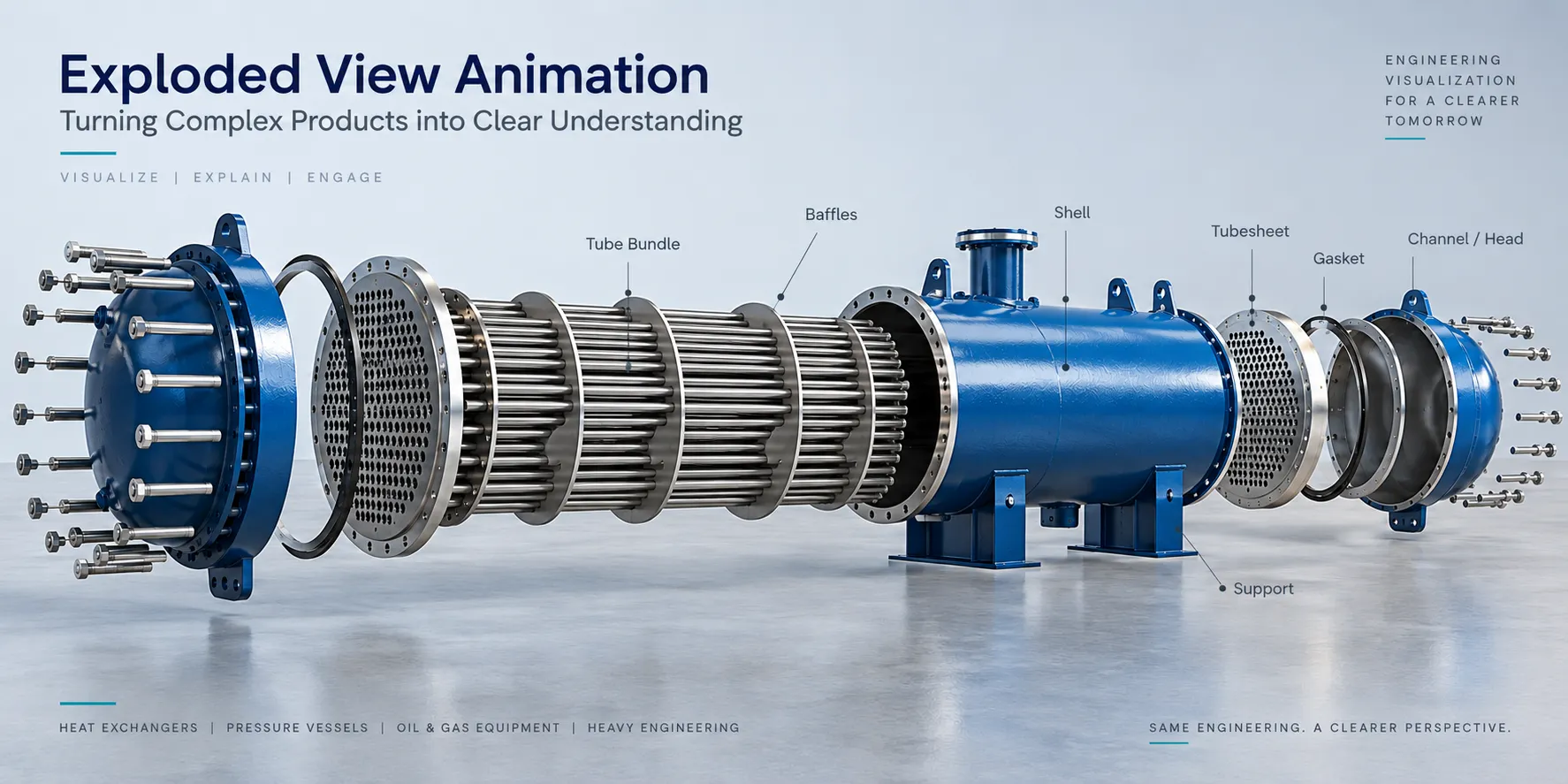
- Exploded shot: separated components
- Internal cutaway: hidden mechanisms
This transforms technical information into visual storytelling.
Rendering: Where Technical Decisions Still Matter
Industrial scenes can become extremely heavy.
Large assemblies may contain:
- Millions of polygons
- Hundreds of materials
- High-resolution textures
- Multiple lights
- Complex shaders
- Large animation timelines
Therefore rendering strategy becomes important.
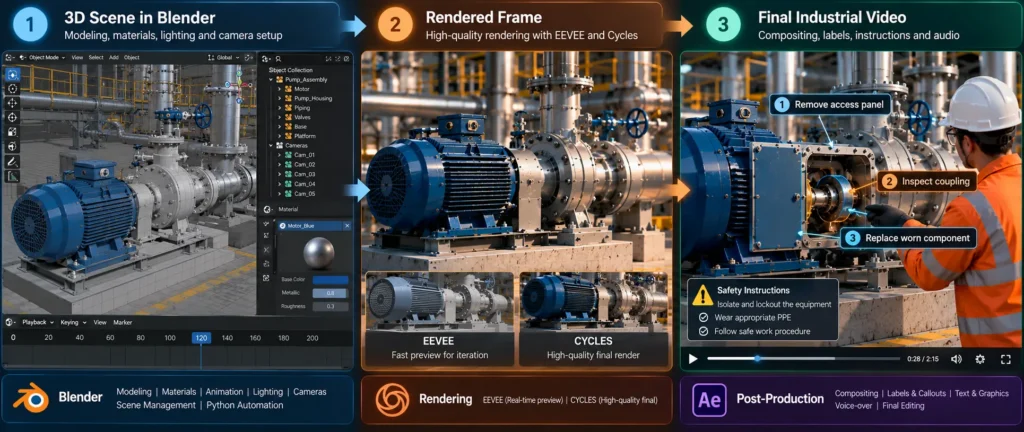
EEVEE can be useful when fast previews, large scenes, interactive performance, and many iterations are required.
Cycles can be useful when physically based lighting, high-quality reflections, and photorealism are priorities.
A practical workflow may use both:
EEVEE → previews and iteration
Cycles → final hero shots
Post-Production: Turning Animation into Communication
Rendering the animation is not the end.
The final industrial film needs to communicate information clearly.
Post-production can include:
- Editing
- Motion graphics
- Titles
- Callouts
- Arrows
- Labels
- Safety warnings
- Voice-over
- Music
- Sound effects
- Subtitles
- Color correction
For example, instead of simply showing a worker pressing a button, the video could display:
STEP 03: ISOLATE POWER
with an animated callout pointing to the relevant control.
This turns a visually impressive animation into an effective training tool.
AI in Post-Production
AI can accelerate several post-production tasks.
- Voice-over: Generate preliminary narration and multilingual versions.
- Translation: Create localized scripts and subtitles.
- Audio cleanup: Reduce noise and improve dialogue quality.
- Video enhancement: Improve selected footage or rendered sequences.
- Rotoscoping: Separate subjects from backgrounds.
- Visual cleanup: Assist with unwanted objects or artifacts.
However, the final edit should still be reviewed by an experienced editor.
AI should accelerate production, not remove quality control.
A Complete AI + Blender + MCP Pipeline
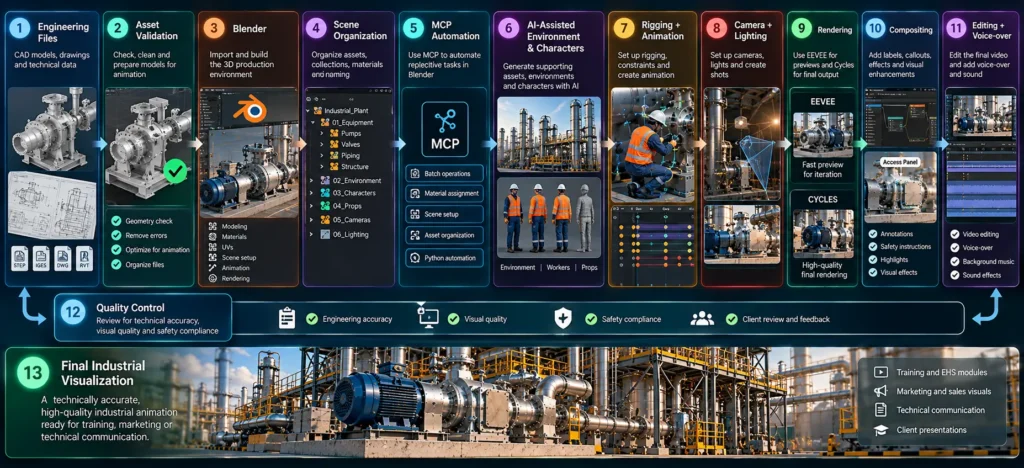
Engineering Files → CAD / STEP / Revit / Drawings → Asset Validation → Blender → Scene Organization → MCP Automation → Material & Collection Management → AI-Assisted Environment & Character Development → Rigging → Animation → Camera & Lighting → Rendering → Compositing → Video Editing → Voice-over + Sound → Subtitles → Quality Control → Final Industrial Visualization
The most important point is that this is not a replacement of one technology by another.
It is an integrated production ecosystem.
What Changes for the Artist?
The role of the industrial animator is likely to change significantly.
Historically, a large part of the job involved operating software.
The future will involve more:
- Scene planning
- Technical interpretation
- Visual storytelling
- AI direction
- Automation design
- Quality control
- Engineering validation
- Creative decision-making
Instead of spending an hour manually assigning materials to hundreds of objects, an artist may spend that hour designing the material logic.
Instead of manually creating dozens of collections, the artist can define the organizational rules.
Instead of manually generating every camera, the artist can define the visual requirements.
The artist moves from being primarily an operator toward becoming a director of an intelligent production pipeline.
The Biggest Challenge: Validation
Automation introduces a new problem.
When a human performs an operation manually, they are continuously observing the result.
When an automated system performs hundreds of operations, an error can propagate very quickly.
Therefore, future industrial animation pipelines need validation.
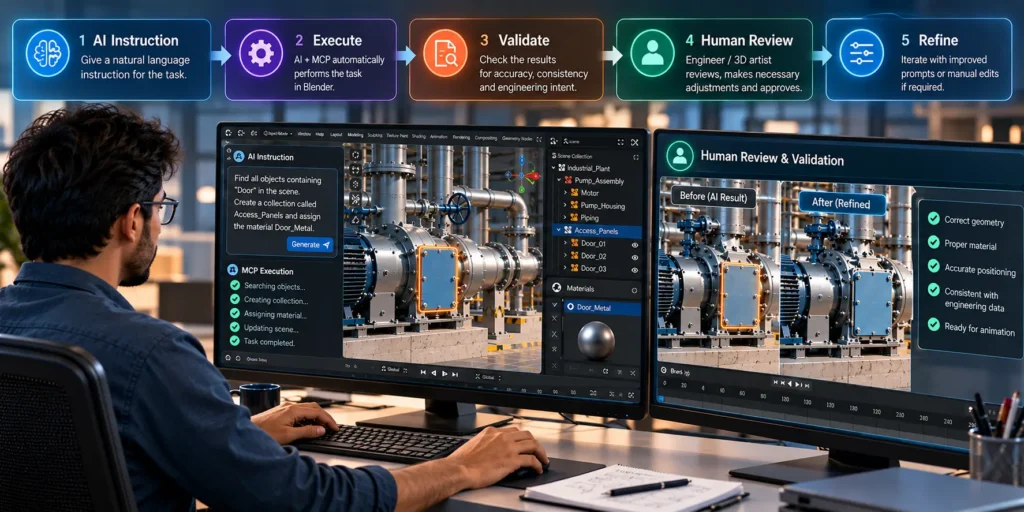
For example:
AI performs operation → Blender executes operation → Scene analyzer checks result → Validation report → Artist approval
This creates a feedback loop:
AI → Execute → Validate → Human Review → Refine
This is much safer than allowing AI to operate without supervision.
Human-in-the-Loop Is Essential
Industrial visualization should not become:
AI → Final Video
Instead, the better model is:
Human + AI + Automation + Engineering Data
The human remains responsible for:
- Accuracy
- Storytelling
- Visual quality
- Safety interpretation
- Client requirements
- Final approval
AI becomes the accelerator.
Blender becomes the production environment.
MCP becomes the bridge between intelligent instructions and software operations.
Where This Workflow Can Be Used
Manufacturing:
- Machine operation
- Assembly procedures
- Maintenance training
- Factory visualization
Pharmaceutical:
- Facility walkthroughs
- EHS training
- Manufacturing processes
- Cleanroom visualization
Oil & Gas:
- Equipment visualization
- Offshore facilities
- Maintenance procedures
- Safety training
Automotive:
- Assembly processes
- Vehicle component visualization
- Manufacturing lines
Construction:
- Digital twins
- Construction sequencing
- BIM visualization
- Facility walkthroughs
Energy:
- Power plants
- Renewable energy installations
- Equipment demonstrations
Aerospace:
- Component visualization
- Assembly
- Maintenance
- Training
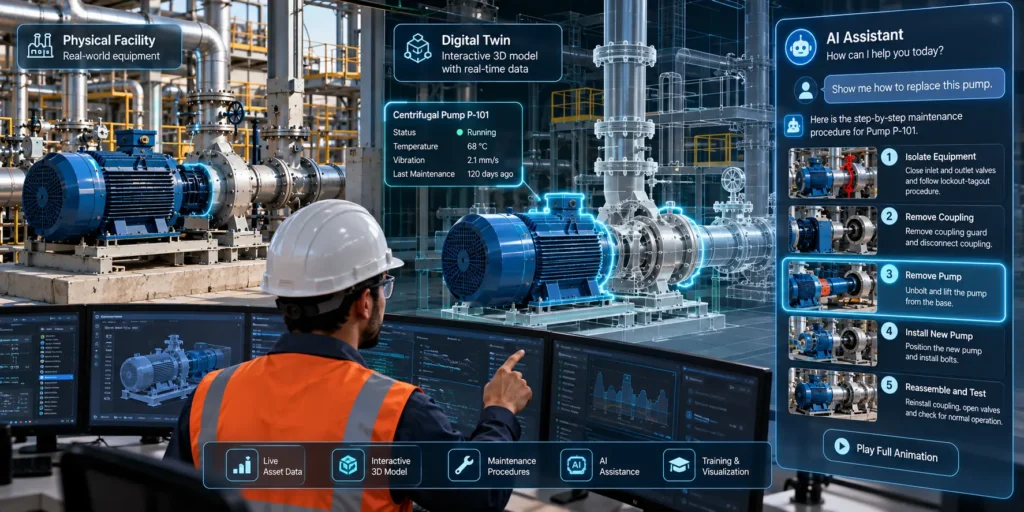
The Future: From Animation to Intelligent Digital Twins
The most exciting possibility is that this workflow will eventually move beyond pre-rendered videos.
Imagine a digital twin where an AI assistant can understand:
- What equipment exists
- Where it is located
- Which components belong to it
- What materials are assigned
- What maintenance procedure applies
- Which camera should show it
- Which animation demonstrates the procedure
Instead of simply watching a video, a user could interact with the digital environment.
For example:
“Show me how to replace this pump.”
The system could identify the pump, isolate the relevant components, position the camera, and present the maintenance sequence.
That is a very different future from traditional animation.
The Industrial Animation Pipeline Is Becoming Intelligent
The real opportunity isn’t simply using AI to generate better images.
It is connecting the entire production chain.
Engineering Data provides accuracy.
Blender provides the 3D environment.
Generative AI provides creative acceleration.
MCP provides tool connectivity and automation.
Animation provides movement and explanation.
Post-production provides communication and storytelling.
Human expertise provides judgment and validation.
Together, they create a new production model.
How Immersiv Techsphere Creates Engineering-Accurate Industrial Animations
At Immersiv Techsphere, we use a hybrid asset approach to balance engineering accuracy with efficient visual production.
Engineering data → Validate critical assets → Add AI-assisted supporting assets → Build the 3D scene → Animate and render → Human review → Final industrial animation
Critical equipment such as machines, pumps, valves, piping, structures, and maintenance components is based on CAD models, 3D assemblies, and technical drawings. AI-assisted or library assets are used for supporting elements such as workers, vehicles, tools, backgrounds, and environmental effects. The final animation is reviewed for geometry, positioning, process sequence, and technical consistency before delivery.
FAQs
AI can automate repetitive tasks such as asset preparation, scene organization, environment creation, and animation setup while reducing manual production effort.
Blender acts as the central 3D production environment for modeling, materials, animation, camera setup, lighting, rendering, compositing, and Python-based automation.
MCP can connect AI instructions with Blender operations, allowing repetitive tasks such as organizing objects, creating collections, and assigning materials to be automated.
AI-generated assets should not replace engineering-controlled models for critical equipment. CAD-based and validated 3D assets should remain the source of technical accuracy.
Human review helps verify geometry, materials, scene organization, animation logic, safety information, and engineering accuracy before final delivery.
Yes. It can combine engineering-accurate equipment models with animated procedures, safety instructions, camera sequences, and visual callouts for maintenance and technical training.
Conclusion
Industrial visualization is entering a new phase. The traditional workflow depended heavily on manual modeling, scene organization, animation, rendering, and post-production.
Generative AI is now accelerating creative development, while automation is reducing repetitive operations. Blender provides a flexible foundation for bringing these technologies together, and MCP-based integrations open the possibility of communicating with the 3D environment through intelligent, structured instructions.
But the goal should not be to replace the industrial artist. The goal should be to remove unnecessary manual work so artists can spend more time solving creative and technical problems. The most effective future workflow will therefore not be:
AI instead of 3D.
It will be:
AI + 3D + Automation + Engineering Data + Human Expertise.
And that combination has the potential to transform industrial animation from a primarily manual production process into an intelligent, scalable, and highly automated visualization pipeline.
The future of industrial animation is not fully AI-generated. It is intelligently engineered.
Looking to create engineering-accurate industrial animations using 3D, AI, and automation? Connect with Immersiv Techsphere to discuss your project.
Have a Project in Mind?
Need help with 3D animation, industrial visualization, HSE training animation, or product visualization? Tell us about your project and our team will get back to you.