

Table of Contents
Introduction
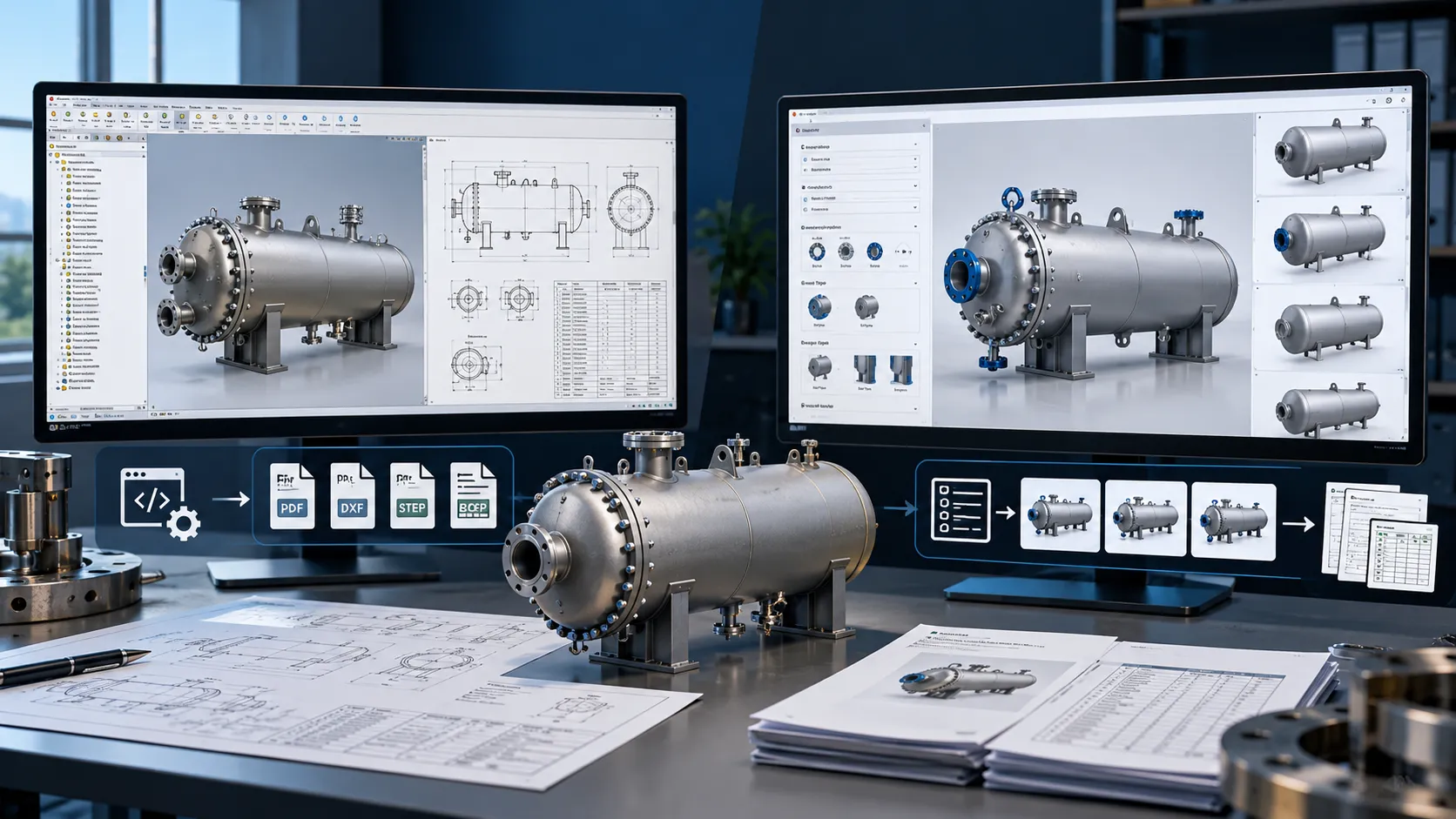
Mechanical engineering teams often spend significant time on repetitive CAD tasks that do not necessarily require manual engineering decisions.
Creating manufacturing drawings, updating title blocks, generating parts lists, extracting BOM data, exporting PDFs or STEP files, and maintaining engineering properties can become especially time-consuming when a company manages hundreds or thousands of Autodesk Inventor files.
This is where the Autodesk Inventor API becomes valuable.
The Inventor API provides programmatic access to Inventor objects and functionality, allowing developers to create custom applications, add-ins, macros, and automation workflows. Autodesk also supports automation through iLogic and its broader Automation API ecosystem.
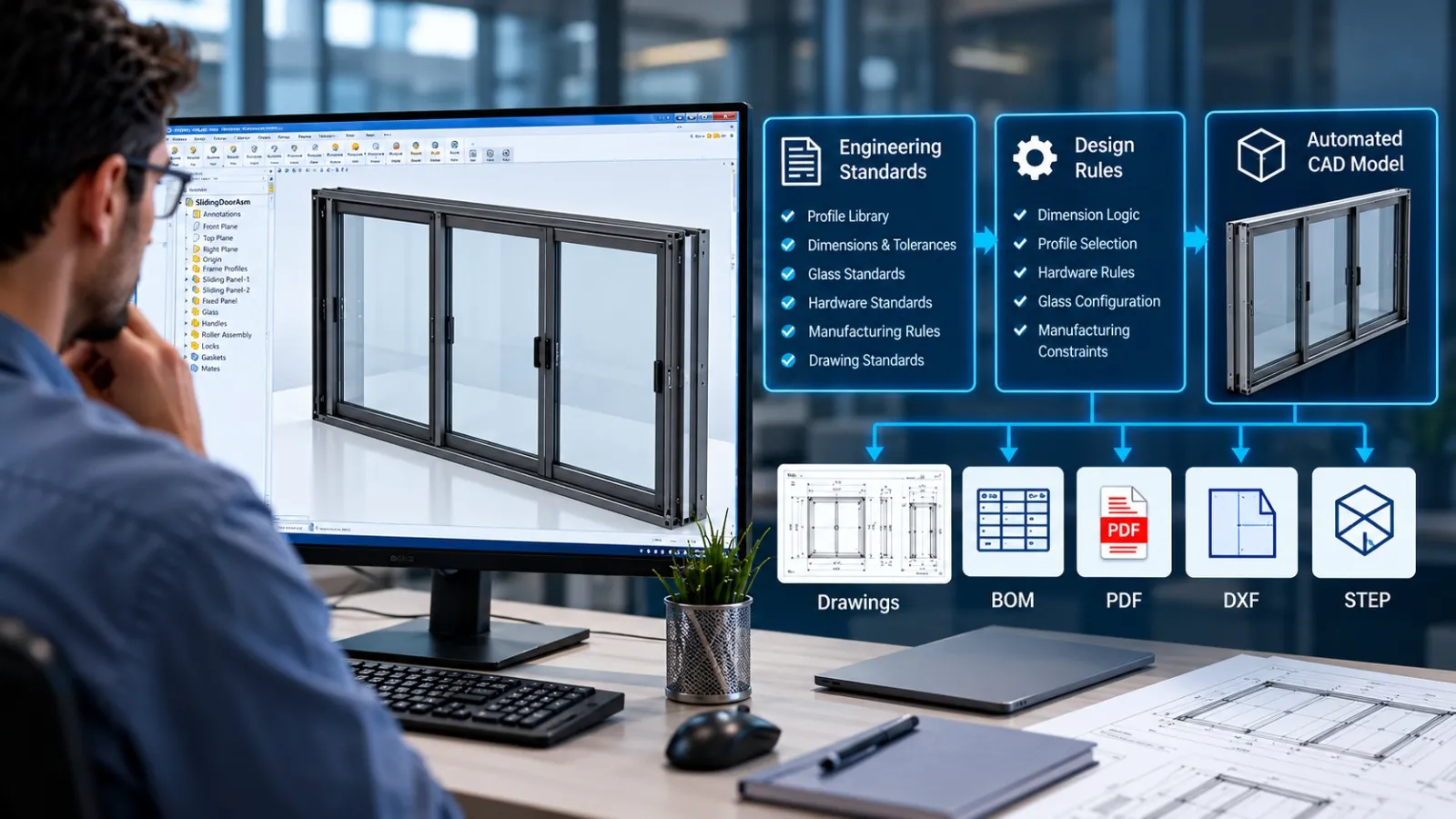
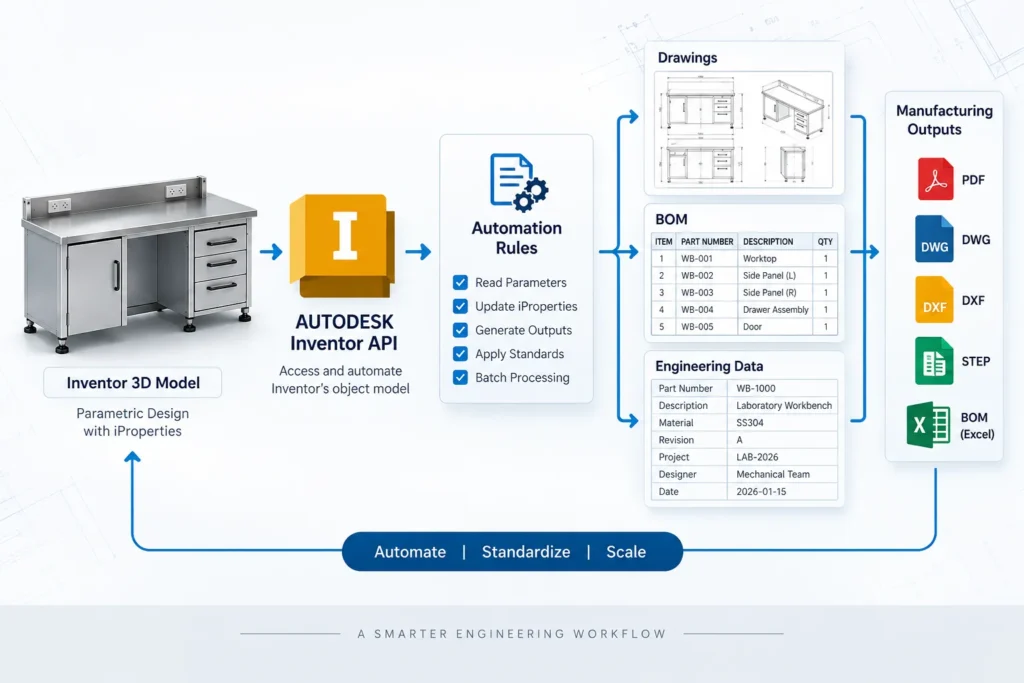
Instead of treating every drawing or BOM as an individual manual task, engineering teams can build workflows where information flows automatically from the 3D model → assembly → drawing → BOM → manufacturing data.
This article explains how Autodesk Inventor API automation can be used to automate drawings, BOMs, engineering properties, and downstream documentation.
What Is the Autodesk Inventor API?
The Autodesk Inventor API (Application Programming Interface) is a programming interface that allows external code and custom applications to interact with Autodesk Inventor.
According to Autodesk, the Inventor API can be used with technologies including Visual Basic, C++, C#, Python, Java, and VBA. It provides access to Inventor’s object model and supports customization of mechanical design workflows.
For example, an automation application can interact with:
- Part files (.ipt)
- Assembly files (.iam)
- Drawing files (.idw / .dwg)
- Model states
- Parameters
- iProperties
- Drawing views
- Dimensions
- Parts lists
- BOM data
- Component occurrences
- File references
- Engineering metadata
This makes the API useful when a workflow extends beyond what can reasonably be handled through standard Inventor commands.
Inventor API vs iLogic
Inventor API and iLogic are related but serve somewhat different purposes.
iLogic is useful for rule-based automation directly within Inventor. It can automate parameter changes, configurations, drawing operations, and other repetitive tasks.
The Inventor API provides broader programmatic access to Inventor’s object model and is particularly useful when developing more advanced automation, custom tools, add-ins, integrations, or batch-processing workflows.
Autodesk specifically recommends using the API when an iLogic function does not provide the required functionality or when developers need more direct access to Inventor’s object collections and objects.
Why Automate Autodesk Inventor Workflows?
A typical engineering process may look like:
Design Model → Assembly → Drawing → BOM → PDF → Manufacturing Data → ERP/PDM
If every stage requires manual interaction, the engineering team may repeatedly perform the same operations for every project or product variant.
For example:
- Open assembly.
- Open drawing.
- Update views.
- Update dimensions.
- Update title block.
- Update parts list.
- Check BOM properties.
- Export PDF.
- Export STEP.
- Rename files.
- Move files to the correct folder.
- Update engineering data.
When performed hundreds of times, these tasks become an excellent candidate for CAD automation.
The objective is not simply to reduce clicks.
The objective is to create a repeatable engineering workflow based on defined rules.
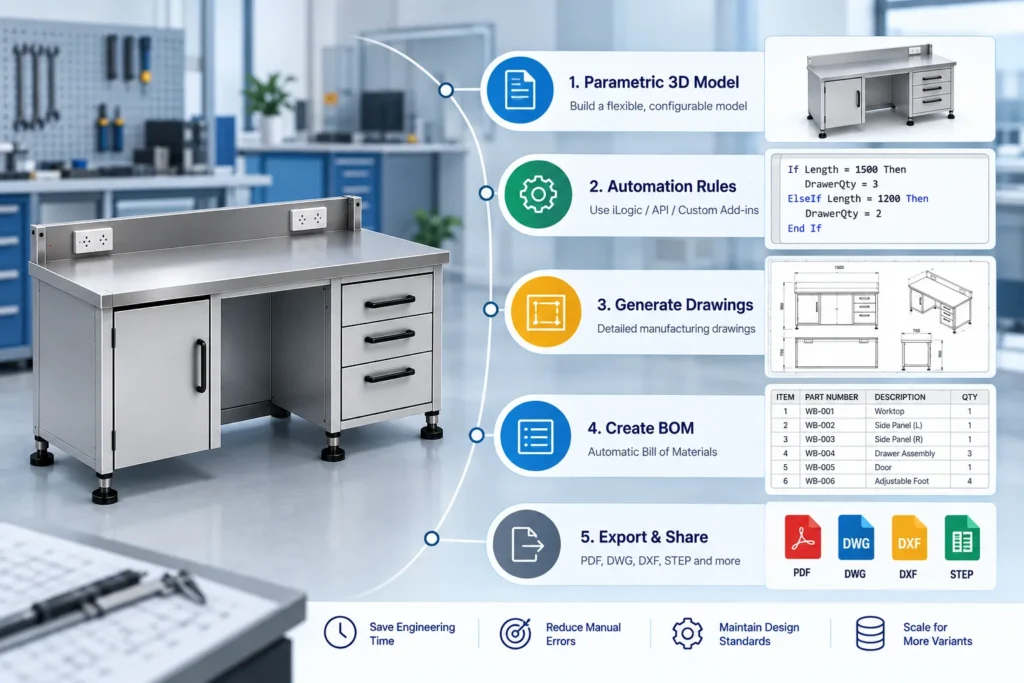
1. Automating Autodesk Inventor Drawings
Drawing creation and maintenance is one of the most practical applications of the Inventor API.
A manufacturing drawing may contain:
- Base views
- Projected views
- Section views
- Detail views
- Dimensions
- Center marks
- Balloons
- Parts lists
- Notes
- Title blocks
- Revision information
- Material information
- Drawing properties
Many of these elements can be accessed and manipulated programmatically.
Autodesk has documented drawing automation workflows using iLogic and the API, including manipulating drawing views and extending automation to dimensions and balloons.
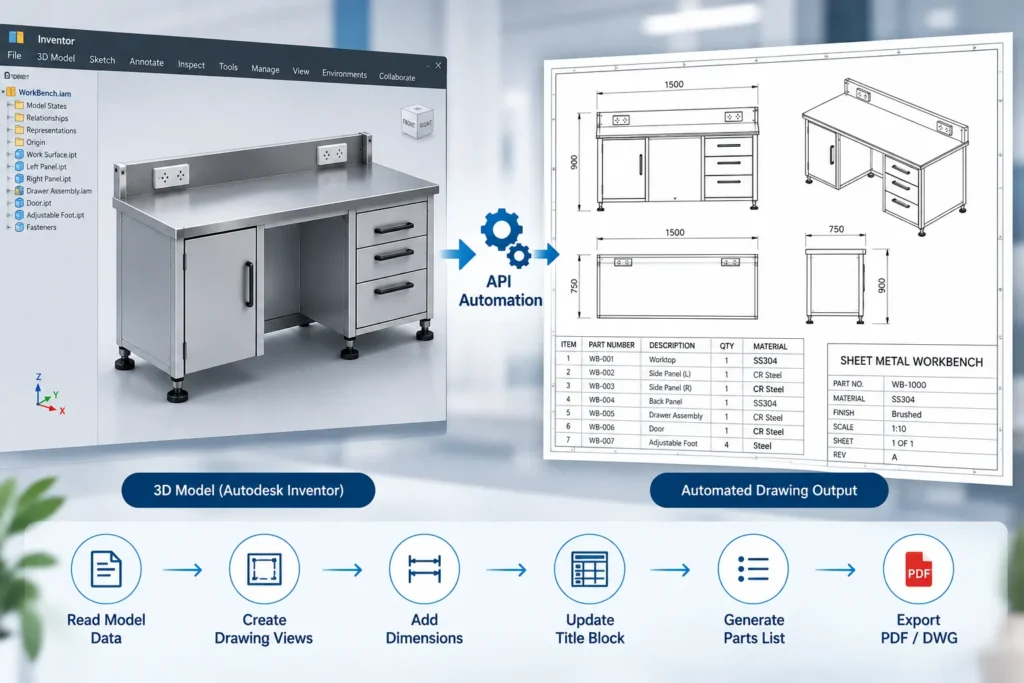
What Can Be Automated?
An Inventor drawing automation workflow can potentially:
- Create drawing files from templates
- Add drawing sheets
- Insert model views
- Create projected views
- Update drawing views
- Add or modify dimensions
- Create section/detail views
- Position drawing elements
- Update title blocks
- Update revision information
- Generate parts lists
- Add balloons
- Apply predefined drawing standards
- Export drawings to PDF/DWG
- Batch-process multiple drawings
For companies producing similar products or configurable equipment, this can significantly reduce repetitive drafting work.
Example: Automated Drawing Workflow
Consider a manufacturer producing multiple sizes of an industrial enclosure.
The models follow a predefined structure:
Width + Height + Depth + Material + Configuration
Instead of manually creating a drawing for each variation, an automation workflow could:
Read Model Parameters
↓
Identify Configuration
↓
Open Drawing Template
↓
Insert Appropriate Views
↓
Update Dimensions
↓
Update Title Block
↓
Generate Parts List
↓
Export PDF
↓
Save Manufacturing Package
The engineer can still review the final drawing, while repetitive documentation steps are handled programmatically.
2. Automating BOM Generation in Inventor
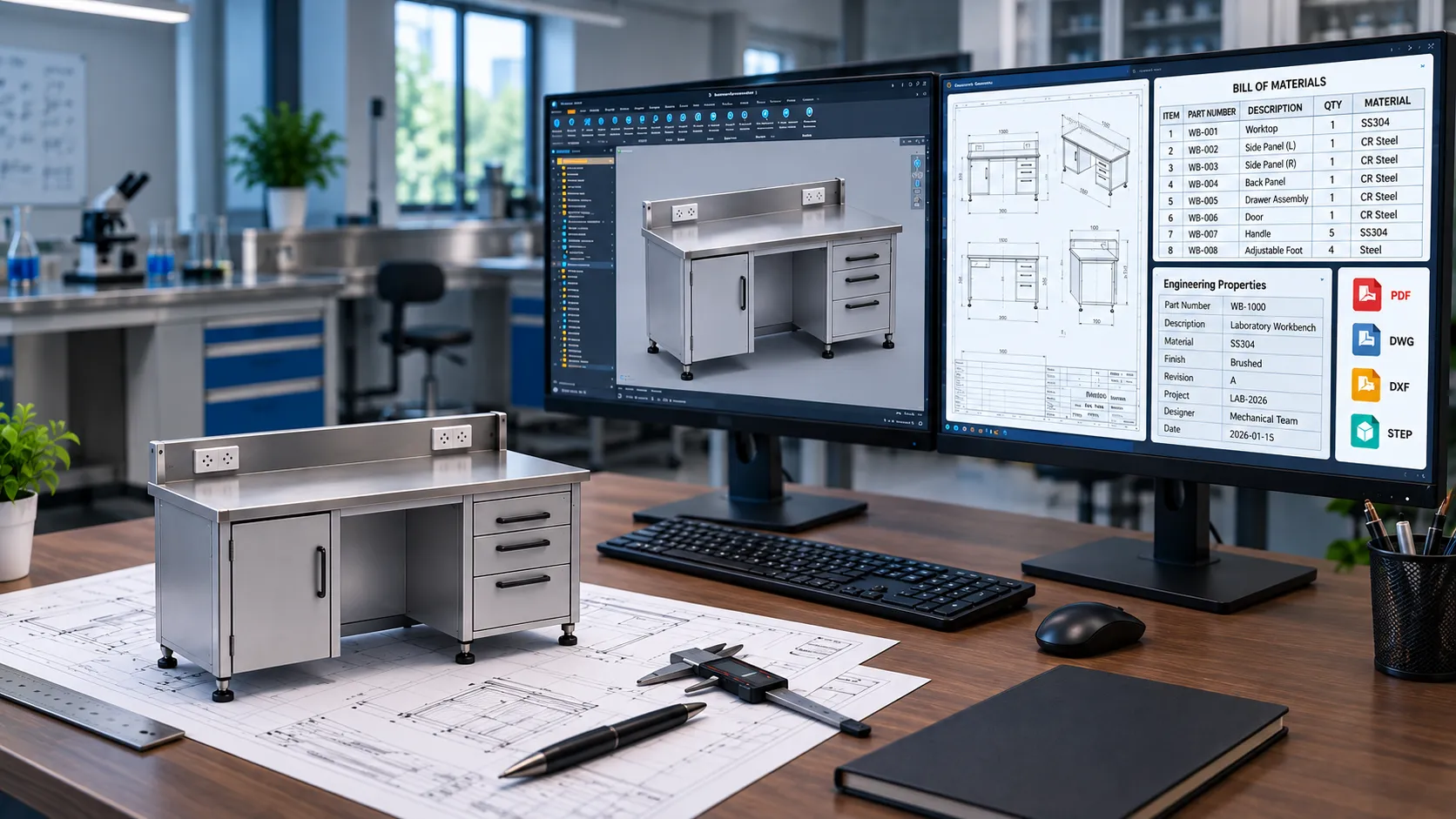
A Bill of Materials (BOM) contains structured information about the components used in an assembly.
For manufacturing organizations, BOM data may include:
- Part number
- Description
- Quantity
- Material
- Revision
- Manufacturer
- Component type
- Stock information
- Custom properties
Inventor provides BOM functionality for assemblies, and the API can be used to access and process this information programmatically.
Autodesk’s Automation API documentation specifically identifies BOM export as an Inventor automation use case, including workflows where BOM information can be integrated with pricing or material data.
BOM Automation Can Include
A custom workflow can be designed to:
- Read assembly structures
- Access BOM views
- Extract component information
- Filter components
- Read iProperties
- Update custom properties
- Generate structured BOMs
- Generate parts-only BOMs
- Export BOM data
- Create Excel-ready datasets
- Prepare ERP-compatible data
- Validate missing properties
This is particularly useful for configurable products.
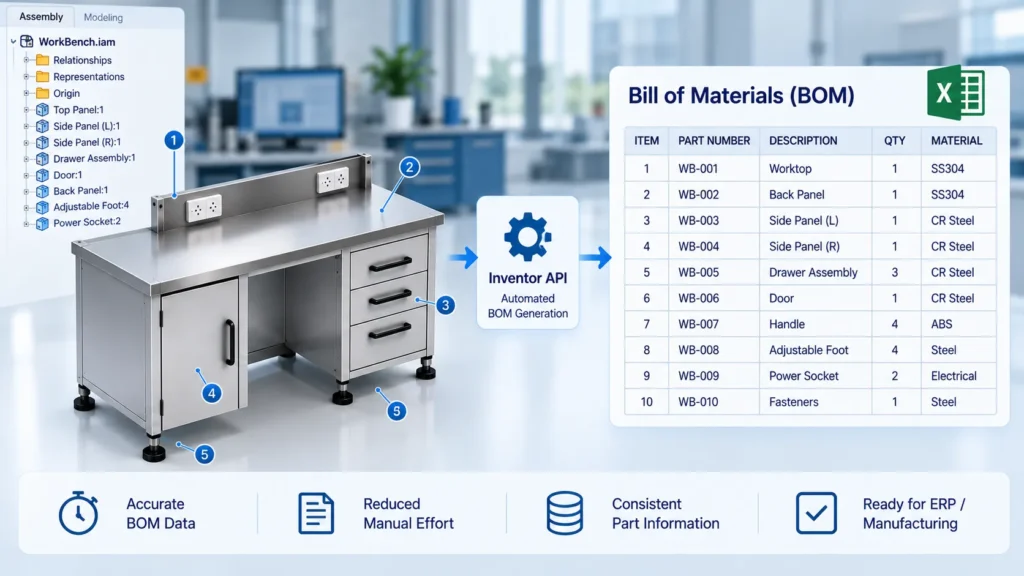
3. Engineering Data and iProperties Automation
CAD models contain much more information than geometry.
Engineering data can include:
- Part numbers
- Descriptions
- Materials
- Revision information
- Designer names
- Project numbers
- Manufacturing codes
- ERP identifiers
- Custom attributes
- Mass properties
- Classification information
Manually maintaining this information across hundreds of files can introduce inconsistencies.
The Inventor API can be used to access document properties and other engineering information programmatically. Autodesk’s recent Inventor API documentation also highlights expanded capabilities around iProperties and model states.
Example
Suppose a company has a standard property structure:
| Property | Example |
|---|---|
| Part Number | ENC-250-001 |
| Description | Electrical Enclosure |
| Material | SS304 |
| Revision | B |
| Project | PRJ-2026-014 |
| Manufacturing Code | ENC-SS-250 |
| ERP Code | 100245 |
An automation tool can populate or validate these fields according to predefined engineering rules.
This helps create a more consistent connection between CAD data and downstream business systems.
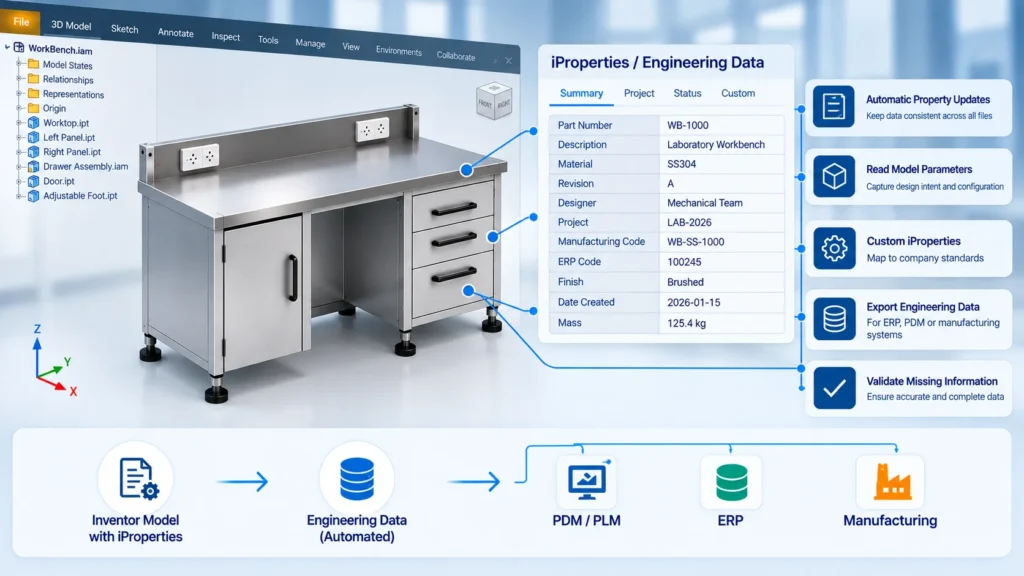
4. Automating PDF, STEP, DWG and DXF Exports
Engineering teams frequently need multiple outputs from the same Inventor model.
For example:
Inventor Model
→ PDF Drawing
→ STEP Model
→ DWG Drawing
→ DXF Flat Pattern
→ BOM
→ Engineering Data
Manually exporting each file increases processing time and creates opportunities for inconsistent filenames, incorrect folders, or missing files.
An Inventor automation workflow can coordinate these exports.
Example Manufacturing Package
A single automation command could generate:
Product_001/
│
├── 3D/
│   └── Product_001.step
│
├── Drawings/
│   ├── Product_001.pdf
│   └── Product_001.dwg
│
├── Manufacturing/
│   └── Product_001.dxf
│
├── BOM/
│   └── Product_001_BOM.xlsx
│
└── Engineering_Data/
    └── Product_001_Data.xlsx
This approach can turn multiple manual export operations into a structured engineering release workflow.
Immersiv Techsphere has also covered Autodesk Inventor automation for DXF and CNC data generation, where automation can connect flat-pattern processing with downstream manufacturing outputs.
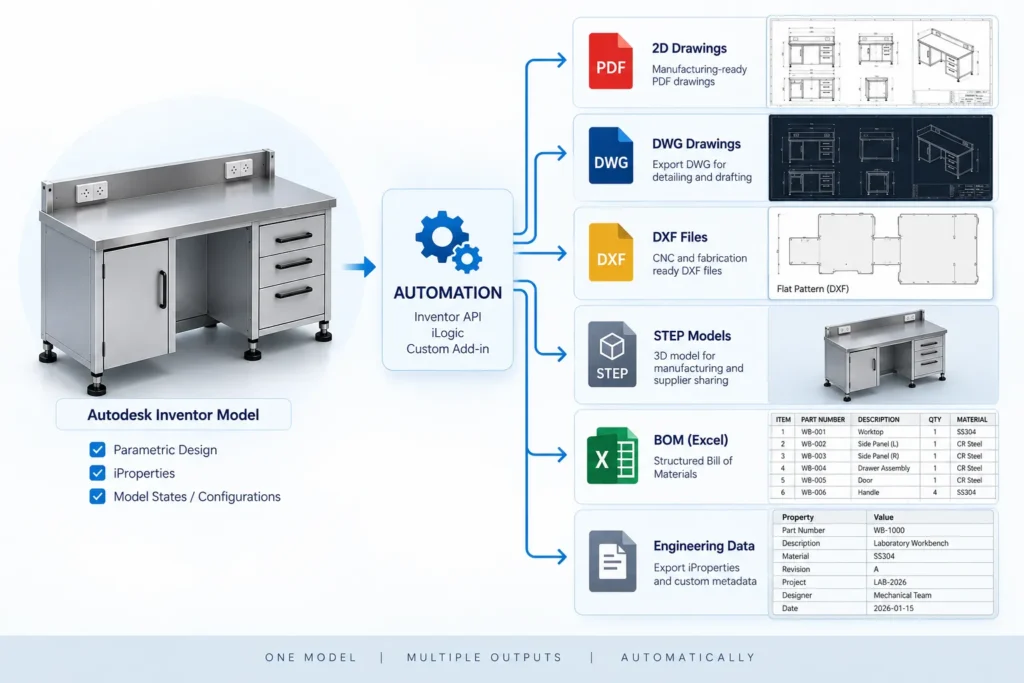
5. Automating Drawing Templates and Title Blocks
Engineering organizations often have standardized drawing templates.
These templates may contain:
- Company information
- Drawing numbers
- Revision fields
- Material fields
- Approval information
- Project information
- Standard notes
- Manufacturing instructions
The Inventor API can be used to populate drawing information based on model and project data.
For example:
Model iProperties
↓
Drawing Properties
↓
Title Block
↓
PDF Output
Instead of manually entering the same information into every drawing, the automation can retrieve the relevant data from the model.
This can reduce repetitive data entry and improve consistency between models and drawings.
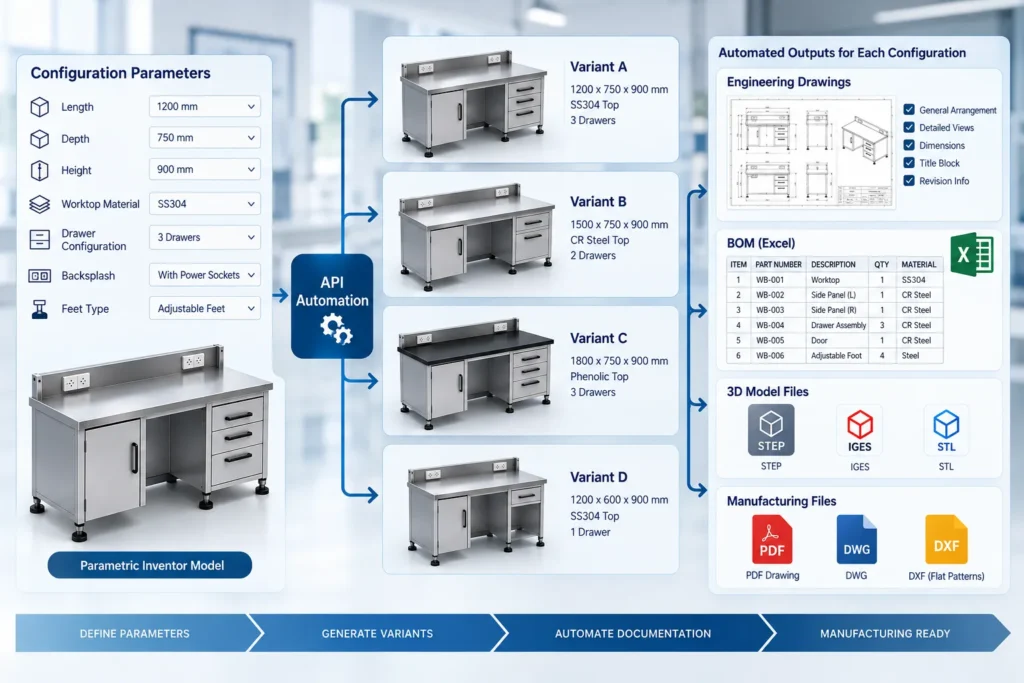
6. Automating Configurable Products
Inventor automation becomes especially useful when a company produces configurable products.
Consider an equipment manufacturer with:
- 10 width options
- 5 height options
- 4 material options
- 3 mounting configurations
That creates hundreds of possible combinations.
If each configuration requires separate engineering documentation, manual processing can become a bottleneck.
An automation workflow can use parameters and rules to:
- Select configuration.
- Update model parameters.
- Generate required model state.
- Update assembly.
- Generate drawing.
- Update BOM.
- Populate engineering properties.
- Export manufacturing files.
- Create documentation package.
This creates a bridge between parametric CAD and automated engineering documentation.
7. Inventor API and Model States
Modern Inventor workflows can involve multiple model states representing different configurations or representations of a design.
Inventor 2026 introduced additional API capabilities around model states and their edit scope, as well as relationships between model states and iProperties.
This creates opportunities for automation workflows that need to:
- Identify active model states
- Access model-state-specific properties
- Process multiple configurations
- Generate configuration-specific outputs
- Manage BOM behavior
- Automate documentation for product variants
For configurable manufacturing products, this can be an important part of designing a scalable automation architecture.
8. Batch Processing of Inventor Files
One of the biggest advantages of API-based automation is the ability to process multiple files according to predefined rules.
Imagine a folder containing:
500 Inventor assemblies
A manual process might require engineers to open files individually and perform repetitive operations.
A batch automation workflow could instead:
Scan Files
↓
Identify Assemblies
↓
Open / Process Files
↓
Extract Engineering Data
↓
Generate BOM
↓
Update Drawings
↓
Export PDFs
↓
Generate STEP/DXF
↓
Save Output
↓
Create Processing Report
This is particularly useful for:
- Legacy CAD data
- Engineering migrations
- Product documentation updates
- Manufacturing data generation
- BOM extraction
- Large product libraries
Autodesk’s Automation API documentation identifies bulk operations such as processing large numbers of Inventor files as a supported automation scenario.
9. Connecting Inventor With ERP, PDM and Other Systems
CAD automation does not have to stop inside Inventor.
Engineering data often needs to move into other systems.
For example:
Inventor
↓
Automation Layer
↓
BOM / Metadata
↓
PDM / PLM
↓
ERP
↓
Manufacturing
A custom automation solution can help transfer structured information between systems, depending on the APIs and integration capabilities available in each environment.
Potential data flows include:
- Part numbers
- BOMs
- Material information
- Revision data
- Drawing numbers
- Manufacturing codes
- File paths
- Product configuration information
This transforms CAD automation from a simple desktop macro into part of a broader digital engineering workflow.
Autodesk Inventor API vs Manual Engineering Workflow
| Activity | Manual Workflow | API Automation |
|---|---|---|
| Drawing creation | Repetitive | Rule-based |
| Title block updates | Manual | Automated |
| BOM extraction | Manual/export | Programmatic |
| Property updates | Manual | Rule-based |
| PDF generation | Individual | Batch |
| STEP export | Individual | Automated |
| DXF generation | Manual | Batch workflow |
| File naming | Manual | Standardized |
| Folder organization | Manual | Rule-based |
| Data validation | Manual checks | Automated rules |
| ERP-ready data | Manual preparation | Structured extraction |
The goal is not to remove engineering review. Instead, automation can handle repetitive execution while engineers retain control over design decisions and validation.
Autodesk Inventor API, iLogic and Design Automation
These technologies can be viewed as different layers of an automation strategy.
iLogic
Useful for:
- Rule-based design
- Parameter changes
- Configuration logic
- Internal Inventor automation
- Design rules
Inventor API
Useful for:
- Custom applications
- Add-ins
- Advanced drawing automation
- BOM processing
- Engineering data extraction
- External workflow integration
Autodesk Automation API
Useful when automation needs to move toward cloud-based or scalable processing. Autodesk describes the Inventor Automation API as a way to run add-ins and iLogic to process or create Inventor files, including drawing generation and BOM export.
The appropriate architecture depends on the workflow, file volume, integration requirements, and level of customization.
What Should You Automate First?
Not every CAD task needs automation.
A good starting point is a task that is:
- Repetitive
- Rule-based
- High-volume
- Time-consuming
- Prone to data-entry errors
- Required across many product variants
- Dependent on standardized outputs
For example:
Good automation candidate:
“For every approved assembly, generate the standard drawing, update the BOM, populate properties, export PDF and STEP, and save everything using our naming convention.”
Poor automation candidate:
“Make an engineering decision about whether this component should be redesigned.”
Automation works best when the process has clearly defined rules.
Designing a Reliable Inventor Automation Workflow
A successful Inventor API project should begin with the engineering process rather than the code.
Step 1: Map the Current Workflow
Document:
- Inputs
- Engineering decisions
- Repetitive operations
- Outputs
- File structures
- Naming conventions
- Approval steps
Step 2: Identify Automation Rules
Separate:
Engineering decisions
from
Repeatable operations
The second category is usually where automation provides the greatest opportunity.
Step 3: Define the Data Structure
Determine which properties are required:
- Part number
- Description
- Material
- Revision
- Project
- Manufacturing information
Step 4: Define Outputs
Determine whether the workflow needs:
- DWG
- DXF
- STEP
- BOM
- Excel
- ERP data
- PDM metadata
Step 5: Develop and Test
The automation should be tested against:
- Standard models
- Complex assemblies
- Missing properties
- Multiple configurations
- Existing drawings
- Revision scenarios
- Unexpected file structures
Step 6: Add Validation
Automation should not simply generate files.
It should also identify problems such as:
- Missing part numbers
- Missing materials
- Duplicate file names
- Broken references
- Missing drawings
- Invalid output paths
This makes the workflow more reliable for production environments.
Where Autodesk Inventor API Automation Can Deliver Value
Inventor API automation can be applied across many manufacturing environments.
Industrial Equipment
Automate:
- Assembly documentation
- BOM generation
- Manufacturing drawings
- Engineering data
Sheet Metal Manufacturing
Automate:
- Flat-pattern processing
- DXF generation
- Drawing creation
- BOM extraction
- Manufacturing packages
Machinery Manufacturing
Automate:
- Configurable assemblies
- Drawing generation
- Model states
- BOMs
- Product documentation
Process Equipment
Automate:
- Equipment drawings
- Component data
- BOM generation
- Documentation packages
Furniture and Fabrication
Automate:
- Configurable product documentation
- Cut lists
- Manufacturing drawings
- DXF exports
- Product variants
Autodesk Inventor API Automation at Immersiv Techsphere
At Immersiv Techsphere, CAD automation is approached as an engineering workflow problem rather than simply a scripting exercise.
Our CAD automation capabilities include:
- Autodesk Inventor automation
- Inventor API development
- SolidWorks API development
- VBA and .NET automation
- Automated drawing generation
- BOM automation
- DXF generation
- Batch PDF and STEP export
- Engineering property extraction
- Manufacturing data generation
- ERP-ready data extraction
- Rule-based product automation
Our objective is to connect:
Design → Engineering Data → Documentation → Manufacturing
rather than automating isolated CAD commands.
For manufacturers using Autodesk Inventor, automation can be developed around existing models, engineering rules, drawing standards, file structures, and manufacturing requirements.
You can explore Immersiv Techsphere’s CAD Automation services and our recent article on Automating DXF Export and CNC Data Generation in Autodesk Inventor.
Frequently Asked Questions
Autodesk Inventor API is a programming interface that allows developers to interact with Inventor programmatically and create custom automation tools, applications, and add-ins.
Yes. Inventor API and iLogic can be used to automate drawing operations such as views, dimensions, balloons, title blocks, and other documentation workflows, subject to the capabilities exposed by the API.
Yes. Inventor automation can access and export BOM information, making it possible to connect BOM data with other engineering or business workflows.
Yes. Export workflows can be incorporated into a larger automation process to generate standardized engineering and manufacturing outputs.
iLogic provides rule-based automation within Inventor, while the Inventor API provides broader programmatic access for developing more advanced automation, custom applications, and integrations.
Yes. Autodesk’s Automation API supports workflows for processing Inventor files at scale, including batch-oriented operations.
It can be used as part of an integration architecture to extract and transform CAD information for downstream systems. The exact integration depends on the APIs and data structures of the connected ERP, PDM, or PLM system.
Conclusion
The Autodesk Inventor API provides a powerful foundation for automating repetitive mechanical engineering workflows.
Instead of treating drawings, BOMs, engineering properties, and manufacturing exports as separate manual activities, organizations can connect them into a structured workflow:
3D CAD Model
↓
Configuration / Model State
↓
Automated Drawing
↓
BOM Generation
↓
Engineering Data
↓
PDF / DWG / DXF / STEP
↓
Manufacturing / ERP / PDM
The greatest opportunity is not simply generating a drawing faster. It is creating a consistent, repeatable and scalable engineering data pipeline.
For manufacturers handling configurable products, high drawing volumes, repetitive BOM preparation, or large CAD libraries, Autodesk Inventor API automation can become an important component of a broader CAD automation strategy.
Have a Project in Mind?
Need help with 3D animation, industrial visualization, HSE training animation, or product visualization? Tell us about your project and our team will get back to you.