


Table of Contents
Introduction
Engineering teams continuously strive to deliver better products in less time while maintaining quality and controlling costs. However, many manufacturers still rely on manual CAD workflows for tasks that are repetitive, time-consuming, and highly prone to human error.
Whether you’re creating production drawings, exporting DXFs, generating Bills of Materials (BOMs), updating custom properties, or modifying hundreds of assemblies, manual work silently consumes engineering hours every single day.
These hidden inefficiencies often go unnoticed because they become part of the team’s daily routine. But over weeks, months, and years, they translate into thousands of lost engineering hours, delayed projects, inconsistent documentation, and increased operational costs.
This is where CAD Automation transforms engineering operations.
Using SolidWorks Automation, Autodesk Inventor Automation, APIs, .NET applications, VBA scripts, and custom macros, companies can automate repetitive engineering activities, allowing engineers to focus on innovation instead of repetitive clicks.
In this article, we’ll explore why manual CAD workflows are expensive, how automation solves these challenges, and where engineering organizations can gain the highest return on investment.
The Hidden Cost of Manual CAD Workflows
Many engineering departments believe manual work is simply part of the design process.
In reality, engineers often spend surprisingly little time on actual product development.
Instead, much of their day is consumed by repetitive administrative CAD tasks such as:
- Creating drawings from models
- Updating title blocks
- Renaming files
- Editing custom properties
- Exporting PDFs
- Exporting DXFs
- Generating STEP files
- Updating BOMs
- Revising assemblies
- Managing file versions
- Producing customer documentation
Individually, these tasks may only take a few minutes.
Across hundreds or thousands of projects, they become one of the largest hidden costs in engineering.
Where Engineering Time Is Actually Lost
The biggest productivity losses usually occur in repetitive operations that require little engineering judgment.
Examples include:
1. Creating Similar Parts Again and Again
Many companies manufacture configurable products.
Engineers repeatedly create similar designs with only minor dimensional changes.
Instead of designing once and reusing intelligently, they remodel nearly identical components repeatedly.
Automation eliminates this redundancy.
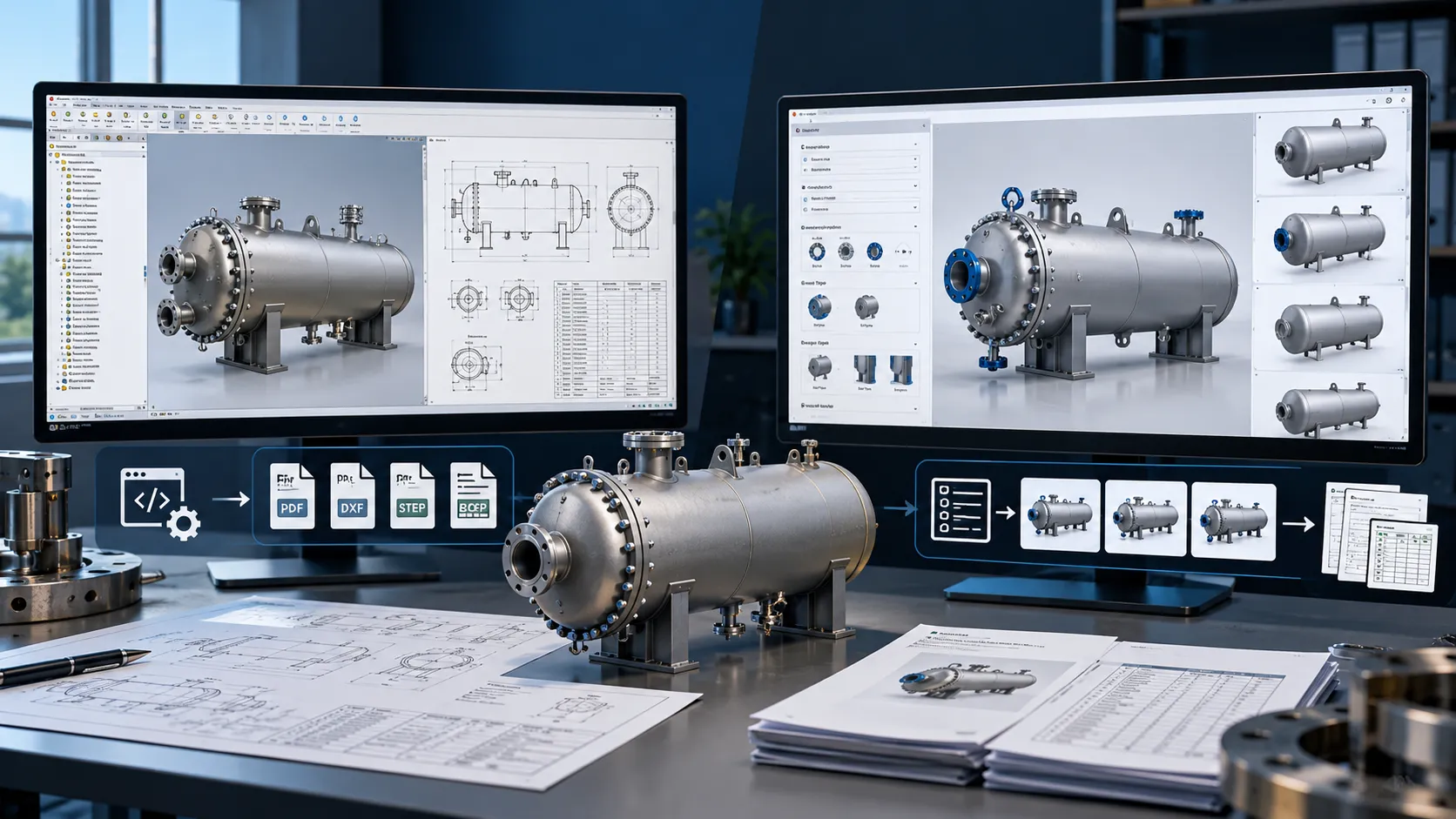
For manufacturers offering configurable products, Configurator & CPQ Solutions automate product selection, generate engineering-ready CAD models, and create manufacturing documents based on predefined rules, significantly reducing engineering effort and quotation time.
2. Updating Hundreds of Drawings
A single engineering change can affect dozens, or even hundreds, of drawings.
Updating them manually is tedious and increases the likelihood of inconsistencies.
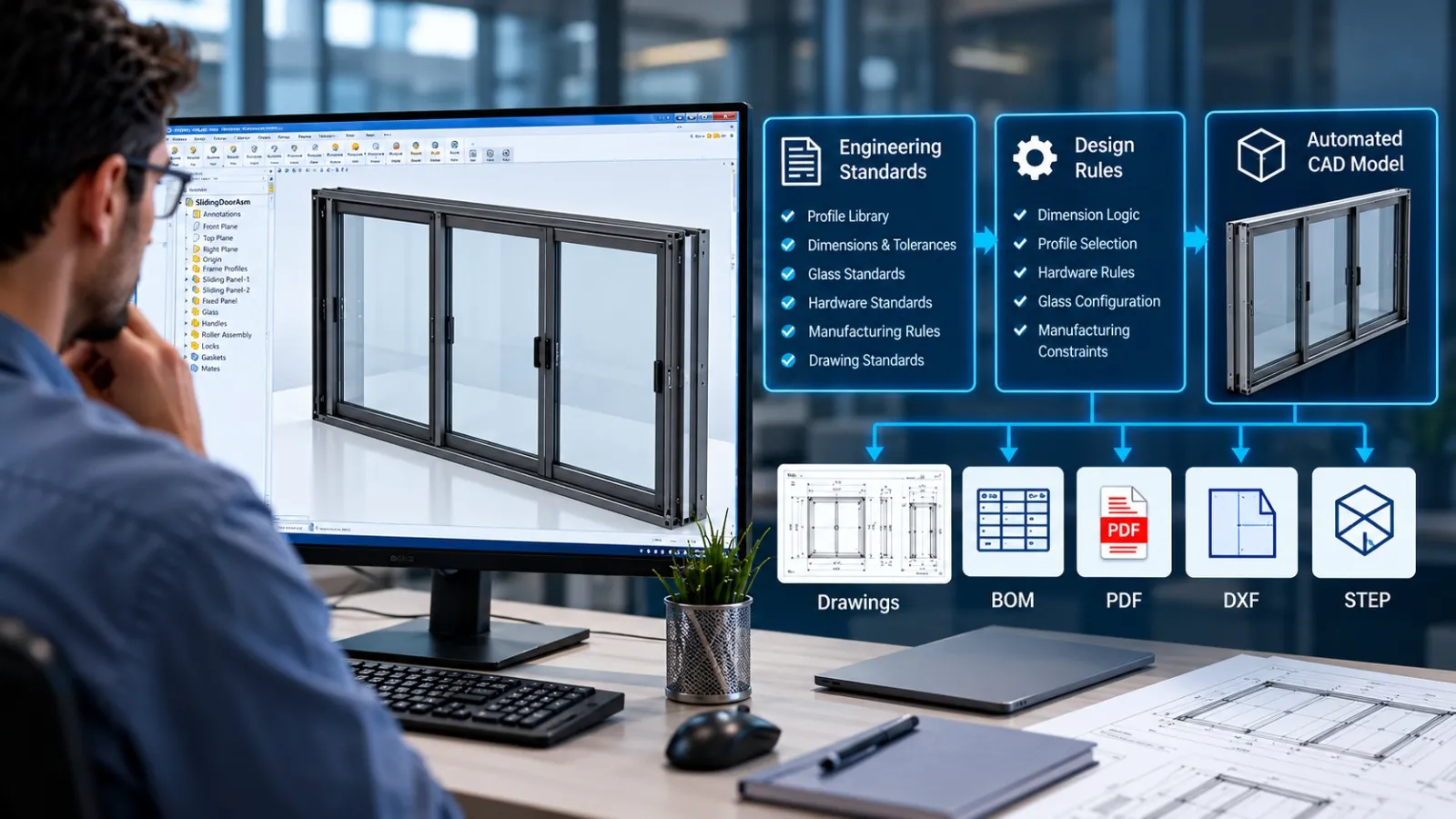
With CAD Automation, drawings can be updated automatically based on predefined rules.
3. Manual File Exports
Customers often require multiple deliverables:
- PDF drawings
- DXF files
- STEP models
- IGES files
- STL files
Exporting each file manually is repetitive and prone to mistakes.
Automation exports all required formats with a single command.
4. Repetitive BOM Generation
Bills of Materials are essential for purchasing, production, ERP systems, and manufacturing.
Manual BOM creation often introduces:
- Missing items
- Incorrect quantities
- Duplicate components
- Formatting inconsistencies
Automation generates standardized BOMs instantly.
5. Repetitive Design Changes
Changing one parameter frequently requires updates across:
- Parts
- Assemblies
- Drawings
- Configurations
- Custom properties
Automation propagates these changes automatically.
What is CAD Automation?
CAD Automation is the process of using software logic to perform repetitive CAD operations without manual intervention.
Instead of requiring engineers to perform identical actions repeatedly, automation executes those tasks consistently and accurately.
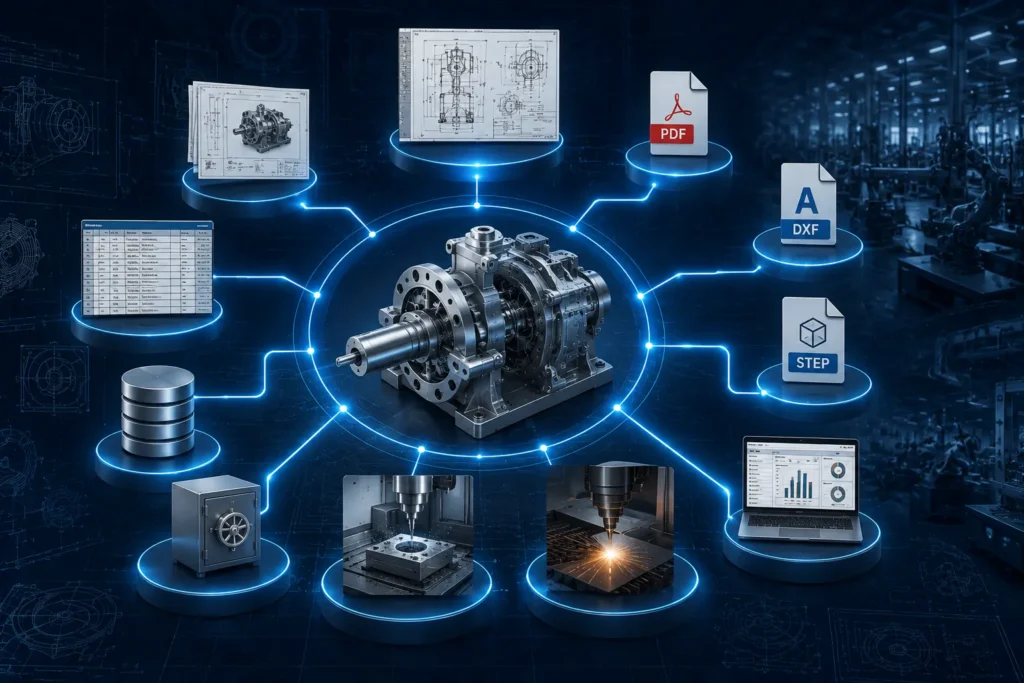
Automation can range from simple macros to enterprise-level engineering applications integrated with ERP, PDM, CRM, and manufacturing systems.
The objective is not to replace engineers, it is to eliminate repetitive work so engineers can concentrate on solving engineering problems.
Types of CAD Automation
Different organizations require different levels of automation.
Some begin with simple macros, while others implement fully integrated engineering systems.
Common approaches include:
- VBA Macros
- SolidWorks API Development
- Autodesk Inventor API Development
- .NET Desktop Applications
- Add-ins
- Rule-based design automation
- Parametric product configurators
- PDM automation
- ERP integration
- Automated documentation systems
Each approach addresses specific engineering challenges and can be combined as organizations scale their automation efforts.
SolidWorks Automation: Eliminating Repetitive Engineering Tasks
For organizations using SolidWorks, automation can dramatically improve engineering efficiency.
Using the SolidWorks API, developers can create intelligent applications that automate repetitive tasks across parts, assemblies, and drawings. Learn how SolidWorks API and VBA Automation can streamline engineering workflows, automate documentation, and eliminate repetitive design tasks.
Common SolidWorks Automation solutions include:
1. Automatic Drawing Creation
Generate complete manufacturing drawings directly from 3D models.
Automation can include:
- Standard views
- Dimensions
- Balloons
- Tables
- Notes
- Title blocks
2. Bulk PDF, DXF and STEP Export
Instead of exporting files individually, engineers can export hundreds of files automatically.
This is especially useful for sheet metal manufacturing.
3. Custom Property Automation
Automatically populate:
- Material
- Part Number
- Revision
- Weight
- Description
- Project Number
- Customer Information
This ensures consistent documentation.
4. BOM Automation
Automatically generate manufacturing-ready Bills of Materials.
Data can also be exported directly into ERP systems.
5. Sheet Metal Automation
Generate:
- Flat patterns
- Bend tables
- DXF files
- Manufacturing drawings
without manual intervention.
6. Design Validation
Automation can verify:
- Missing properties
- Incorrect materials
- Suppressed components
- Naming conventions
- File standards
before drawings are released.
Autodesk Inventor Automation: Streamlining Design-to-Manufacturing
Engineering teams using Autodesk Inventor can achieve similar productivity improvements through automation.
Using the Autodesk Inventor API, repetitive modeling and documentation tasks can be automated across complete product families.
Common Autodesk Inventor Automation applications include:
1. Automatic Assembly Generation
Generate complete assemblies from user-defined parameters.
2. Configurable Product Design
Create multiple product variants automatically by changing dimensions and specifications.
Ideal for:
- Cabinets
- Furniture
- Industrial equipment
- Sheet metal products
- Process equipment
3. Automated Drawing Generation
Produce standardized manufacturing drawings instantly.
4. Intelligent Part Creation
Generate new components automatically based on engineering rules.
5. Automated Documentation
Create:
- DWG
- DXF
- STEP
- BOM
All in one automated workflow.
Using APIs for Advanced CAD Automation
Modern CAD platforms provide extensive Application Programming Interfaces (APIs) that enable deep customization and integration.
APIs allow developers to control nearly every aspect of CAD software programmatically, from creating geometry to managing documents and interacting with external systems.
Benefits of API-driven automation include:
- Access to CAD functions beyond the standard user interface
- Creation of custom engineering tools tailored to company workflows
- Integration with ERP, PLM, CRM, and PDM systems
- Rule-based product generation
- Automated model validation and reporting
- Batch processing of thousands of files
API-based solutions are ideal for organizations with recurring engineering processes that demand consistency, scalability, and speed.
Building Automation with .NET
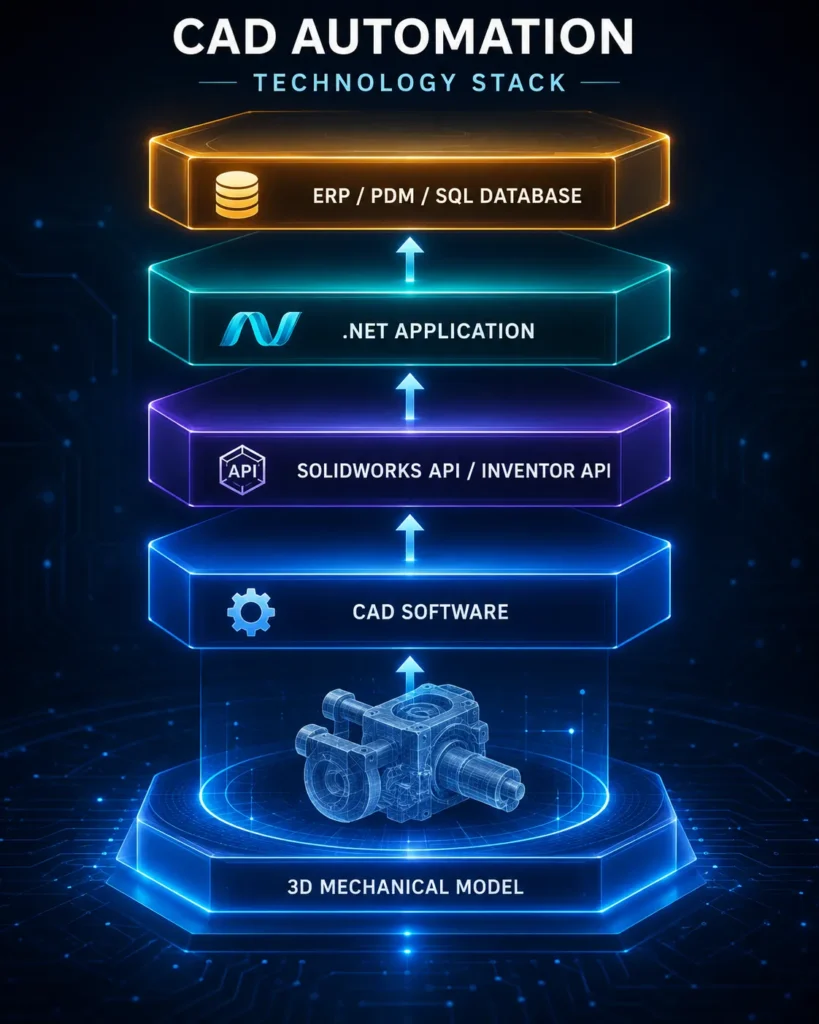
Many enterprise-grade CAD automation solutions are developed using the Microsoft .NET framework.
Using C# or VB.NET, developers can create:
- Standalone desktop applications
- Custom CAD add-ins
- Engineering calculators
- Product configurators
- Drawing automation software
- BOM management tools
- Manufacturing data export utilities
.NET applications can also communicate with SQL databases, web services, ERP systems, and cloud platforms, making them suitable for end-to-end engineering automation.
VBA Macros: A Practical Starting Point
For organizations beginning their automation journey, VBA (Visual Basic for Applications) offers a simple and cost-effective way to automate repetitive tasks within CAD software.
Typical VBA macro applications include:
- Renaming files
- Updating custom properties
- Exporting PDFs
- Creating DXFs
- Batch printing drawings
- Opening and processing multiple files
- Applying drawing templates
- Standardizing document settings
Although VBA has limitations compared to API-based development, it is an excellent solution for automating routine engineering tasks without significant investment.
Macros: Small Tools with Big Productivity Gains
Macros are one of the quickest ways to eliminate repetitive CAD operations.
A single macro can automate tasks that engineers perform dozens, or even hundreds, of times each week.
Examples include:
- One-click PDF export
- Batch DXF generation
- Automatic sheet creation
- Property synchronization
- View generation
- Drawing cleanup
- File organization
Even simple macros can save hundreds of engineering hours annually by reducing repetitive manual effort.
Industries That Benefit Most from CAD Automation
CAD Automation delivers value across industries where designs follow repeatable rules or require extensive documentation.
Examples include:
- Sheet metal manufacturing
- Industrial equipment
- Pressure vessels
- Heat exchangers
- Process plants
- Structural steel
- Furniture manufacturing
- Laboratory furniture
- Automation machinery
- Material handling equipment
- HVAC systems
- Machine design
- Consumer products
Any organization managing configurable products or large volumes of engineering drawings can significantly improve productivity through automation.
Business Benefits of CAD Automation
The impact of automation extends beyond engineering departments.
Organizations implementing CAD Automation often experience:
- Faster Design Cycles: Automated workflows reduce repetitive tasks, enabling quicker project completion.
- Reduced Engineering Costs: Engineers spend more time on design and less on routine documentation.
- Improved Accuracy: Automation minimizes manual data entry and reduces the risk of costly errors.
- Standardized Documentation: Consistent templates, naming conventions, and document outputs improve quality across projects.
- Better Collaboration: Integrated workflows help engineering, manufacturing, procurement, and quality teams work from synchronized data.
- Higher Scalability: Automation allows businesses to handle more projects without proportionally increasing engineering resources.
When Should Your Company Invest in CAD Automation?
Automation becomes especially valuable if your team regularly:
- Creates similar products
- Generates repetitive drawings
- Produces large numbers of DXFs
- Updates custom properties manually
- Exports multiple file formats
- Manages configurable product families
- Spends significant time on documentation
- Maintains strict engineering standards
If these activities are part of your daily workflow, automation can deliver measurable improvements in productivity and consistency.
Frequently Asked Questions (FAQs)
CAD Automation is the use of APIs, macros, scripts, or custom applications to automate repetitive engineering tasks within CAD software. It helps reduce manual effort, improve design accuracy, and speed up product development by automating activities such as drawing generation, file exports, and BOM creation.
CAD Automation reduces engineering costs by eliminating repetitive manual tasks like creating drawings, exporting PDFs and DXFs, updating custom properties, and generating Bills of Materials. This allows engineers to spend more time on design and innovation while improving productivity, consistency, and project turnaround times.
Both SolidWorks and Autodesk Inventor support automation for a wide range of engineering tasks, including:
– Automatic drawing generation
– PDF, DXF, STEP, and DWG exports
– BOM creation
– Custom property updates
– Batch processing of parts and assemblies
– Sheet metal flat pattern generation
– Configurable product design
– Manufacturing documentation
These workflows can be automated using APIs, .NET applications, VBA scripts, and macros.
Professional CAD Automation solutions are commonly developed using SolidWorks API, Autodesk Inventor API, Microsoft .NET (C# or VB.NET), VBA, and custom macros. These technologies can also integrate CAD software with ERP, PDM, PLM, and other business systems to create end-to-end automated engineering workflows.
A company should consider CAD Automation when engineers spend significant time on repetitive tasks such as creating similar designs, generating production drawings, exporting multiple file formats, updating BOMs, or managing configurable products. Automating these workflows improves efficiency, reduces errors, shortens design cycles, and helps engineering teams scale without increasing manual workload.
Conclusion
Manual CAD workflows may seem manageable on a project-by-project basis, but their cumulative impact on engineering productivity, costs, and project timelines is significant.
Repetitive tasks such as creating drawings, exporting files, updating BOMs, and modifying product variants consume valuable engineering time that could be better spent on innovation and problem-solving.
CAD Automation enables organizations to replace these repetitive processes with intelligent, rule-based workflows. Whether through SolidWorks Automation, Autodesk Inventor Automation, custom APIs, .NET applications, VBA scripts, or macros, businesses can improve accuracy, standardize documentation, reduce engineering effort, and accelerate product development.
As products become more configurable and manufacturing demands continue to grow, automation is no longer just an efficiency improvement, it is a strategic advantage. Companies that invest in CAD Automation today are better positioned to deliver projects faster, reduce operational costs, and scale engineering operations with confidence.
Explore more insights, practical applications, and engineering best practices in our CAD Automation resource library.
Have a Project in Mind?
Need help with 3D animation, industrial visualization, HSE training animation, or product visualization? Tell us about your project and our team will get back to you.