

Table of Contents
Introduction
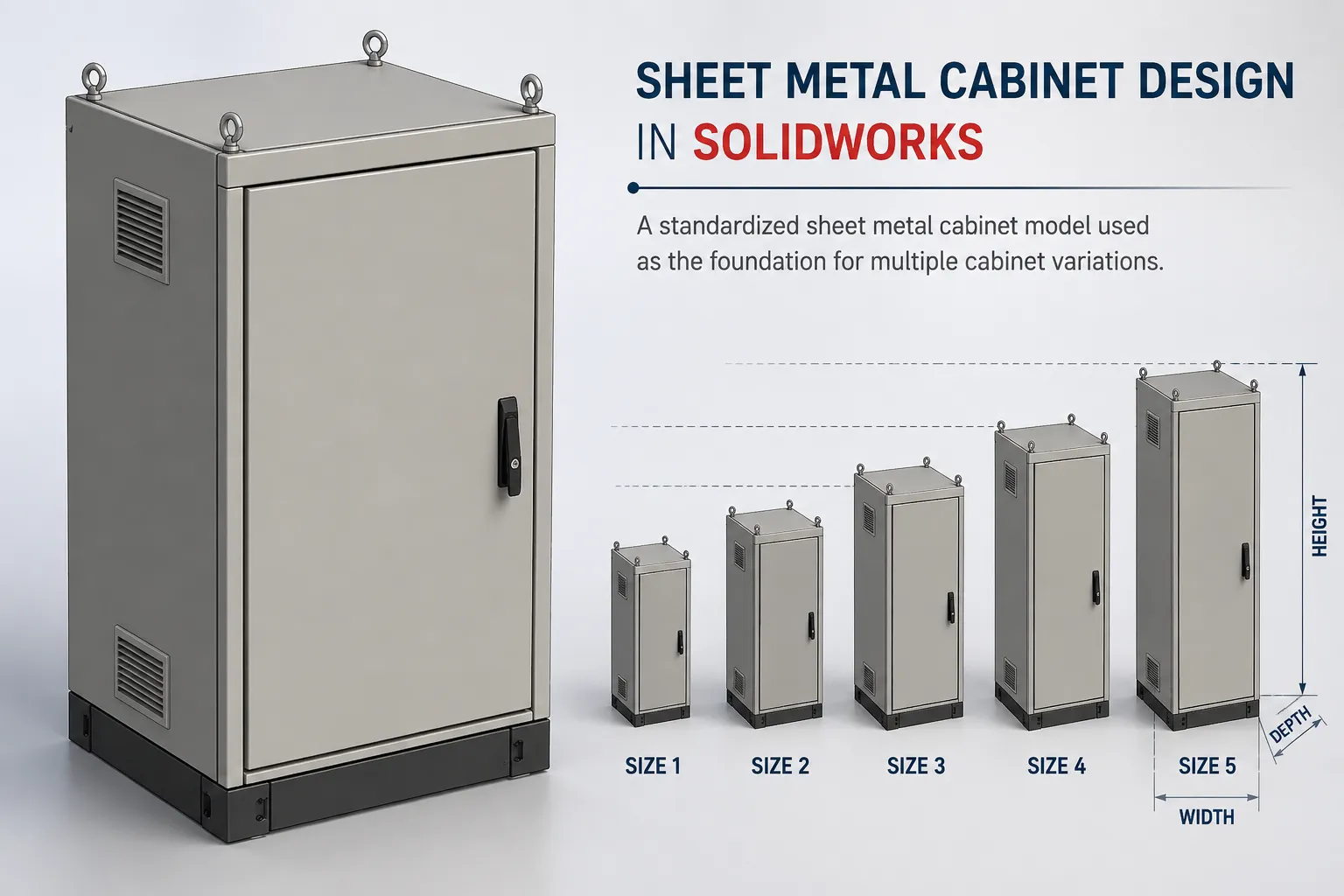
Designing sheet metal cabinets often involves creating multiple sizes based on the same fundamental design. The overall structure may remain similar, while dimensions and selected requirements change from one cabinet to another.
For engineering teams, managing these variations efficiently can become challenging when every cabinet size is created as a separate CAD file.
We encountered this challenge while working on sheet metal cabinet design in SolidWorks. Initially, different cabinet sizes were created and maintained as individual files. As the number of variations increased, this resulted in repeated design work, more files to manage, and additional effort when modifications or revisions were required.
To address this, we changed our design methodology.
We developed a standard sheet metal cabinet model and used SolidWorksConfigurations to manage different cabinet sizes within the same master file. We also focused on making the model more parametric so that important dimensions and features could be controlled without rebuilding the complete cabinet.
This case study explains how we moved from separate cabinet files to a standardized and reusable sheet metal cabinet design approach.
The Challenge: Managing Similar Sheet Metal Cabinet Designs
The cabinet designs we were developing shared the same basic design logic, but different projects required different cabinet sizes.
Initially, each variation was handled as a separate CAD file.
The workflow looked like this:
Cabinet Size 1 → Separate CAD File
Cabinet Size 2 → Separate CAD File
Cabinet Size 3 → Separate CAD File
Cabinet Size 4 → Separate CAD File
At first, this seemed like a straightforward way to manage different cabinet sizes.
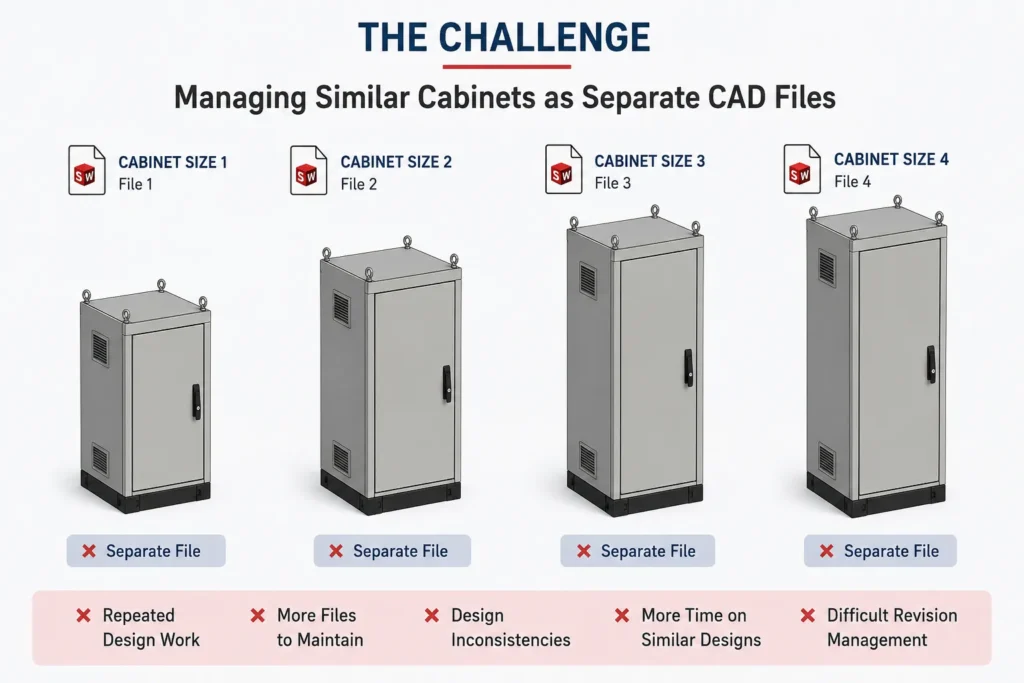
However, as more variations were created, the limitations of this approach became increasingly apparent.
- Repeated Design Work — Similar cabinet designs required similar modeling operations to be performed repeatedly. Even though the fundamental design was already established, creating another cabinet size involved additional modeling and modification work.
- More Files to Maintain — Every cabinet variation created another CAD file that needed to be stored, managed, revised, and maintained. As the number of designs increased, managing these related files became more complicated.
- Risk of Design Inconsistencies — When similar designs are maintained independently, changes made to one cabinet may not automatically carry over to other cabinet variations. This can make it more difficult to maintain consistency across a family of similar products.
- More Effort During Revisions — Design changes can become more complicated when multiple versions of a similar cabinet exist as separate files. A modification to the common design may need to be reviewed and implemented across multiple models.
- Limited Design Reuse — Although the cabinet designs were based on the same fundamental logic, we were not fully leveraging that commonality. We needed a design approach that treated these cabinets as variations of a standard design, rather than completely independent models.
Changing the Sheet Metal Cabinet Design Approach
The solution was to rethink how we represented different cabinet sizes in CAD.
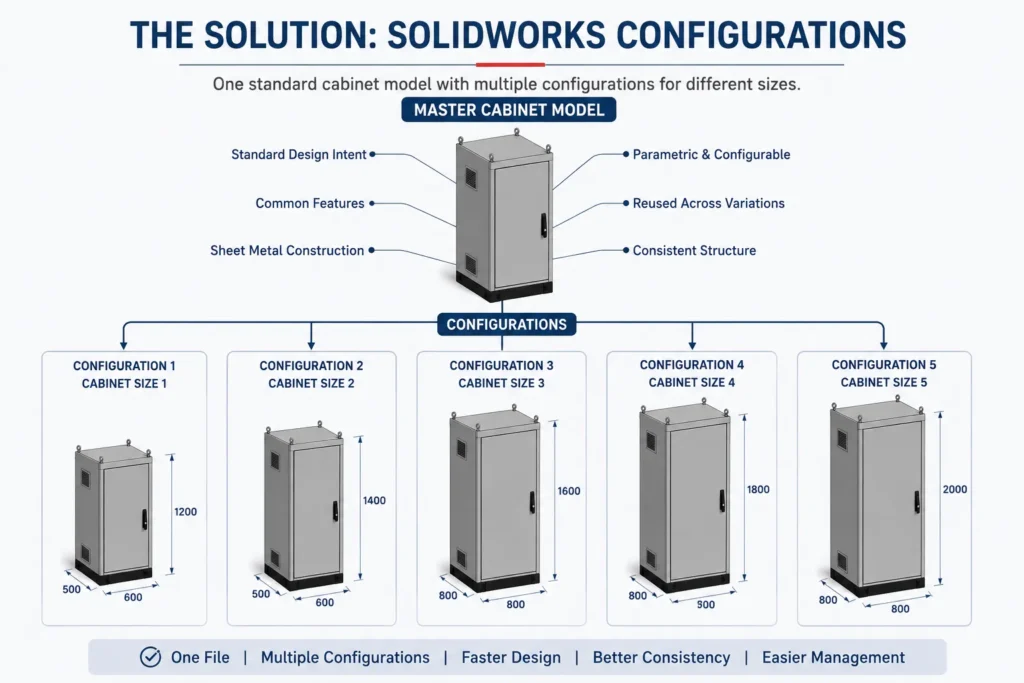
Instead of creating a new file for every cabinet variation, we created one master sheet metal cabinet model.
We then used SolidWorksConfigurations to represent different cabinet sizes within that model.
The structure became:
One Standard Cabinet File
- Configuration – Cabinet Size 1
- Configuration – Cabinet Size 2
- Configuration – Cabinet Size 3
- Configuration – Cabinet Size 4
- Configuration – Cabinet Size 5
This provided a common model structure for multiple cabinet variations.
The cabinet sizes could now be treated as configurations of a standard design rather than completely separate designs.
Why We Chose SolidWorksConfigurations
SolidWorksConfigurations provide a way to represent different versions of a model within the same SolidWorksfile.
For our sheet metal cabinet design, this was useful because the basic cabinet design remained the same while the required size could vary.
Instead of maintaining multiple independent files, we could organize the variations within one master cabinet model.
The important part was not simply creating configurations.
We also needed to ensure that the underlying model was structured appropriately for reuse.
That led to the next step: developing a standard parametric cabinet model.
Developing a Standard Sheet Metal Cabinet Model
We wanted the cabinet model to become more than a single completed design.
The objective was to create a standard cabinet model that could be reused for future projects.
The basic concept was:
Standard Design → Configure → Modify Required Parameters → New Cabinet
The standard model provided the common design foundation.
When a new cabinet was required, we could use that model as the starting point and adapt the required dimensions and features.
This approach helped shift the design process from:
Create → Save → Create Another → Save Another
to:
Standardize → Configure → Modify → Reuse
That change was central to improving the design process.
Making the Cabinet Model More Parametric
A standard model needs to be adaptable.
For this reason, we focused on making the sheet metal cabinet model more parametric.
The purpose of parametric modeling in this workflow was to allow important dimensions and features to be controlled without requiring the entire cabinet to be rebuilt.
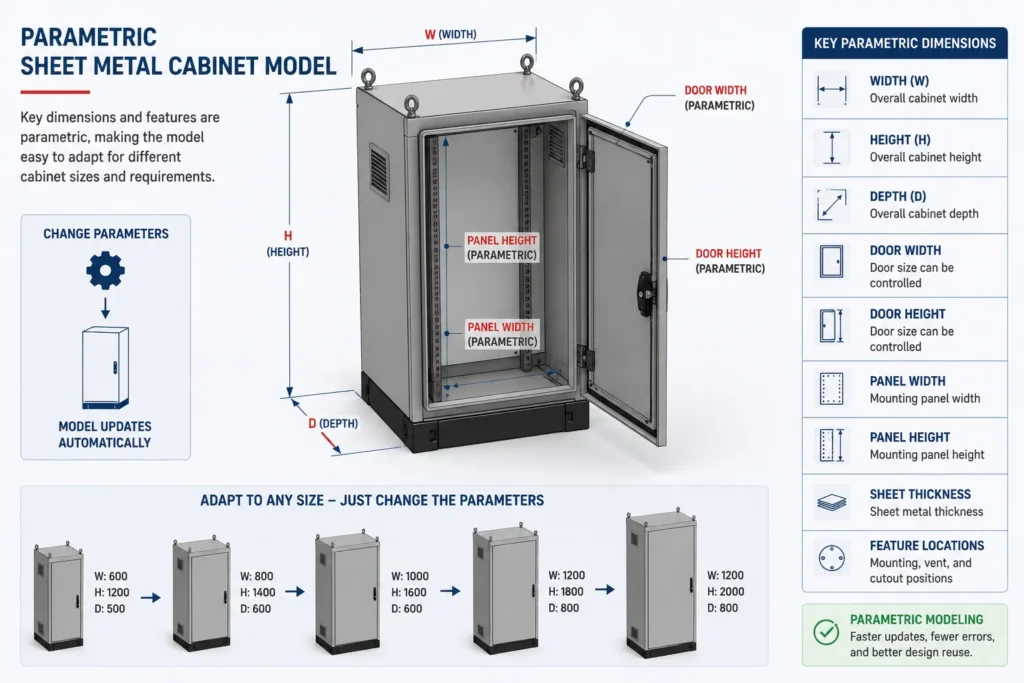
Depending on the cabinet requirements, relevant design parameters can include dimensions such as:
- Cabinet width
- Cabinet height
- Cabinet depth
- Panel dimensions
- Door dimensions
- Feature locations
- Mounting features
- Sheet metal thickness
- Internal clearances
The exact parameters depend on the cabinet design and the required product variations.
The key principle was to identify which aspects of the cabinet needed to change and structure the model so those changes could be managed efficiently.
This made the standard cabinet model more adaptable for future designs.
The Standardized Cabinet Design Workflow
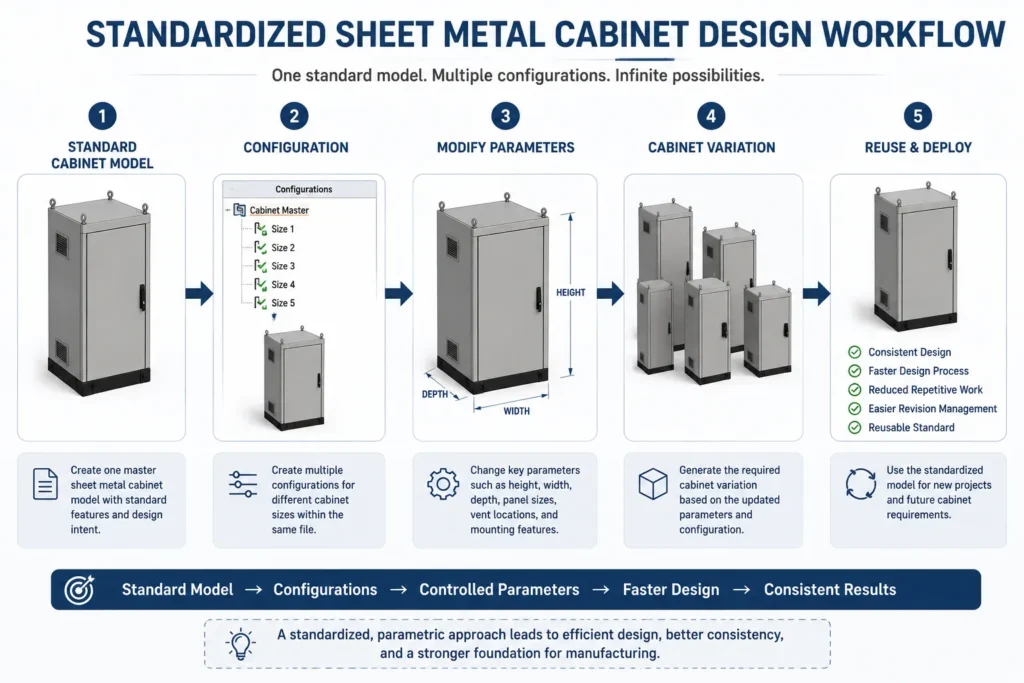
With the standard model and configurations established, the design process became more structured.
Step 1: Create the Standard Design
We created a master sheet metal cabinet model containing the common design structure and design intent.
Step 2: Define Cabinet Configurations
Different cabinet sizes were represented through configurations within the same SolidWorksfile.
Step 3: Control the Required Parameters
Important dimensions and features were structured so they could be modified according to the requirements of the particular cabinet.
Step 4: Reuse the Standard Model
For future projects, the standard cabinet model became the starting point instead of creating the design from scratch.
The resulting workflow was:
Standard Cabinet Model → Select / Create Configuration → Modify Required Parameters → Create Cabinet Variation → Apply Project-Specific Requirements
This provided a repeatable approach to creating different sheet metal cabinet sizes.
Before and After the Design Standardization
The change can be summarized by comparing the two approaches.
| Earlier Approach | Standardized Approach |
|---|---|
| Separate CAD file for each cabinet size | One master cabinet model |
| Repeated similar modeling | Reuse of established design logic |
| Multiple independent files | Multiple configurations within one file |
| More files to maintain | Centralized model structure |
| Greater possibility of inconsistencies | More consistent design approach |
| Repeated design modifications | Parameter-driven modifications |
| Limited reuse | Reusable standard cabinet model |
The key improvement was not simply reducing the number of files.
It was creating a standardized design framework for multiple cabinet variations.
Impact on Sheet Metal Cabinet Design
The new approach helped us improve the way we developed and managed different cabinet sizes.
The main benefits included:
1. Faster Creation of Cabinet Variations
Existing design logic could be reused instead of rebuilding the basic cabinet for every new size.
2. Reduced Repetitive Modeling
Common geometry and design relationships were established in the standard model, reducing repeated design work.
3. Improved Design Consistency
Using a common cabinet model helped maintain a consistent design approach across different cabinet sizes.
4. Easier Design Modifications
The parametric nature of the model made it easier to modify required dimensions and features.
5. Simplified CAD File Management
Multiple related cabinet variations could be organized within a common master model rather than being maintained entirely as independent files.
6. Easier Revision Management
A standardized model structure made it easier to manage modifications to the common cabinet design.
7. Reusable Design Standard
The model could be reused as a starting point for future sheet metal cabinet projects.
Similar engineering challenges can also be addressed through structured sheet metal design case studies, where design optimization and manufacturing requirements are considered early in the product development process.
Supporting a More Efficient Manufacturing Workflow
The primary objective of this improvement was to standardize the sheet metal cabinet design process.
However, a consistent engineering design approach can also provide a stronger foundation for downstream manufacturing activities.
A standardized cabinet design can support a more consistent workflow when designs move into activities such as:
- Sheet metal fabrication
- Cutting
- Bending
- Assembly
- Manufacturing documentation
The important distinction is that standardization does not mean making every cabinet identical.
Instead, the common design logic is standardized, while configurations and parameters provide the flexibility required for different cabinet sizes and project requirements.
This makes the approach particularly relevant for organizations that regularly produce families of similar sheet metal products.
What We Learned from the Project
The biggest lesson was that not every new cabinet size needs to be treated as a completely new design.
When the fundamental design logic remains the same, it is worth identifying the elements that can be standardized and reused.
In our case, this meant combining:
Standardization + Parametric Modeling + SolidWorksConfigurations + Design Reuse
- The result was a more structured approach to sheet metal cabinet design.
- Configurations provided the mechanism for managing variations.
- Parametric modeling provided adaptability.
- The standard cabinet model provided a reusable foundation.
- Together, they created a more systematic design process.
For projects involving a larger number of repetitive CAD tasks, this same principle can be extended through CAD automation solutions, helping engineering teams build more repeatable and efficient design workflows.
When to Consider a Standardized Sheet Metal Cabinet Model
This approach can be useful when an organization regularly designs multiple variations of a similar product.
For example:
- Sheet metal cabinets
- Electrical enclosures
- Control cabinets
- Control panels
- Machine enclosures
- Industrial equipment cabinets
- Standardized sheet metal assemblies
- Product families with different dimensions
A configuration-based approach can be particularly useful when the basic structure remains consistent while dimensions or selected features change.
Before creating a new CAD file, the design team can evaluate whether the requirement is actually a new design or simply another variation of an existing standard.
Key Takeaway
Our challenge was not simply having multiple sheet metal cabinet sizes.
The real challenge was managing those variations efficiently while maintaining a consistent design approach.
Initially, each cabinet size was created as a separate CAD file. This resulted in repeated design work, more files to maintain, and additional effort when modifications and revisions were required.
By developing a standard parametric sheet metal cabinet model and using SolidWorksConfigurations, we created a more reusable and standardized approach to cabinet design.
The methodology can be summarized as:
One Standard Cabinet → Multiple Configurations → Controlled Parameters → Faster Design → More Consistent Results
The goal was not simply to use configurations.
The goal was to establish a standard, reusable sheet metal cabinet design system that could support future projects and contribute to a more efficient engineering and manufacturing workflow.
Looking to Standardize Your Sheet Metal Design Process?
If your engineering team repeatedly designs similar cabinets, enclosures, or sheet metal products, a standardized and parametric CAD approach can help reduce repetitive modeling and improve design reuse.
Immersiv Techsphere can help you develop structured CAD workflows, parametric models, and CAD automation solutions tailored to your engineering and manufacturing requirements.
Have a similar design challenge? Submit your requirements through our enquiry form to discuss how your sheet metal design process can be made more standardized and efficient.
Have a Project in Mind?
Need help with 3D animation, industrial visualization, HSE training animation, or product visualization? Tell us about your project and our team will get back to you.