

Table of Contents
Introduction
Manufacturers selling configurable products often face a familiar challenge: customers want customized products and quick pricing, but preparing an accurate quotation can require significant input from sales, engineering, and production teams.
A customer may want a workbench with a specific width, depth, worktop, drawer arrangement, cabinet, and accessories. Another customer may require a sheet metal cabinet with different dimensions, sheet thickness, doors, shelves, locks, and finishes.
When these requirements are handled manually, even a relatively simple quotation can involve emails, spreadsheets, CAD checks, BOM preparation, price calculations, and repeated communication.
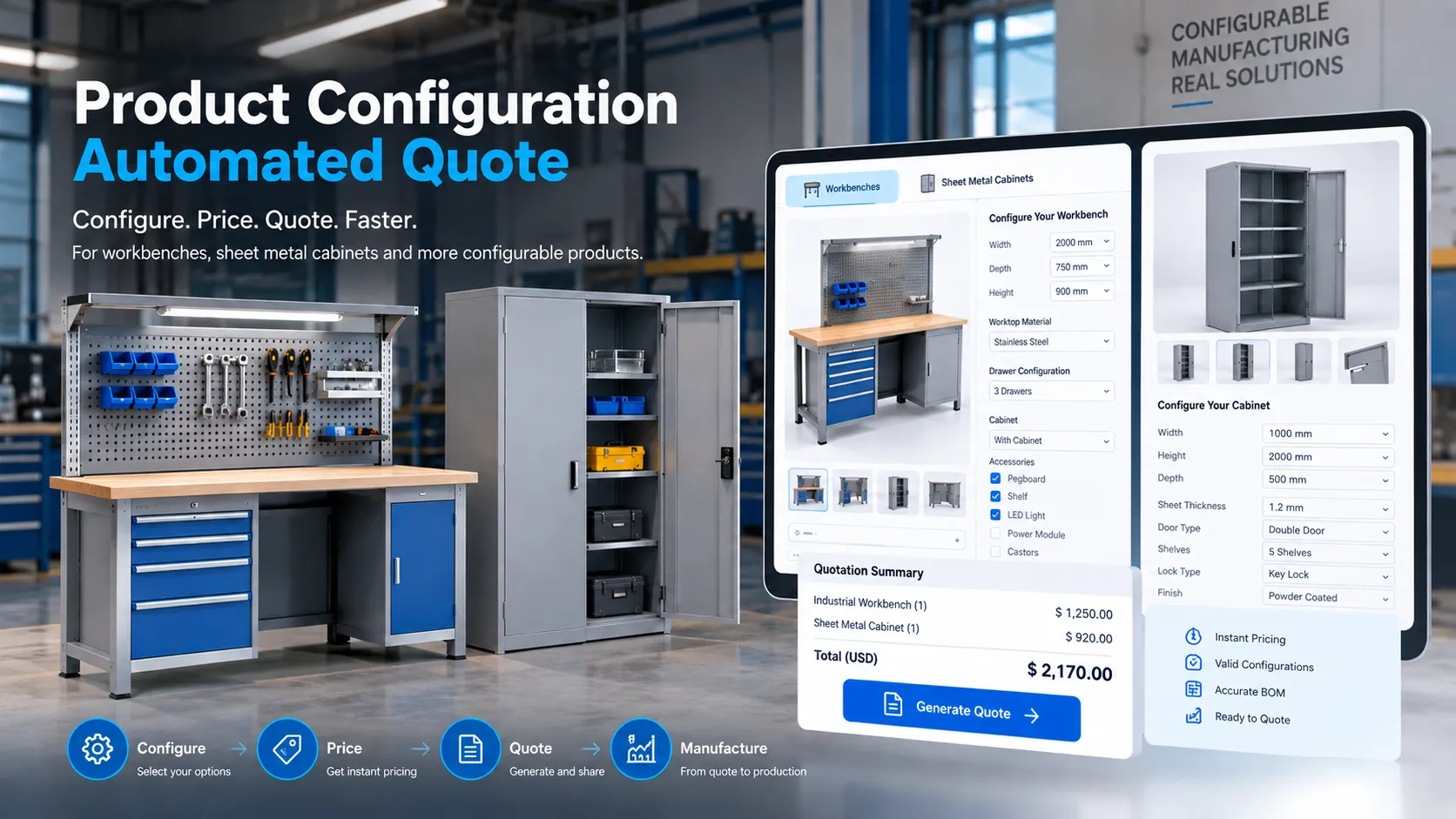
A product configurator integrated with CPQ (Configure, Price, Quote) can automate much of this process.
Instead of treating every quotation as a separate manual task, manufacturers can define product rules, pricing logic, component relationships, and configuration options once and use them repeatedly.
The result is a connected workflow:
Customer Requirements → Product Configuration → Rule Validation → Automatic Pricing → BOM → Quote
When CAD automation is included, the workflow can extend further:
Product Configuration → CPQ → CAD Automation → BOM/Manufacturing Data → Quotation
For manufacturers of workbenches, sheet metal cabinets, industrial equipment, enclosures, storage systems, and other configurable products, this approach can make online quotation faster, more consistent, and easier to scale.
What Is a Product Configurator?
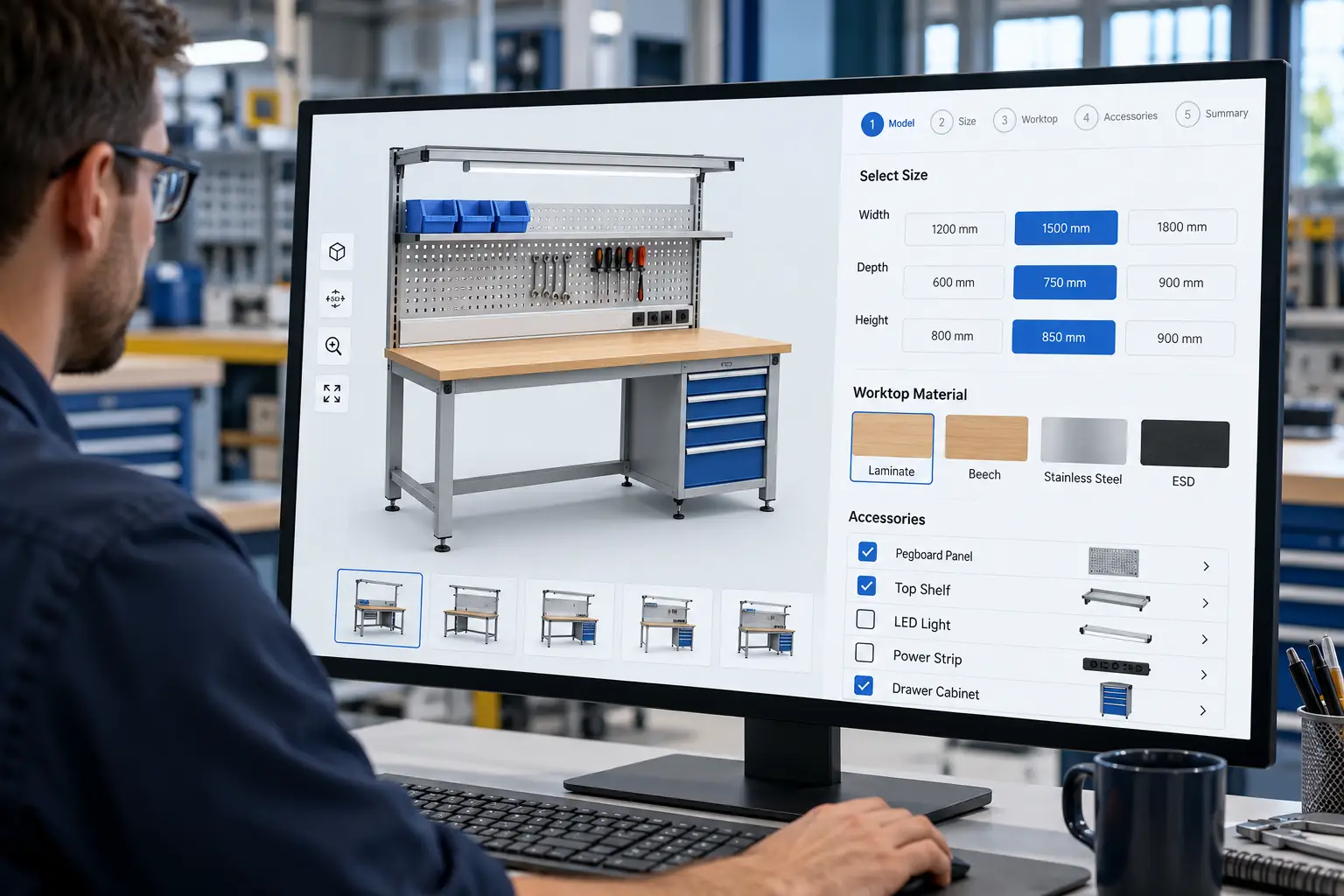
A product configurator is a software system that allows customers, sales teams, or distributors to build a product from predefined options and parameters.
Rather than asking an engineer to manually determine every product variation, the configurator presents the available choices and applies predefined product rules.
For example, an industrial workbench configurator could allow a customer to select:
- Workbench type
- Width
- Depth
- Working height
- Worktop material
- Frame type
- Drawer configuration
- Cabinet configuration
- Shelf options
- Lighting
- Power accessories
- Castors or leveling feet
- Surface finish
The important part is that the configurator does not simply display options. It can control which options are compatible.
For example:
If the selected workbench width requires a heavy-duty frame, the system can automatically add or require that frame.
Similarly:
If a particular cabinet configuration requires additional components, the configurator can include those components in the configuration and downstream BOM.
This makes a manufacturing configurator different from a basic online product selector.
A well-designed configurator captures product logic and engineering constraints, allowing users to create valid product configurations.
Autodesk describes its iLogic technology as supporting rules-driven design, design standardization, automation, and configuration of virtual products.
What Is CPQ in Manufacturing?
CPQ stands for Configure, Price, Quote.
In manufacturing, CPQ connects product configuration with pricing and quotation.
The process can be broken into three stages:
Configure: Determine what the customer wants to purchase.
Price: Calculate the price based on the selected configuration, quantities, pricing rules, and commercial conditions.
Quote: Generate a quotation containing the configured product, specifications, price, quantity, and other required information.
A manufacturing CPQ solution can therefore answer three important questions:
What can the customer configure?
What should the configuration cost?
How should that configuration be presented as a quotation?
For configurable manufacturing products, connecting these stages reduces the need to manually transfer information between sales, engineering, and quotation documents.
Why Traditional Manufacturing Quotation Processes Become Difficult to Scale
A manual quotation process may initially look straightforward:
Customer Inquiry → Sales Review → Engineering Review → Cost Calculation → Quote
However, the process becomes more complicated as product variations increase.
Consider a manufacturer offering industrial workbenches.
The product may have multiple:
- Widths
- Depths
- Heights
- Worktop materials
- Frame types
- Drawer combinations
- Cabinet modules
- Accessories
- Finishes
Now consider a sheet metal cabinet manufacturer offering different:
- Widths
- Heights
- Depths
- Sheet thicknesses
- Door configurations
- Shelf arrangements
- Drawer modules
- Locks
- Handles
- Finishes
- Mounting options
If every combination requires manual review, quotation time increases and engineering teams can become involved in repetitive work.
The challenge is not simply the number of products.
It is the number of possible product configurations.
A product configurator and CPQ system can convert these repeatable decisions into predefined rules.
How Product Configurators Automate Online Quotations
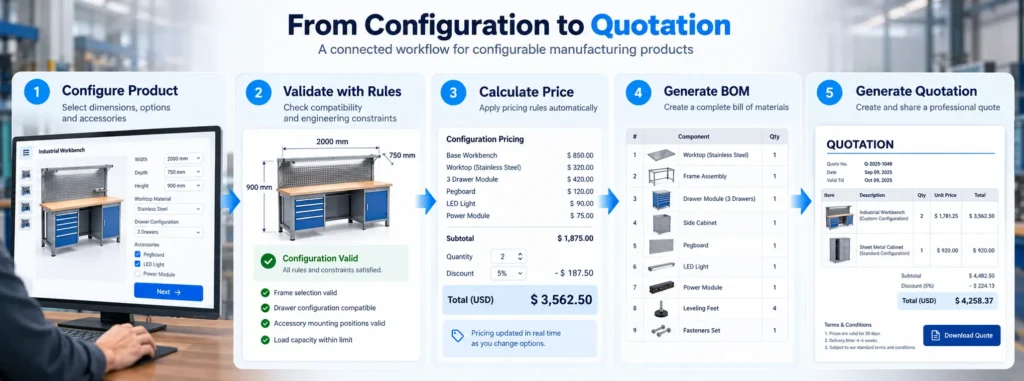
1. Customers Configure the Product Online
The first step is to turn customer requirements into structured selections.
Instead of receiving an email such as:
“We need a 2000 mm workbench with a stainless-steel top, three drawers and a lower shelf.”
the manufacturer can provide a guided configuration interface.
The customer could select:
Product: Industrial Workbench
Width: 1800 / 2000 / 2400 mm
Depth: 750 / 900 mm
Worktop: Steel / Stainless Steel / Wood / Composite
Storage: None / Drawers / Cabinet / Drawers + Cabinet
Accessories: Shelf / Pegboard / Lighting / Power Module
The system stores these choices as structured configuration data.
This creates a consistent input for the pricing and engineering workflow.
2. Configuration Rules Check the Customer’s Selections
One of the most important capabilities of a manufacturing product configurator is rule-based validation.
Not every combination of options is necessarily manufacturable or commercially valid.
Rules can define:
- Compatible options
- Required components
- Optional components
- Dimension limits
- Material restrictions
- Accessory dependencies
- Load-related requirements
- Manufacturing constraints
- Product-family relationships
For example:
Rule 1
If:
Workbench Width > Defined LimitThen:
Heavy-Duty Frame = RequiredRule 2
If:
Storage Module = SelectedThen:
Compatible Frame Configuration = RequiredRule 3
If:
Cabinet Door Type = Double DoorThen:
Cabinet Width Must Meet Minimum RequirementThe exact rules depend on the manufacturer’s product architecture and engineering requirements.
The objective is to prevent invalid configurations from reaching the quotation stage.
Autodesk’s iLogic documentation describes rules that can monitor and control Inventor parameters, features, and components, providing a mechanism for rules-driven product behavior.
3. Pricing Is Calculated Automatically
Once the configuration has passed the applicable rules, the CPQ system can calculate the price.
A simplified pricing model could be:
Final Price = Base Product + Selected Options + Materials + Accessories + Finishing + Other Applicable Costs − Discounts
For a workbench, pricing may depend on:
- Workbench size
- Worktop material
- Frame type
- Drawer modules
- Cabinet modules
- Accessories
- Electrical components
- Castors
- Finish
- Quantity
For a sheet metal cabinet, pricing may depend on:
- Cabinet dimensions
- Sheet material
- Sheet thickness
- Doors
- Shelves
- Drawers
- Locks
- Handles
- Accessories
- Surface treatment
- Quantity
The important advantage is consistency.
Instead of sales representatives manually calculating every configuration, the pricing logic can be centralized within the CPQ workflow.
4. The Configuration Can Generate a BOM
A configured product may contain dozens or even hundreds of components.
When the customer changes the configuration, the Bill of Materials (BOM) may also change.
For example, a basic workbench might contain:
- Frame
- Worktop
- Leveling feet
- Fasteners
Adding storage could introduce:
- Drawer assembly
- Cabinet module
- Handles
- Additional hardware
Adding accessories could introduce:
- Shelf
- Pegboard
- Lighting
- Power module
- Tool holder
The configurator can use the selected options to determine the appropriate components.
This creates a direct relationship between:
Customer Configuration → Product Structure → BOM
For CAD-driven workflows, this can become particularly useful because the same configuration information can potentially drive engineering outputs.
5. CAD Automation Can Extend the Workflow
For engineering-intensive manufacturers, generating the quotation is only part of the challenge.
After receiving the order, engineering may still need to create or modify the CAD model.
This is where CAD automation can extend the value of a product configurator.
For example, a customer configures a sheet metal cabinet with:
- Width: 1200 mm
- Height: 2000 mm
- Depth: 600 mm
- Five shelves
- Double doors
- Locking handle
- Powder-coated finish
The configuration data can potentially be passed to an engineering automation workflow.
The resulting process could be:
Online Configurator
↓
Configuration Rules
↓
CPQ Pricing
↓
CAD Parameters
↓
Configured CAD Model
↓
BOM / Drawings / Manufacturing Data
↓
Quotation or Order
Autodesk Inventor iLogic, for example, provides rule-based mechanisms for controlling parameters, features, and components within Inventor documents.
This type of integration can be particularly useful when a manufacturer repeatedly produces variations of the same fundamental product architecture.
CPQ Example: Automating Workbench Quotations
Industrial workbenches are a strong application for product configuration because manufacturers often offer a common product architecture with multiple dimensions, storage options, and accessories. A workbench configurator can allow customers to select these product parameters and options as part of a guided configuration process.
Imagine a customer configuring an industrial workbench.
Step 1: Select Workbench Type
- Standard
- Heavy-Duty
- Mobile
- Height-Adjustable
- ESD
Step 2: Select Dimensions
- Width
- Depth
- Height
Step 3: Select Worktop
- Steel
- Stainless Steel
- Wood
- Composite
Step 4: Configure Storage
- No Storage
- Drawers
- Cabinet
- Drawer + Cabinet
Step 5: Select Accessories
- Shelf
- Pegboard
- Lighting
- Power Module
- Tool Holder
Step 6: Validate Configuration
The system checks the selected options against the defined product rules.
Step 7: Calculate Price
The CPQ engine applies the appropriate pricing logic.
Step 8: Generate the Quote
The customer receives a quotation based on the configured workbench.
The entire process can happen without requiring a salesperson to manually calculate every option.
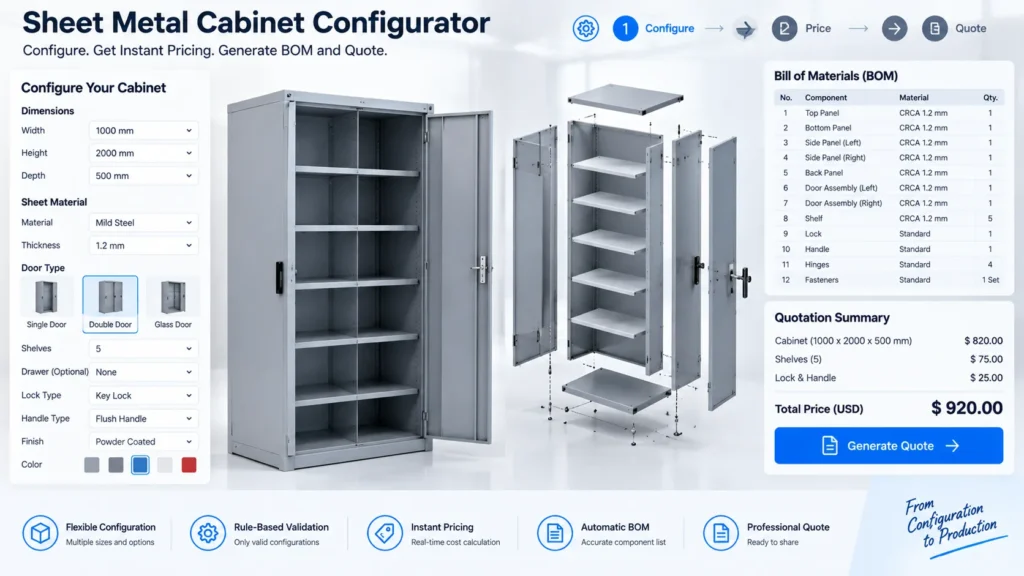
CPQ Example: Automating Sheet Metal Cabinet Quotations
Sheet metal cabinets are another strong use case for product configurators and CPQ.
A manufacturer may have a standard cabinet architecture while allowing customers to configure different sizes and options.
A configurator could expose parameters such as:
- Cabinet width
- Cabinet height
- Cabinet depth
- Sheet material
- Sheet thickness
- Door configuration
- Shelf quantity
- Drawer configuration
- Lock type
- Handle
- Mounting arrangement
- Finish
The resulting workflow can be:
Cabinet Selection
→ Dimensions
→ Sheet Metal Options
→ Doors and Storage
→ Accessories
→ Configuration Validation
→ Price Calculation
→ BOM
→ Quotation
This approach can complement a standardized CAD methodology.
For example, Immersiv Techsphere has documented a sheet metal cabinet design workflow using a standard master model, parametric modeling, and SolidWorks Configurations to manage different cabinet variations. This demonstrates how a reusable product architecture can support multiple cabinet sizes without treating every variation as an entirely separate design.
Product Configurator vs. CPQ: What Is the Difference?
Product configurators and CPQ systems are closely related, but they do not necessarily perform exactly the same function.
| Function | Product Configurator | CPQ |
|---|---|---|
| Product selection | Yes | Yes |
| Configuration rules | Yes | Often |
| Engineering constraints | Yes | Depending on implementation |
| Component selection | Yes | Yes |
| Pricing | Can be included | Core capability |
| Discount rules | Can be included | Core capability |
| Quote generation | Can be included | Core capability |
| BOM generation | Depending on integration | Depending on integration |
| CAD integration | Common in engineering workflows | Usually through integration |
A simple way to understand the difference is:
Product Configurator = What should the product be?
CPQ = What should it cost and how should it be quoted?
An integrated solution can connect both functions.
For manufacturers, that can create a broader workflow:
Configure → Validate → Price → Generate BOM → Generate Engineering Data → Quote
Why Manufacturers Combine Product Configuration and CPQ
The value of CPQ increases when it is connected to the underlying product logic.
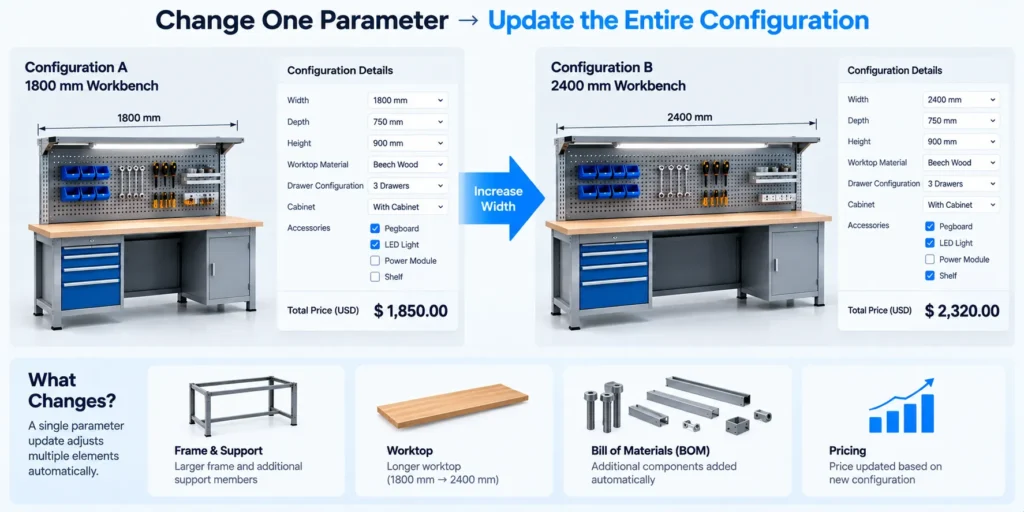
Consider a customer changing a workbench from:
1800 mm → 2400 mm
That single change could affect:
- Frame selection
- Worktop
- Support components
- Price
- BOM
- Potential manufacturing requirements
A disconnected quotation system may require several manual updates.
An integrated configurator can treat the dimension as a product parameter and update dependent information according to predefined rules.
The same principle applies to sheet metal cabinets.
Changing cabinet dimensions can affect:
- Sheet metal panels
- Doors
- Shelves
- Reinforcement
- Hardware
- Material quantity
- Price
The more relationships a product has, the greater the potential value of structured configuration logic.
How Automated Quotation Reduces Repetitive Engineering Work
Engineering teams often become involved in quotation preparation because sales teams need help determining whether a customer-requested configuration is technically valid.
For standard product families, this can create repetitive work.
A configurator can automate known decisions such as:
- Which components are compatible?
- Which options are required?
- Which dimensions are permitted?
- Which accessories can be selected?
- Which price should apply?
- Which BOM components are required?
Engineering can then focus on cases that genuinely require technical judgment.
This is an important distinction:
A configurator does not replace engineering expertise.
It captures repeatable engineering knowledge and product rules so that standard decisions can be automated.
Benefits of Product Configurator and CPQ Automation
- Faster Quote Turnaround: Automating configuration and pricing can reduce the time required to prepare routine quotations.
- Consistent Pricing: Centralized pricing rules reduce dependency on manually maintained spreadsheets and individual calculations.
- Fewer Configuration Errors: Rule-based validation can prevent incompatible options from being quoted.
- Reduced Manual Data Entry: Customer selections can flow into pricing, BOM, and other downstream processes without repeatedly entering the same information.
- Lower Engineering Workload: Standard configurations can be handled automatically, reducing repetitive quotation-related engineering tasks.
- Better Customer Experience: Customers can understand available options and receive pricing without waiting for multiple rounds of communication.
- Scalable Sales Process: Manufacturers can handle more configuration requests without increasing manual quotation effort at the same rate.
- Better Sales-to-Engineering Handoff: Structured configuration data gives engineering a clearer definition of the requested product.
What Should Be Automated in a Manufacturing Quotation Workflow?
Not every part of the process needs to be automated.
The best candidates are usually repeatable, rule-driven activities.
1. Product Configuration
Automate:
- Product options
- Dimensions
- Component combinations
- Dependencies
- Compatibility checks
2. Pricing
Automate:
- Base pricing
- Option pricing
- Quantity pricing
- Discounts
- Material-related pricing
- Finishing charges
3. Engineering Outputs
Where appropriate, automate:
- CAD parameters
- Product variants
- BOMs
- Drawings
- DXF or other manufacturing files
4. Commercial Output
Automate:
- Quote generation
- Configuration summary
- Pricing breakdown
- Product specifications
The objective is not to automate everything.
It is to automate the predictable decisions while retaining human review where engineering judgment is required.
How to Implement a Product Configurator for Manufacturing
A successful configurator project should begin with product and process analysis rather than software development alone.
Step 1: Identify Configurable Product Families
Start with products that have:
- Repeated designs
- Standard components
- Multiple options
- Predictable pricing
- Defined configuration rules
Workbenches and sheet metal cabinets are good examples.
Step 2: Define Product Parameters
Document the variables that customers can change.
For a workbench:
Width + Depth + Height + Worktop + Storage + Accessories
For a cabinet:
Width + Height + Depth + Material + Thickness + Doors + Shelves + Accessories
Step 3: Document Engineering Rules
Define:
- Valid combinations
- Invalid combinations
- Required components
- Dependencies
- Dimension limits
- Manufacturing constraints
Step 4: Build the Pricing Logic
Map each configurable choice to the appropriate pricing rule.
Step 5: Define the Required Outputs
Determine whether the configurator should generate:
- Price
- Quote
- BOM
- CAD model
- Drawing
- DXF
- STEP
- Manufacturing data
- Order data
Step 6: Integrate With Existing Systems
Depending on the business process, the configurator may connect with:
- CRM
- ERP
- CAD
- PDM/PLM
- Manufacturing systems
- E-commerce platforms
Step 7: Test Real Product Combinations
Testing should include:
- Standard configurations
- Boundary dimensions
- Option dependencies
- Invalid combinations
- Pricing scenarios
- BOM accuracy
- Engineering outputs
The goal is to ensure that the system reflects the manufacturer’s actual product and quotation logic.
Product Configurators Can Become a Digital Thread From Sales to Manufacturing
The real opportunity is larger than simply providing an online price.
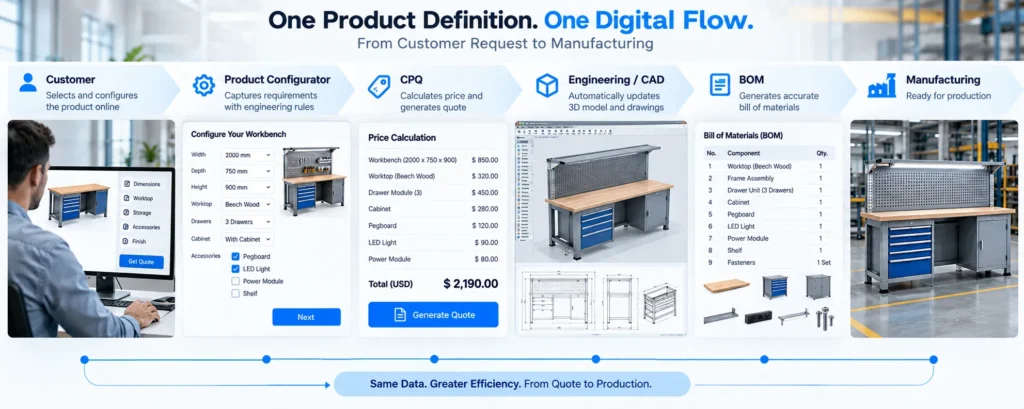
A well-integrated manufacturing configurator can create a structured digital flow from customer requirements to downstream engineering and manufacturing information.
The architecture can look like:
Customer
↓
Web Product Configurator
↓
Product Rules
↓
CPQ Pricing Engine
↓
BOM
↓
CAD Automation
↓
Engineering Documentation
↓
ERP / CRM
↓
Manufacturing
This reduces the need to repeatedly translate customer requirements between different departments.
The same configuration can become the common data point connecting sales, engineering, and production.
When Does a Manufacturer Need a Product Configurator?
A product configurator may be worth considering when:
- Customers regularly request different product combinations.
- Sales teams frequently ask engineers for pricing support.
- Similar products are repeatedly redesigned.
- Pricing changes according to configuration.
- Product options have dependencies.
- BOMs change between configurations.
- Custom dimensions are common.
- The business follows a configure-to-order model.
- Quotation speed is important to winning orders.
- The manufacturer maintains a large number of product variants.
For manufacturers of industrial workbenches and sheet metal cabinets, the business case can be particularly strong when a common product architecture supports many customer-specific variations.
Key Takeaways
A manufacturing product configurator can automate much more than product selection.
When combined with CPQ, it can connect:
Configuration + Validation + Pricing + Quotation
When connected with engineering automation, it can extend the workflow to:
Configuration + CPQ + BOM + CAD + Manufacturing Data
For products such as workbenches and sheet metal cabinets, this approach can turn a traditionally manual quotation process into a structured digital workflow.
The key is to capture the manufacturer’s product logic, engineering rules, and pricing logic in a system that can apply them consistently.
Instead of:
Email → Spreadsheet → Manual Engineering Review → Price Calculation → Quote
the process can move toward:
Configure → Validate → Price → Generate → Quote
That is the core value of combining a product configurator with CPQ for manufacturing: customers get a faster path to a valid quotation, while manufacturers gain a more consistent and scalable way to manage configurable products.
FAQs
A product configurator for manufacturers is a rule-based system that allows customers or sales teams to configure products using predefined dimensions, components, options, and constraints.
Yes. When connected to a CPQ or pricing engine, a product configurator can use the selected configuration and pricing rules to calculate a price and generate a quotation.
CPQ helps manufacturers automate the Configure, Price, Quote process by combining product configuration with pricing and quotation logic.
Yes. A workbench configurator can calculate pricing based on parameters such as dimensions, worktop material, frame, drawers, cabinets, accessories, quantity, and other defined pricing rules.
Yes. A configurable sheet metal cabinet can use parameters such as width, height, depth, sheet thickness, doors, shelves, drawers, hardware, and finish to represent different product variants.
Yes. CPQ can be integrated with CAD automation workflows so that approved configuration parameters can be used to generate or modify engineering models and related outputs.
No. A configurator can automate repeatable product decisions, but engineering teams remain important for product architecture, engineering rules, validation, exceptions, and non-standard requirements.
Combining CPQ with CAD automation can create a connected workflow in which customer configuration data can influence pricing, BOM generation, CAD parameters, and manufacturing documentation, reducing duplicate data entry and repetitive engineering work.
How Immersiv Techsphere Can Help
Immersiv Techsphere works with engineering and manufacturing businesses to develop Configurator & CPQ solutions that can connect product selection, pricing logic, BOM generation, and engineering workflows.
The approach can be adapted to configurable products such as industrial workbenches, sheet metal cabinets, enclosures, storage systems, and other engineered products.
Explore Immersiv Techsphere’s Configurator & CPQ Solutions
For manufacturers considering online quotation automation, the starting point is usually not the configurator interface itself. It is identifying which product decisions, engineering rules, pricing rules, and outputs can be standardized and automated.
Have a Project in Mind?
Need help with 3D animation, industrial visualization, HSE training animation, or product visualization? Tell us about your project and our team will get back to you.