

Table of Contents
Introduction
“Can we make it wider, change the material, and add another accessory?”
For manufacturers selling customizable products, a question like this can begin a long conversation. Sales needs to understand the request. Engineering needs to check the combination. Someone must identify the correct components before the quotation can be completed.
The customer sees a few choices. Behind those choices are dimensions, compatibility rules, component relationships, and manufacturing decisions.
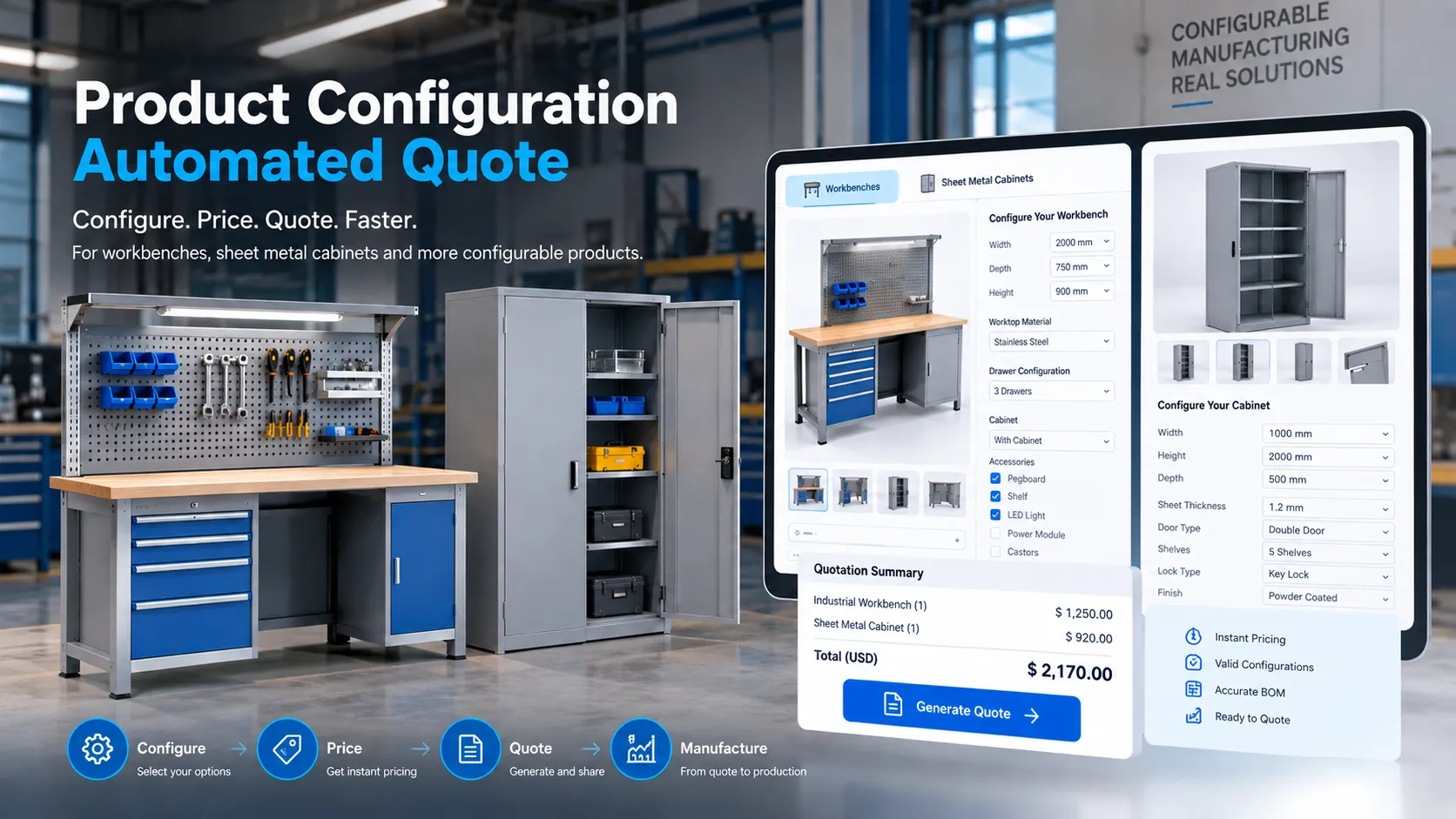
A product configurator brings these relationships into the selection process. It guides users through available options and checks their choices against defined product rules. Once the product is specified, CPQ can apply pricing and quotation logic to that configuration.
This article follows that journey: how a customer’s choices become a defined product, how the configuration can connect with engineering data, and how CPQ supports the commercial steps that follow.
What Is a Product Configurator?
A product configurator is a tool that helps a user specify a product by choosing from available options or entering permitted values.
For a manufacturing business, these inputs might include size, material, mounting arrangement, accessories, or other product-specific requirements.
The value comes from the relationships between those inputs. Choosing one option may make another mandatory, remove an incompatible selection, or change the components required.
For example, selecting a particular accessory could require a matching mounting kit. The configurator can include that kit or explain why the accessory is unavailable for the selected model.
A configurator may use forms, guided questions, images, or an interactive 3D view. The presentation can vary; the underlying product rules determine how useful the selection process becomes.
From Customer Choices to a Defined Product
1. Start With What the Customer Needs
Customers do not always know the correct model number or component code. They may know the available space, the required function, or the accessories they want.
A useful configurator translates those requirements into manageable questions. For example:
- What type of product do you need?
- What dimensions must it fit within?
- Which approved material or finish do you prefer?
- Which accessories are required?
The questions should match the intended user. An internal engineering configurator may expose technical parameters, while a customer-facing version may need simpler labels and explanations.
2. Guide Users Through Relevant Options
Showing every possible choice at once can make a configurable product difficult to understand.
Instead, the selection process can reveal relevant options as the product takes shape. Choosing a base model establishes the appropriate size range. Selecting a size determines which accessory arrangements remain available.
This also creates an opportunity to explain restrictions at the moment they matter. A message such as “This accessory needs the wider frame” gives the user a clear next step.
Configuration rule capabilities can include restricting incompatible selections, recommending related items, and connecting selections with component information. The exact behavior depends on the platform and implementation.
3. Check the Complete Combination
Individual options may be valid while their combination is unsupported.
Two accessories might require the same mounting space. A selected finish might be unavailable for a particular material. A requested dimension might exceed the standard product range.
The configurator should check these relationships as selections change. When a request falls outside documented rules, it can collect the requirement and route it for engineering review.
Rule checks confirm consistency with the encoded product definition. They do not independently establish the engineering suitability of a new design or replace required calculations and testing.
4. Create a Clear Configuration Summary
Once the choices are complete, the user should be able to review exactly what has been selected.
The summary can include the base product, dimensions, materials, accessories, quantities, and any unresolved approval requirements. It should use clear descriptions that sales and the customer can understand.
Preserving a configuration identifier and version also helps connect later work to the correct selection. If the customer changes the product, the team can distinguish the revised configuration from the earlier one.
A Practical Example: Configuring an Industrial Workbench
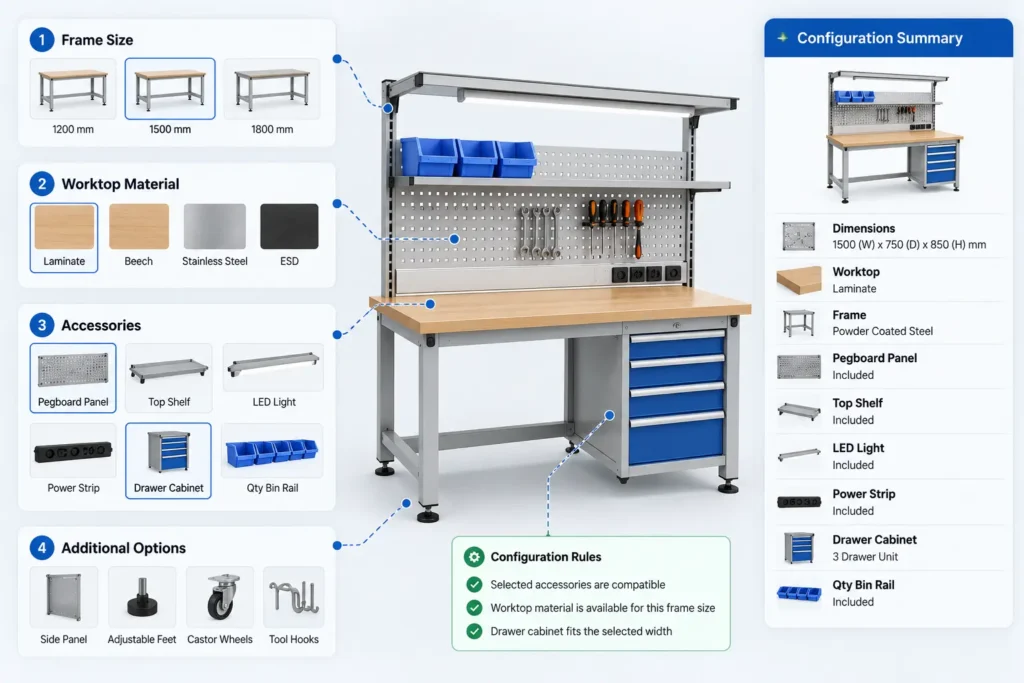
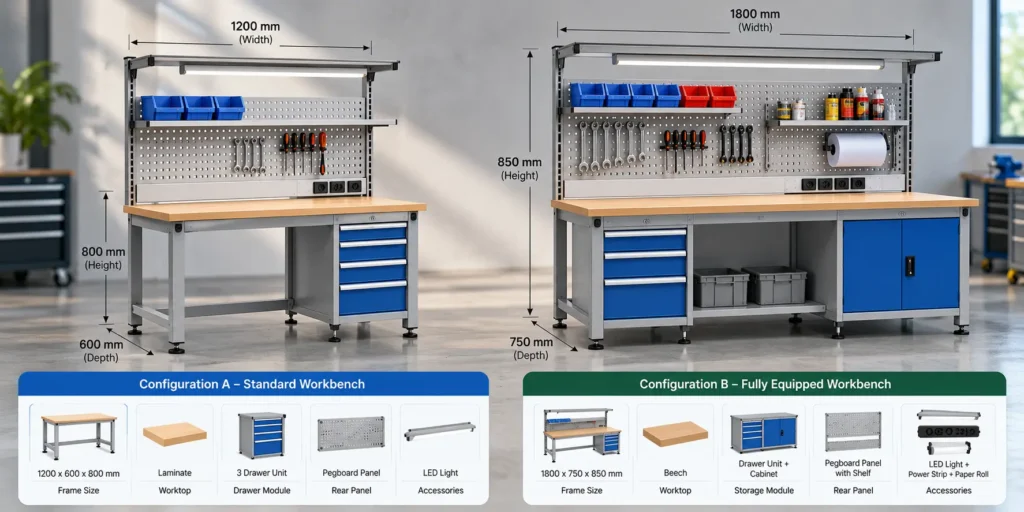
Imagine a manufacturer offering a family of industrial workbenches. Customers can choose a frame size, a worktop, storage accessories, and a rear panel.
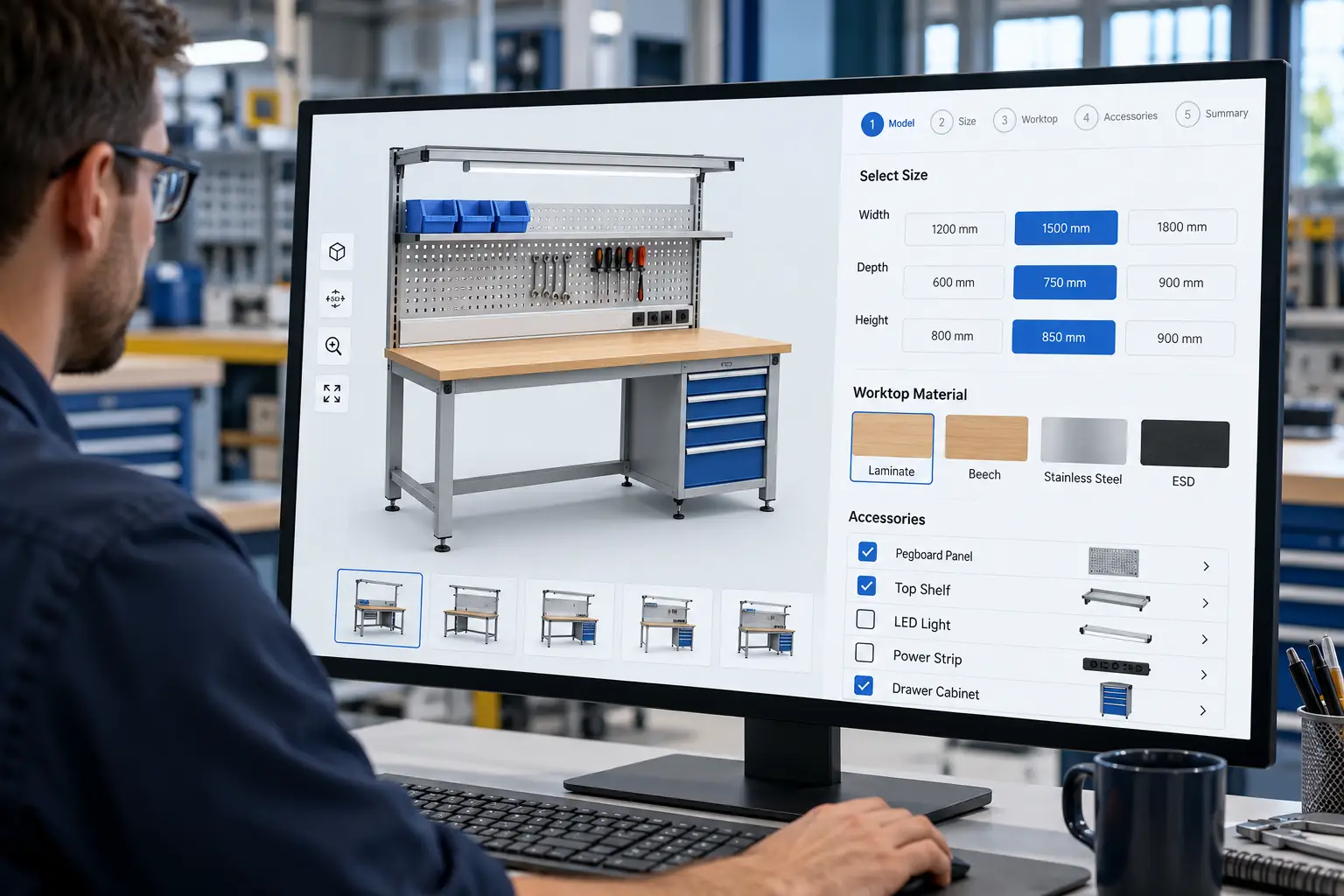
An interactive workbench configurator allows users to explore different product dimensions and accessory combinations before finalizing a selection. This provides a practical example of how product configuration can make customization easier to understand.
The Customer’s Request
The customer selects a standard bench size, a worktop option, a drawer module, and a rear tool panel.
The configurator first checks whether the selected accessories are supported by that frame. It then identifies the relevant mounting components and presents the complete specification for review.
| Customer action | Example configurator response |
|---|---|
| Chooses a frame size | Shows the worktops and accessories available for that size |
| Adds a drawer module | Checks its mounting arrangement and includes required hardware |
| Adds a rear tool panel | Includes the specified support components |
| Changes to a smaller frame | Rechecks the existing accessory combination |
| Requests a nonstandard arrangement | Marks the request for engineering review |
Why the Change Matters
Suppose the customer changes to a smaller frame after selecting the accessories. The system should recheck the whole configuration. If the drawer arrangement no longer fits the approved design, the user should receive an explanation and an available alternative.
The change should also update related component selections and the configuration summary. An accessory removed from the product should not remain in the later quotation.
This is where the configurator becomes more than an option list: it manages the consequences of each choice.
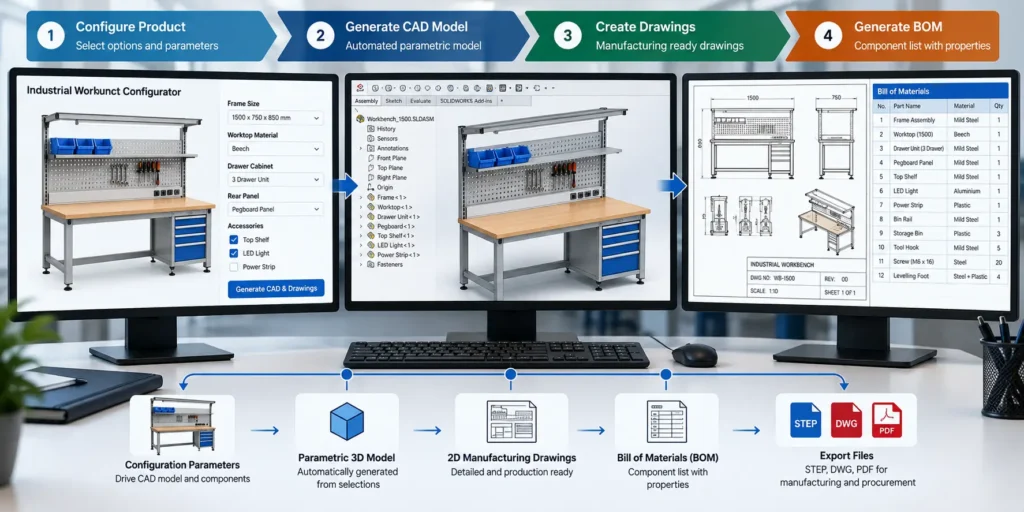
Connecting the Configurator With CAD and Product Data
The selected configuration can become an input for engineering automation when the required integrations are developed.
For a CAD connection, configuration values need to map to the correct dimensions, features, components, and model variants. Changing a workbench width, for example, may affect several parts rather than a single overall dimension.
The engineering workflow must define those relationships and check that the model updates successfully. Where required, it can also prepare drawings, component lists, or export files using approved templates and release checks.
Useful configuration outputs may include:
- A product specification for customer review.
- A component list or BOM for the selected variant.
- Parameters for a linked CAD automation workflow.
- A configuration reference for pricing and order processing.
A Bill of Materials, or BOM, identifies components and quantities. Its purpose should be clear: a sales-level component summary may differ from the detailed BOM used for manufacturing.
These connections require explicit mapping, testing, and ownership. A 3D preview alone does not mean that manufacturing drawings or production data have been generated.
Where CPQ Fits: Pricing and Quoting the Selected Product
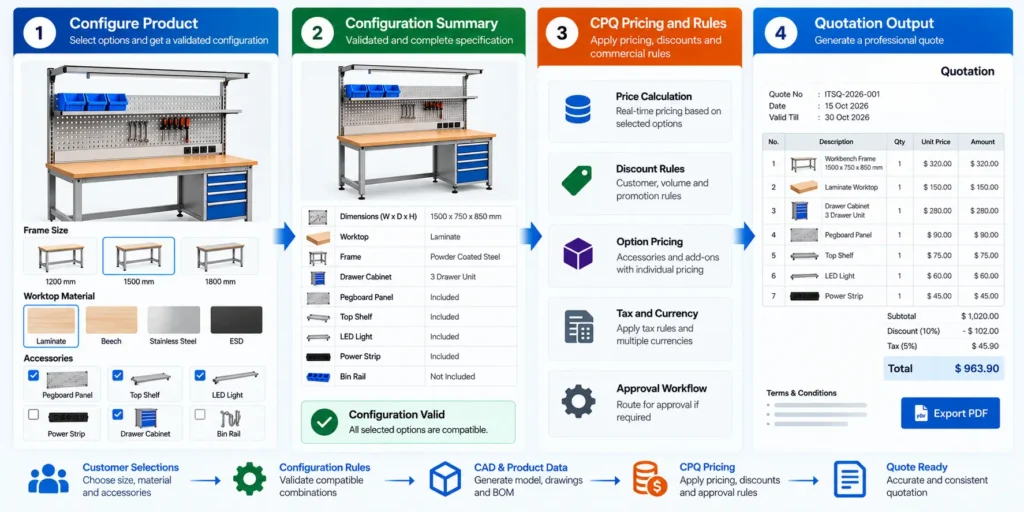
Once the product configuration is defined, the next question is commercial: what will it cost the customer, and what should the quotation include?
CPQ stands for Configure, Price, Quote. Configuration is already part of that broader process. A product configurator may therefore operate within a CPQ platform or connect to a separate pricing and quotation workflow.
The practical sequence remains clear: establish the product selection, calculate the applicable price, obtain required approvals, and prepare the quotation. Some implementations also show updated prices while the user is configuring.
Apply Pricing to the Actual Selection
For the workbench example, pricing could consider the base variant, selected worktop, drawer module, rear panel, and order quantity.
The business defines how these items are priced. The workflow should use the applicable price data and commercial rules instead of relying on assumptions from an older quotation.
Configuration-dependent pricing and component mapping are supported rule categories in platforms such as Oracle CPQ. The pricing method and integration scope still need to be selected for the individual project.
Route Exceptions for Approval
Technical acceptance and commercial approval serve different purposes.
A workbench configuration may meet the documented product rules while a requested discount still requires management approval. Conversely, a nonstandard product arrangement may require engineering review before a firm price can be offered.
The workflow should keep these decisions visible so that a completed price calculation is not mistaken for every required approval.
Prepare the Quotation
The quotation should describe the same product the customer selected. Depending on the business process, it may contain the configuration summary, quantities, prices, applicable charges, terms, exclusions, and confirmed delivery information.
If the customer revises the selection, the associated price and quotation content should be reviewed together. Keeping the configuration and quotation versions linked helps the team identify what was offered and what was accepted.
What Makes a Product Configurator Useful?
- Clear choices. Users should understand what each option means and why a selection is unavailable.
- Approved product rules. Compatibility conditions, dimensional limits, and component dependencies need a responsible owner.
- Consistent updates. Changing an option should update every affected selection and output within the implemented scope.
- Visible exceptions. Requests outside the standard range need a defined review path.
- Reliable product information. Descriptions, units, identifiers, and revisions should remain consistent across connected workflows.
- Testing that reflects real use. Test incomplete requests, invalid combinations, boundary dimensions, and changes made after several accessories have been selected.
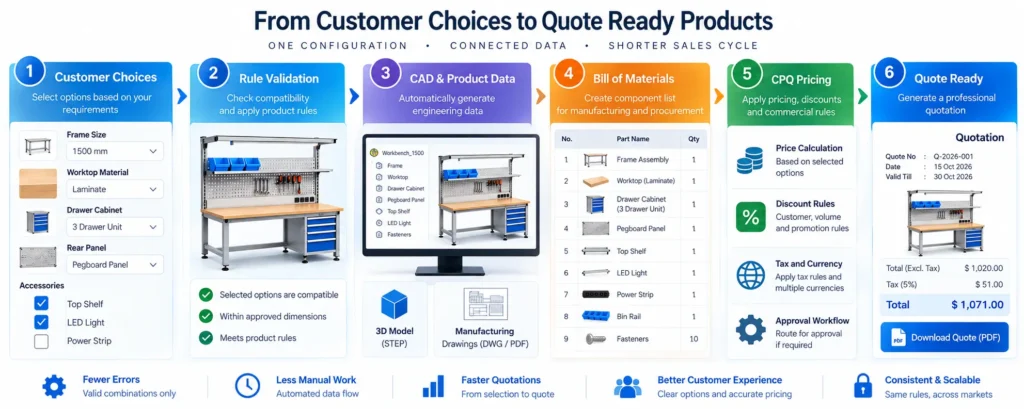
Together, these qualities help users move from a broad requirement to a product definition they can review with confidence.
Common Mistakes to Avoid
Designing the Interface Before Defining the Rules
A polished selection screen still needs precise instructions for how the product behaves. Document the option relationships before treating the interface as complete.
Treating Every Custom Request as a Standard Choice
An earlier customer-specific design may not belong in the standard catalog. Review historical exceptions before making them generally selectable.
Leaving Old Selections Behind
When an option changes, dependent accessories, quantities, and descriptions may need to change too. Test removal and replacement behavior as carefully as initial selection.
Assuming Every System Includes Every Capability
Interactive 3D, CAD generation, BOM preparation, ERP integration, and quotation automation should each have a defined project scope. They are not automatically included in every configurator.
How Immersiv Techsphere Supports Configurator Development
Immersiv Techsphere offers product configurator development, rule-based engineering automation, CAD-integrated configuration workflows, and automated quotation and BOM generation.
For a manufacturing configurator project, the starting discussion can focus on the product family: what customers can change, which combinations are supported, and what information sales and engineering need from the selection.
From there, the project can define the required interface, engineering connections, and CPQ workflow. Product catalogs, representative CAD models, option spreadsheets, and sample quotations provide useful material for that discussion.
Explore Immersiv Techsphere’s Configurator & CPQ Solutions to discuss a configuration workflow for your products.
Frequently Asked Questions
A product configurator helps define a product using options and rules. CPQ covers the broader Configure, Price, Quote process, including configuration, pricing, and quotation preparation. The configurator can be part of the CPQ solution.
No. A guided form or option-based interface may be sufficient. Interactive 3D can be useful when customers benefit from seeing differences in size, layout, or appearance.
It can capture those requirements and route them for review. Automatic acceptance should remain within the product rules and limits approved for the implementation.
It can support these outputs when component mappings, CAD models, automation, and integrations are developed for that purpose. These capabilities need to be defined and tested as part of the project.
Yes. A well-defined family provides a manageable starting scope. Its configuration behavior and downstream outputs can be tested before additional ranges are introduced.
Conclusion
A product configurator helps turn a customer’s ideas into a specific product selection. It makes options easier to navigate, applies documented relationships, and gives sales and engineering a shared definition to review.
CPQ builds on that definition by supporting pricing, commercial approvals, and quotation preparation. Connecting these steps carefully helps keep the product being discussed aligned with the product being quoted.
For manufacturers offering multiple sizes, materials, or accessories, the starting question is practical: which customer choices can we define clearly enough to guide and check consistently?
Ready to Make Your Products Easier to Configure?
Tell Immersiv Techsphere how your products vary and where the selection process becomes difficult. Our team can discuss a product configurator and the CAD, BOM, or CPQ connections needed for your workflow.
Have a Project in Mind?
Need help with 3D animation, industrial visualization, HSE training animation, or product visualization? Tell us about your project and our team will get back to you.