

Table of Contents
Introduction
Operating industrial equipment requires more than knowing which buttons to press. Employees must understand machine functions, operating procedures, potential hazards, emergency controls, and the correct safety precautions before using any equipment.
In manufacturing plants, construction sites, warehouses, and industrial facilities, even a small operating mistake can lead to equipment damage, production downtime, or serious workplace injuries. Traditional training methods, such as classroom presentations and printed manuals, may not always help employees understand how a machine behaves during actual operation.
This is where Safety Training Videos for Equipment Operation can make a practical difference.
Beyond equipment-specific instructions, organisations can also use safety training videos for industrial workplaces to communicate general workplace hazards, emergency procedures, and preventive safety measures across different departments.
Using 3D animation, equipment simulations, and scenario-based visual demonstrations, companies can explain complex operating procedures in a way that employees can understand and remember. Instead of simply reading safety instructions, workers can visually see how equipment should be operated, where hazards exist, and what actions to take during an unsafe situation.
For industrial organisations, safety training videos provide a consistent and repeatable approach to equipment operation training, helping employees develop safer working practices.
Why Is Equipment Operation Safety Training Important?
Industrial equipment is designed to perform specific tasks, but incorrect operation can expose workers to significant risks.
For example, operating a hydraulic press without understanding its safety interlocks, using a forklift without maintaining proper load stability, or performing maintenance without isolating the power supply can create dangerous situations.
Equipment operation training helps employees understand:
- How to start, operate, and shut down equipment safely.
- Which operating limits and safety precautions must be followed.
- How to identify abnormal machine behaviour.
- Where emergency stop buttons and protective devices are located.
- How to respond to equipment malfunctions.
- Which personal protective equipment (PPE) is required.
- When maintenance or authorised technical support is necessary.
Training is particularly important when new employees join, new machinery is installed, operating procedures change, or existing workers are assigned different responsibilities.
A well-planned equipment safety training programme ensures that employees understand not only how to operate machinery but also how to recognise and avoid potential hazards.
What Are Safety Training Videos for Equipment Operation?
Safety training videos for equipment operation are instructional videos that demonstrate the correct and safe use of industrial machines, tools, and equipment.
These videos explain operating procedures, machine-specific hazards, safety precautions, emergency responses, and maintenance-related risks through visual demonstrations.
Unlike general safety awareness videos, equipment-specific training focuses on the actual machinery and working conditions employees encounter.
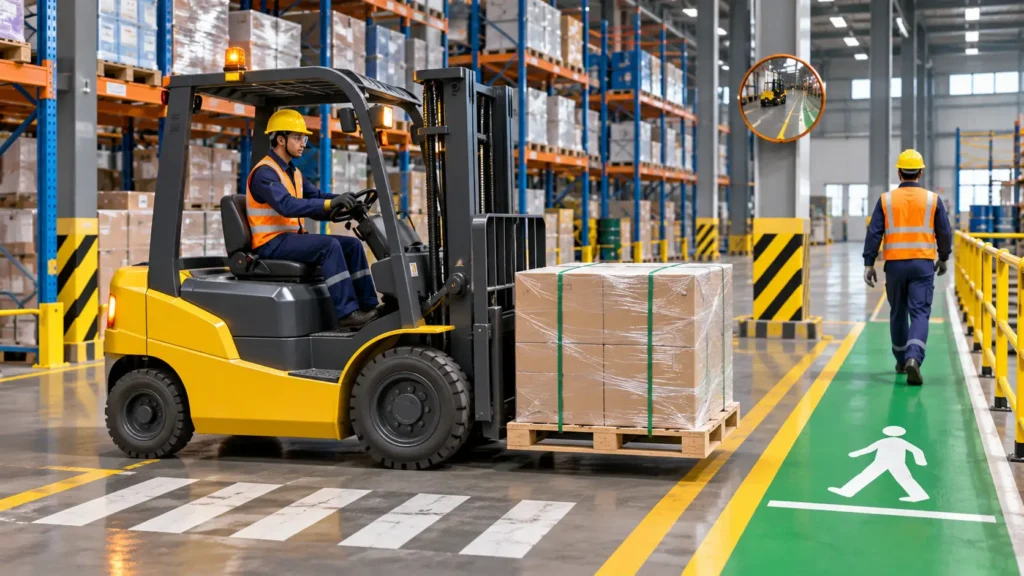
For example, a forklift safety training video may demonstrate:
- Pre-operation inspection.
- Safe starting and stopping procedures.
- Correct load handling.
- Maintaining a safe travelling speed.
- Pedestrian awareness.
- Parking and shutdown procedures.
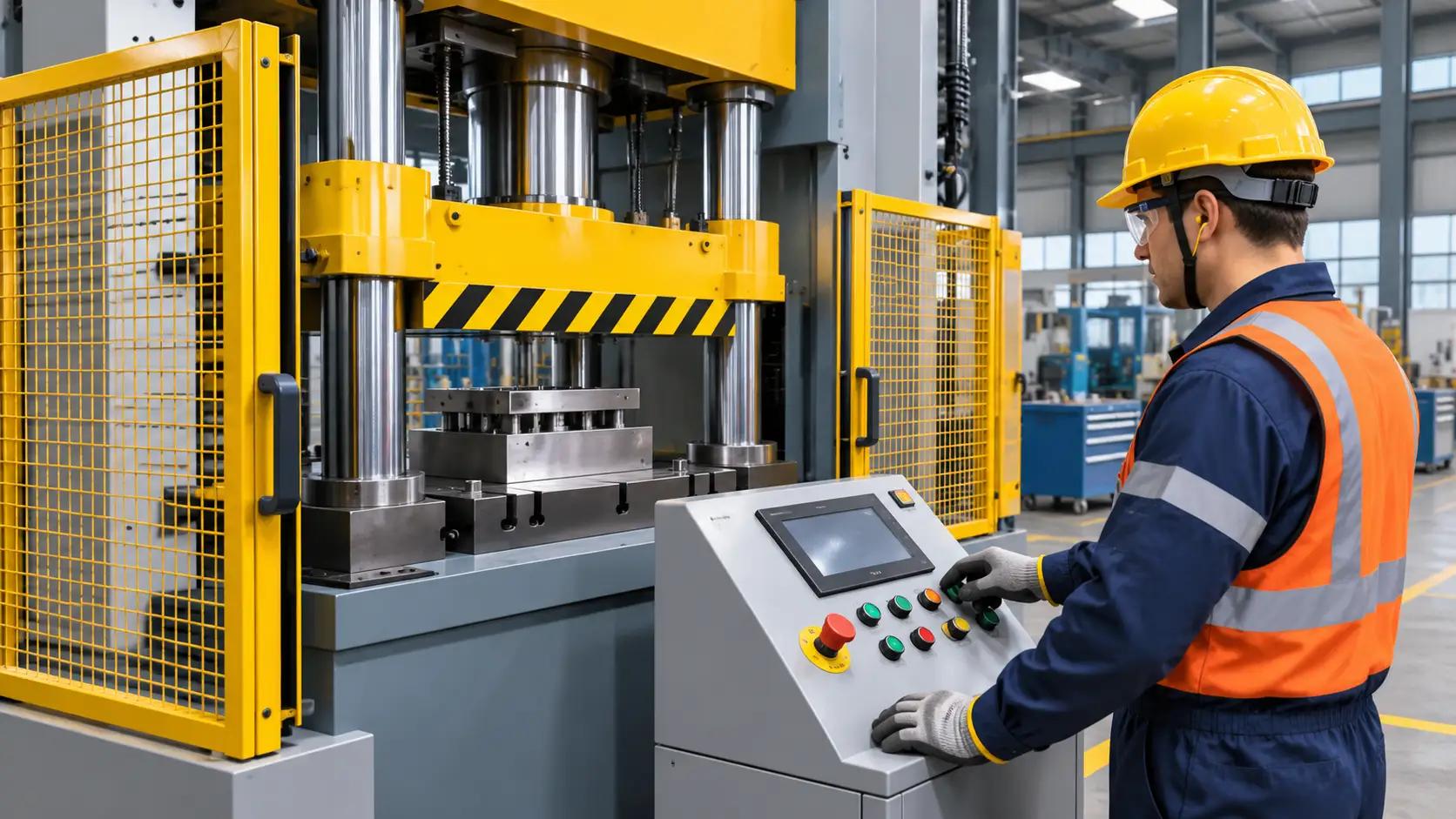
Similarly, a machine operation safety video for a hydraulic press can explain the machine’s operating cycle, pinch points, guarding systems, emergency stops, and safe material handling.
Depending on the training objective, these videos can be developed using:
- Real equipment footage.
- 2D instructional animation.
- 3D industrial animation.
- Animated operating sequences.
- Simulated accident and emergency scenarios.
- On-screen safety instructions and voiceovers.
The objective is simple: make equipment-related safety procedures easier to understand through visual learning.
What Should an Equipment Operation Safety Training Video Include?
An effective equipment operation safety training video should follow the actual workflow of the machine. It should explain the operating procedure while highlighting the risks associated with each stage.
1. Equipment Introduction and Identification
Start by introducing the equipment, its purpose, and its major components.
Show important machine parts such as control panels, moving assemblies, guards, sensors, emergency stops, and operating controls.
This helps employees become familiar with the equipment before they begin operating it.
2. Pre-Operation Safety Inspection
Before starting any equipment, operators should understand the necessary inspection procedures.
A training video can demonstrate how to check:
- Machine guards and safety interlocks.
- Electrical connections and control panels.
- Hydraulic or pneumatic connections.
- Moving parts and mechanical assemblies.
- Emergency stop functionality.
- Work area cleanliness and obstructions.
- Required PPE and operating accessories.
Visual demonstrations make it easier to communicate what employees should inspect and which conditions require reporting before operation.
3. Safe Operating Procedures
This section demonstrates the correct sequence of machine operation.
It may include:
- Preparing the work area.
- Checking machine readiness.
- Starting the equipment.
- Selecting the correct operating mode.
- Loading or positioning the material.
- Monitoring the operating cycle.
- Stopping the equipment safely.
The sequence should follow the manufacturer’s instructions and the organisation’s approved Standard Operating Procedures (SOPs).
4. Identification of Machine Hazards
One of the most important parts of equipment safety training is showing employees where hazards exist.
For example, 3D animation can highlight:
- Rotating shafts and exposed mechanical components.
- Pinch points between moving assemblies.
- Hot surfaces and high-temperature zones.
- Electrical shock hazards.
- Hydraulic pressure-related risks.
- Flying particles and material ejection.
- Unexpected machine movement.
Using visual highlighting, close-up views, and animated demonstrations helps employees understand hazards that may not be immediately obvious during normal operation.
5. Emergency Response Procedures
Employees must understand what to do when equipment does not operate as expected.
A training video can demonstrate situations such as:
- Unexpected machine movement.
- Equipment overheating.
- Hydraulic or pneumatic leakage.
- Electrical faults.
- Material jamming.
- Machine malfunction.
- Emergency shutdown requirements.
The video should explain the approved response, including when to stop the machine, isolate energy sources, notify supervisors, and seek authorised assistance.
6. Shutdown and Post-Operation Procedures
Training should not end when the machine completes its task.
Employees should also understand how to:
- Stop equipment using the approved procedure.
- Isolate energy where required.
- Remove materials safely.
- Clean the designated work area.
- Report defects or abnormal conditions.
- Secure equipment after use.
For maintenance and servicing activities, appropriate Lockout/Tagout (LOTO) procedures should be explained separately or included as a dedicated training module.
Types of Equipment That Benefit from Video-Based Safety Training
Equipment-specific safety videos are useful across different industrial environments. The content can be customised according to the machine, its operating sequence, and the risks associated with its use.
1. Material Handling Equipment
Material handling equipment is commonly used in warehouses, manufacturing facilities, and logistics operations.
Safety training videos can cover:
- Forklift operation and load stability.
- Pallet truck operation.
- Overhead crane and hoist safety.
- Safe lifting and material handling.
- Pedestrian movement around mobile equipment.
- Loading and unloading procedures.
For organisations using forklifts and other powered industrial trucks, operator training should include formal instruction, practical training, and workplace performance evaluation, as explained in the OSHA powered industrial truck operator training requirements.
2. Manufacturing and Processing Machinery
Manufacturing machinery often contains rotating components, moving assemblies, cutting tools, and automated operating cycles.
Training videos can demonstrate:
- Hydraulic and pneumatic press operation.
- CNC machine safety.
- Conveyor belt operation.
- Injection moulding machine safety.
- Sheet metal cutting and bending machine operation.
- Machine guarding and emergency shutdown.
3. Construction Equipment
Construction equipment operates in changing environments where ground conditions, visibility, load stability, and nearby workers can influence safety.
Video-based training can explain:
- Excavator and loader operation.
- Crane and lifting equipment safety.
- Earthmoving equipment precautions.
- Reversing and blind-spot awareness.
- Safe equipment movement around workers.
- Pre-use inspection and shutdown procedures.
4. Industrial Plant and Process Equipment
Process industries use specialised equipment that requires operators to understand both mechanical operation and process-related hazards.
Training videos can cover:
- Industrial pump operation.
- Compressor safety.
- Pressure vessel operating precautions.
- Heat exchanger operation.
- Pipeline and valve operation.
- Equipment isolation and maintenance safety.
The training content should be developed according to the equipment manufacturer’s instructions, approved operating procedures, and applicable site safety requirements.
How 3D Animation Improves Equipment Operation Training
A conventional training video can demonstrate how an operator uses a machine. However, some equipment-related hazards are difficult to capture through normal camera footage.
For example, employees may not be able to see the internal movement of a hydraulic mechanism, the interaction between machine components, or the exact location of a potential pinch point.
3D animation for equipment safety training makes these technical details easier to communicate.
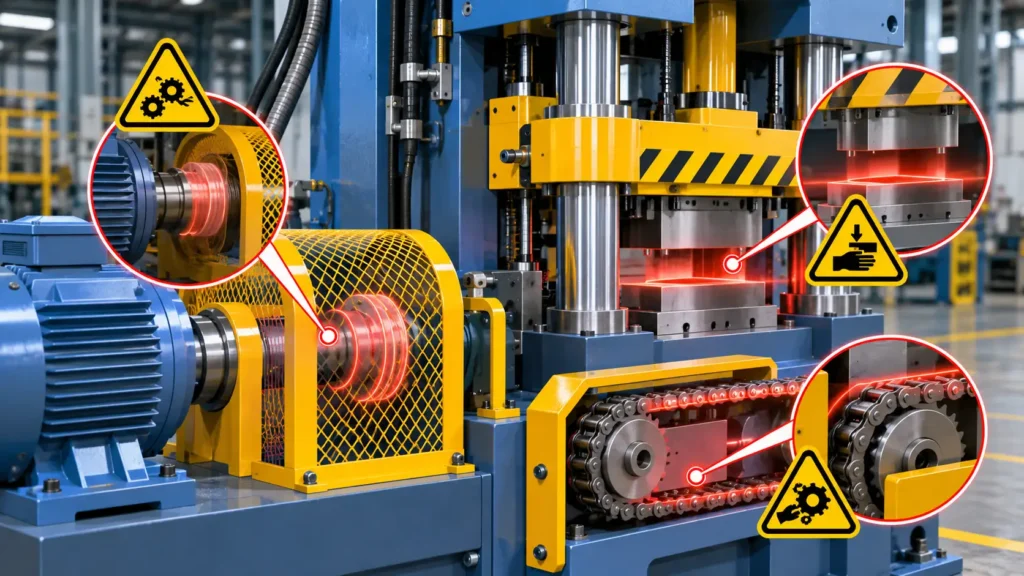
Here are some practical applications.
Visualising Internal Machine Mechanisms
3D animation can show internal equipment components, mechanical movement, and operating cycles.
For example, a hydraulic press animation can demonstrate how hydraulic pressure moves the cylinder, how the ram operates, and where workers should avoid placing their hands.
Demonstrating Unsafe and Safe Operating Practices
An animated sequence can show two different situations:
- An operator bypasses a safety guard and exposes themselves to a moving component.
- The operator follows the approved procedure and uses the installed safety protection.
Comparing these situations helps employees understand why particular safety precautions are necessary.
Recreating Potential Accident Scenarios
Some accidents are difficult or dangerous to recreate using live equipment.
3D animation allows organisations to demonstrate situations such as forklift overturning, conveyor entanglement, falling loads, and machine-related injuries without exposing workers to actual danger during the demonstration.
Highlighting Hazardous Areas
Visual effects can highlight machine danger zones, moving components, electrical hazards, hot surfaces, and restricted operating areas.
For example, colour-coded animation can distinguish between normal operating zones, restricted areas, and potential danger points.
Explaining Emergency Shutdown Procedures
Animated sequences can demonstrate the location and function of emergency stop buttons, isolation points, and other safety controls.
This helps employees understand where to act and which approved procedures to follow during an emergency.
The key advantage of 3D safety animation is its ability to communicate equipment behaviour and workplace hazards that may be difficult to demonstrate through conventional video recording.
Common Equipment Operation Hazards That Videos Can Explain
Different machines create different workplace risks. Equipment safety training should identify hazards according to the actual machine and its operating environment.
Some common examples include:
1. Entanglement Hazards
Rotating shafts, belts, rollers, and exposed mechanical components can catch clothing, gloves, or body parts. Training videos can demonstrate the importance of machine guarding and maintaining safe distances from moving components.
2. Crushing and Pinch Point Hazards
Hydraulic presses, automated machinery, and moving assemblies can create crushing hazards. Animated close-up views can help operators identify these dangerous areas.
Appropriate machine guarding is essential for protecting workers from dangerous moving parts and machinery-related hazards. Organisations can refer to the OSHA machine guarding guidelines for additional information on machinery safeguarding.
3. Electrical Hazards
Damaged cables, exposed electrical components, and unauthorised access to electrical panels can create shock and fire risks. Training should explain authorised access, inspection requirements, and energy isolation procedures.
4. Unexpected Equipment Start-up
Machinery may start unexpectedly during cleaning, inspection, or maintenance if hazardous energy is not properly controlled. Dedicated Lockout/Tagout (LOTO) training can demonstrate isolation, verification, and authorised restoration procedures.
5. Falling Loads and Equipment Instability
Forklifts, cranes, and lifting equipment can create serious risks when loads are incorrectly positioned, exceed rated capacity, or become unstable.
6. Heat and Pressure-Related Hazards
Industrial boilers, pressure vessels, compressors, and process equipment may involve high temperatures or pressurised systems. Training videos can explain warning indicators, operating limits, and approved emergency responses.
7. Human-Machine Interaction Risks
Workers may enter restricted machine zones, approach moving equipment, or stand in the path of mobile machinery. Visual demonstrations can explain safe working distances, communication signals, and access restrictions.
How to Develop an Effective Equipment Safety Training Video
Creating an effective equipment safety training video requires more than producing an attractive animation. The content must accurately represent the machine, its operating sequence, and the organisation’s approved safety procedures.
A structured development process helps achieve this.
Step 1: Understand the Equipment and Training Requirements
Start by identifying the equipment, its purpose, operating environment, and intended audience.
Collect relevant information such as:
- Equipment photographs and videos.
- 2D engineering drawings.
- 3D CAD models, if available.
- Manufacturer operating manuals.
- Standard Operating Procedures (SOPs).
- Equipment-specific risk assessments.
- Existing safety instructions.
Equipment safety training should also consider applicable workplace regulations and equipment safety responsibilities. The UK HSE guidelines on safe work equipment provide information about equipment suitability, maintenance, inspection, and employee training under PUWER.
Step 2: Identify Operating Hazards
Review the operating sequence and identify potential hazards associated with each activity.
The objective is to understand where operators may be exposed to risks and which safety precautions must be demonstrated.
Step 3: Develop the Script and Storyboard
Convert technical and safety information into a clear training narrative.
Each scene should communicate a specific operating step, hazard, preventive measure, or emergency response.
For example:
Equipment Introduction → Pre-Operation Inspection → Safe Operation → Hazard Identification → Emergency Response → Safe Shutdown.
Step 4: Create 3D Equipment Models and Industrial Environments
Develop accurate 3D models of the machinery, surrounding equipment, operators, and workplace environment.
Existing CAD models can be useful references for representing machine geometry and mechanical movement.
Step 5: Animate Equipment Operation and Safety Scenarios
Create animation sequences that demonstrate machine movement, operator interactions, safe operating procedures, and potential accident scenarios.
The animation should clearly distinguish between correct and incorrect actions.
Step 6: Add Voiceover, Labels, and Safety Instructions
Integrate narration, subtitles, warning indicators, on-screen instructions, and sound effects where required.
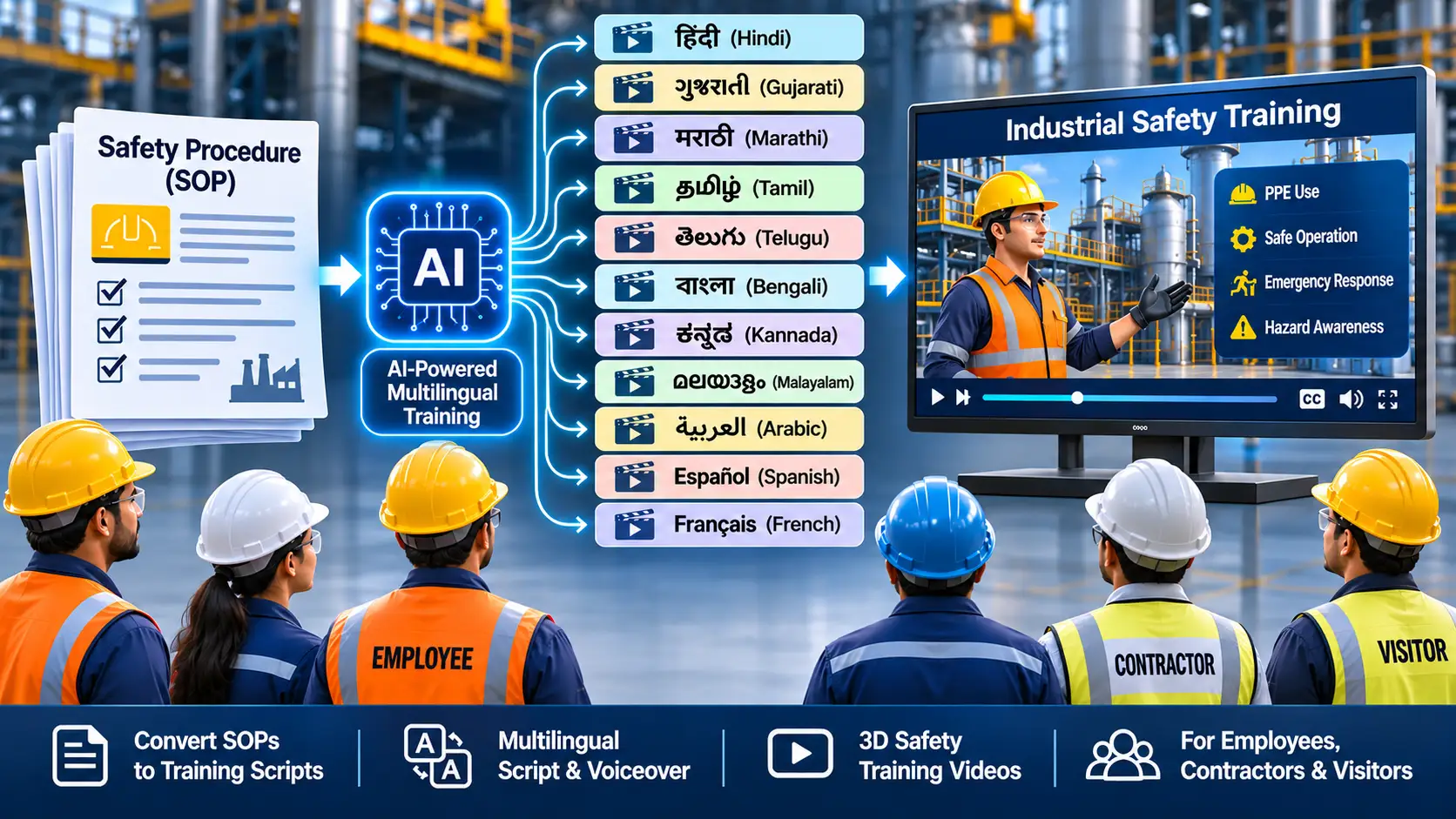
For multilingual workforces, the training video can be adapted with different voiceovers and subtitles.
Step 7: Technical Review and Final Delivery
Review the completed video with the organisation’s engineering and EHS teams.
Check that equipment movement, safety controls, operating sequences, and emergency responses match the approved references.
Once approved, the video can be delivered in formats suitable for classroom training, induction programmes, and digital learning platforms.
Benefits of Safety Training Videos for Industrial Workplaces
Equipment operation safety videos offer several practical benefits for organisations.
Consistent Training Communication
The same approved training material can be used across departments, shifts, and locations, helping maintain consistency in safety communication.
Better Understanding of Complex Equipment
3D animation can simplify mechanical operations and demonstrate hazards that may be difficult to explain through written instructions.
Safer Demonstration of High-Risk Scenarios
Dangerous situations can be recreated digitally without intentionally exposing employees to unsafe conditions.
Support for New Employee Training
New employees can become familiar with equipment functions, workplace hazards, and operating precautions before participating in supervised practical training.
Multilingual Training Support
Voiceovers and subtitles in different languages can help employees understand safety instructions more clearly.
Reusable Training Resources
Once developed and approved, videos can be reused for induction, refresher sessions, toolbox talks, and internal awareness programmes, subject to periodic review and updates.
Support for Safety Awareness and Compliance
Videos can support an organisation’s broader EHS training programme by making equipment-related safety requirements easier to communicate and reinforce.
However, video-based learning should complement, not replace, hands-on equipment demonstrations, competency assessments, supervision, and other training requirements.
OSHA’s powered industrial truck training guidance, for example, specifically combines formal instruction, practical training, and workplace performance evaluation.
How Immersiv Techsphere Supports Equipment Safety Training
Immersiv Techsphere develops customised 3D EHS animations for organisations that want to communicate industrial safety procedures through practical visual demonstrations.
Our approach combines mechanical design knowledge, 3D modelling, technical visualisation, and animation to explain equipment operations and workplace hazards.
For equipment operation safety training, we can support organisations with:
- Machinery Safety Animation: Visual demonstrations of machine operation, moving components, guarding, and potential hazards.
- Equipment Operation Training Videos: Step-by-step visual explanations of equipment operating procedures and safety precautions.
- Industrial Process Animation: 3D visualisation of mechanical systems, industrial processes, and equipment interactions.
- LOTO Safety Animation: Demonstrations of energy isolation, lockout, tagout, and verification procedures.
- Material Handling Safety Videos: Forklift, crane, hoist, and lifting operation safety demonstrations.
- Emergency Response Animation: Visual demonstrations of equipment-related emergencies and approved response procedures.
- Incident Recreation: 3D reconstruction of workplace incidents to explain unsafe actions, contributing factors, and preventive measures.
Our team can work with client-provided CAD models, equipment drawings, photographs, technical documents, and safety procedures to develop customised animation content.
The final videos can include professional voiceovers, subtitles, safety labels, and on-screen instructions depending on the training requirements.
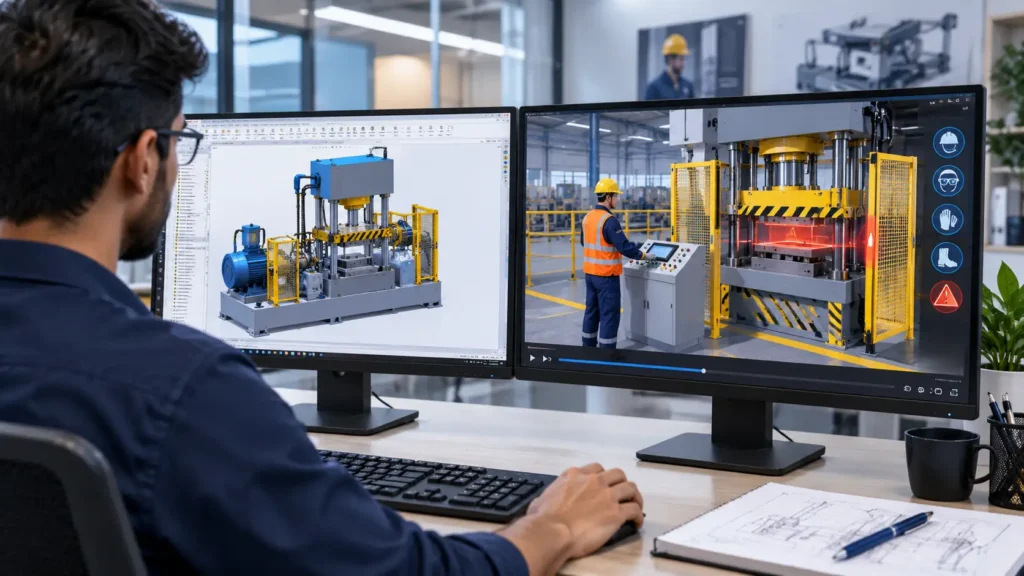
Whether it is a single machine or a complete industrial process, the objective is to make technical safety information easier to understand through accurate and engaging visual communication.
Explore our EHS Animation Services at https://immersivtech.com/ to understand how customised industrial safety animation can support workplace training.
Frequently Asked Questions
These are instructional videos that demonstrate safe machine operation, equipment hazards, pre-use inspections, emergency procedures, and shutdown practices.
Forklifts, cranes, hydraulic presses, CNC machines, conveyors, excavators, compressors, pumps, and other industrial machinery can benefit from equipment-specific safety training videos.
3D animation visualises machine movements, internal mechanisms, hazardous areas, unsafe practices, and emergency scenarios that may be difficult to demonstrate using real footage.
Yes. Videos can be developed using equipment CAD models, engineering drawings, photographs, operating manuals, and company-specific SOPs.
Yes. They can demonstrate emergency stops, equipment isolation, reporting procedures, and other approved emergency response actions.
No. They complement practical demonstrations, supervised operation, competency assessments, and equipment-specific training requirements.
Yes. Voiceovers and subtitles can be adapted into different languages to support employees from diverse linguistic backgrounds.
Conclusion
Safe equipment operation depends on more than employee experience. Operators must understand how machinery works, recognise potential hazards, follow approved operating procedures, and respond correctly when something goes wrong.
Safety Training Videos for Equipment Operation provide an effective way to communicate these requirements through visual demonstrations and practical scenarios.
By combining real equipment references, 3D animation, hazard visualisation, and clear safety instructions, organisations can make complex equipment-related procedures easier to understand.
For manufacturing plants, construction companies, warehouses, and process industries, customised equipment safety animations can become a valuable part of a structured EHS training programme.
Immersiv Techsphere supports industrial organisations with customised 3D EHS and HSE animation videos that turn technical equipment information and safety procedures into clear visual learning experiences.
Need customised safety training videos for your industrial equipment?
Connect with Immersiv Techsphere to discuss your equipment, operating procedures, and EHS training requirements.
Have a Project in Mind?
Need help with 3D animation, industrial visualization, HSE training animation, or product visualization? Tell us about your project and our team will get back to you.