

Table of Contents
Introduction
Think about a workplace procedure that involves operating heavy machinery, handling chemicals or working at height. Written instructions and Standard Operating Procedures (SOPs) explain what workers need to do, but they may not always make it easy to visualise how each step should be performed in an actual working environment.
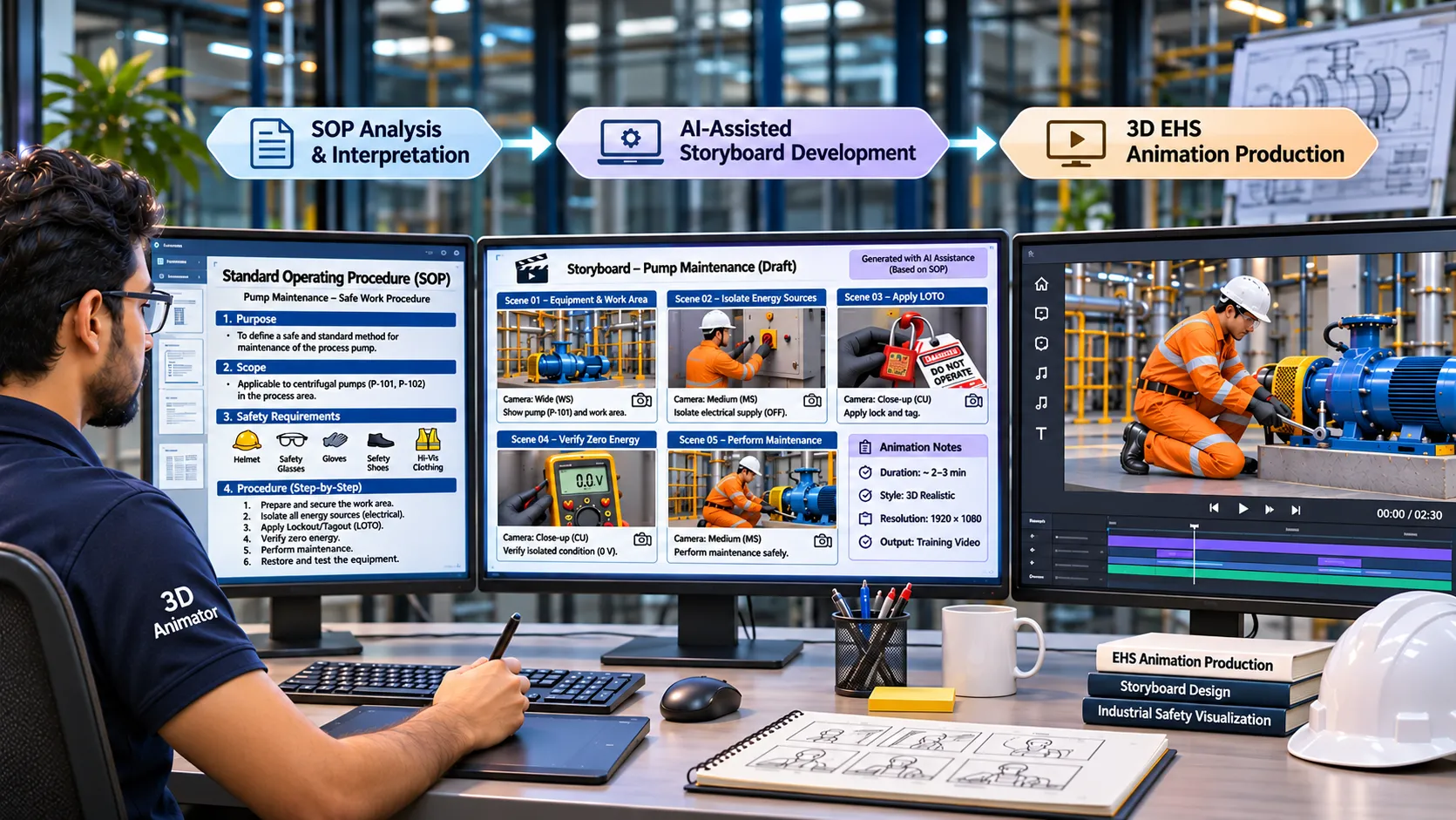
This is where safety animation can make a practical difference. By converting written procedures into visual sequences, 3D animations help demonstrate equipment operation, potential hazards, safe working practices and the correct sequence of actions.
However, creating an effective EHS animation involves more than producing visuals. Before animation begins, the procedure must be understood, technical steps must be organised, and each scene must communicate the intended safety message accurately. This planning stage, particularly storyboard development, can take considerable time.
AI offers an opportunity to make this process more efficient. It can help EHS teams and animation professionals organise technical information, develop initial scene descriptions and prepare storyboard drafts faster.
But speed should never come at the cost of safety. AI-generated content still requires review and validation by qualified EHS professionals and subject-matter experts to ensure that every procedure, hazard and control measure is represented correctly.
In this guide, we explore how AI can support EHS animation storyboard development, where it can save time, and how to maintain technical accuracy throughout the production process.
Key idea: AI is the fast first-draft engine. EHS experts remain the authority. The goal is not to replace expertise but to spend it on review and judgment instead of repetitive drafting.
What Is a Storyboard, and Why Is It the Bottleneck?
A storyboard is a scene-by-scene plan of an animation. For each scene it records what the viewer sees, what they hear, how long it lasts, and what the key safety message is. Think of it as the blueprint: if the blueprint is wrong, everything built from it is wrong.
Projects usually stall at this stage for four reasons:
- Translating text into visuals. “Verify zero energy state” is a requirement, not a picture. Someone must decide what the viewer actually sees: a gauge at zero, a hand pressing the start button, a dark indicator panel.
- Limited SME time. EHS engineers and supervisors are busy. Storyboard reviews tend to be slow, repeated, and meeting-heavy.
- Scope creep. An SOP covers every scenario. A good animation covers the critical ones. Choosing what to leave out takes expertise.
- Late rework. A wrong visual (incorrect glove, missing guard, wrong sequence) found late forces redesign of every scene after it.
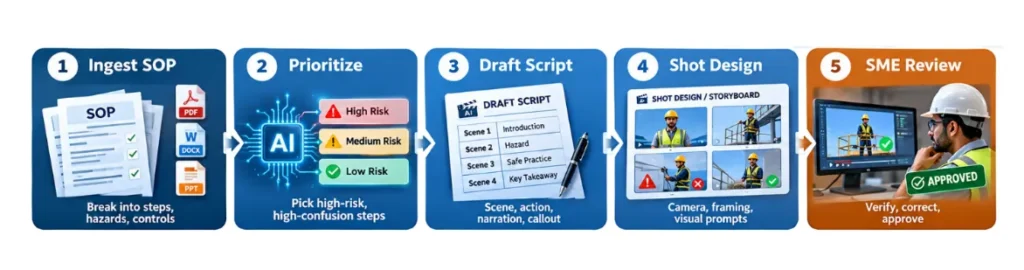
How AI Supports EHS Storyboard Development: A Step-by-Step Workflow
Think of the AI as a very fast junior content developer: it works quickly, structures information well, and produces solid first drafts, but it needs review from someone who knows the plant floor.
Step 1: Ingest and Break Down the SOP
The AI reads the SOP (Word, PDF, or pasted text) and separates it into:
- Numbered steps in correct sequence
- Hazards linked to each step (energy, chemical, mechanical, ergonomic)
- Controls (PPE, engineering controls, permits, verifications)
- Roles (operator, supervisor, maintenance, permit issuer)
- Warnings, cautions, and stop-work conditions
This is the same job an instructional designer does with a highlighter and several hours. The AI produces a first pass in about a minute.
Step 2: Decide What to Animate
Not every line deserves a scene. The AI can flag steps that are:
- Linked to past incidents or near misses (you supply the data)
- Often skipped or done out of order
- Hard to understand from text alone, such as stored energy or invisible hazards
You then validate these suggestions against your own incident history. The AI suggests; you decide.
Step 3: Write the Scene-by-Scene Script
For each selected step, the AI drafts a scene description, the action in order, narration or on-screen text, the key safety callout, and an estimated duration.
Step 4: Add Shot Direction and Visual Prompts
This is where the script becomes a visual plan. The AI writes camera angle, framing, and emphasis for each shot, and can produce prompts that illustrators or image tools use to create rough concept frames.
Step 5: Review, Correct, Approve
SME review is not removed; it becomes faster and better. Reviewers react to a concrete draft instead of imagining one from nothing, so their time goes into corrections rather than creation.
Practical Example: Lockout/Tagout Verification
Here is how a single SOP step turns into a storyboard scene.
SOP text (step 4.3): After applying the lock and tag to the energy isolating device, attempt to start the machine using normal operating controls to verify that isolation has been effective. Return controls to the OFF position.
AI-generated storyboard scene:
| Element | Detail |
|---|---|
| Scene number | 7 |
| Duration | 8 seconds |
| Setting | Production line, packaging machine, control panel in foreground |
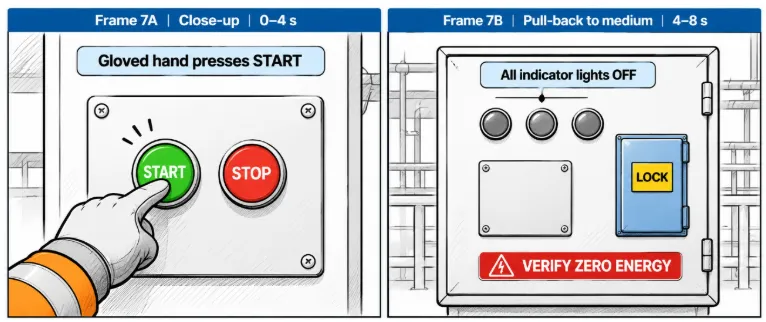
| Visual action | Close-up of the operator’s gloved hand pressing the green START button. The machine does not respond. Cut to the indicator panel: all lights are dark. |
| Camera | Close-up on hand, then slow pull-back to a medium shot of the operator with the locked disconnect behind |
| Narration | “Always test. Try to start the machine. If it moves, isolation has failed.” |
| On-screen text | VERIFY ZERO ENERGY |
| Safety callout | Return controls to OFF after the test |
| SME check needed | Confirm panel layout matches site equipment |
Notice the last row. The format builds in an SME verification flag so nothing goes forward unreviewed. A rough sketch of the two frames for this scene looks like this:
A Ready-to-Use Prompt Template
You do not need special software. A structured prompt in an approved, enterprise-grade AI assistant works well. Copy and adapt:
You are an EHS instructional designer. I will paste an SOP.
1. Break it into numbered steps with hazards, controls, and roles.
2. Identify the 5 highest-risk steps to animate.
3. For each, write a storyboard scene as a table with: Scene #, Duration, Setting, Visual action, Camera, Narration, On-screen text, Safety callout, SME check.
4. Flag any step where the SOP is ambiguous or incomplete.
5. Keep total runtime under 3 minutes. Use plain language (grade 8 reading level).
SOP: [paste here]
Tip: Instruction 4 (flag ambiguity) is often the most valuable. The AI frequently finds gaps in the SOP itself, such as undefined terms, missing steps, or unclear responsibilities. That is a safety benefit before any animation exists.
AI vs. Human Expertise in EHS Animation Development
| AI is strong at | Humans must own |
|---|---|
| Structuring text into steps and hazards | Technical accuracy of every visual |
| Drafting scripts and narration quickly | Site-specific equipment and layout |
| Producing several storyboard variations | Regulatory interpretation (OSHA, local law) |
| Simplifying language for diverse workforces | Cultural and language suitability |
| Keeping format consistent | Final approval and sign-off |
| Spotting gaps and ambiguity | Deciding acceptable risk |
Non-negotiable rule: AI output is a draft, never an authority. A storyboard that shows the wrong PPE, an unsafe body position, or the wrong sequence is worse than no animation, because it teaches the wrong behavior with confidence.
Key Benefits of AI-Assisted EHS Storyboard Development
- Faster first drafts. Work that took one to two weeks of back-and-forth can often reach a reviewable draft in a day.
- Better use of SMEs. Reviewers correct and approve instead of writing from scratch.
- Consistency. Standard templates make a library of animations feel like one program.
- Easier localization. Narration and text can be adapted for multilingual teams from the same storyboard.
- Cheaper updates. When an SOP changes, regenerate only the affected scenes.
- Scalability. Sites with hundreds of SOPs can prioritize animation across many procedures, not just a handful.
Common Pitfalls and How to Avoid Them
| Pitfall | What to do instead |
|---|---|
| Over-trusting the draft | Verify against actual equipment, the current SOP revision, and applicable regulations |
| Sharing confidential data | Use approved enterprise tools and follow your company data policy; SOPs may hold proprietary process details |
| Animating everything | Focus on high-risk, high-confusion tasks |
| Ignoring the audience | Tailor pacing and depth for contractors, new hires, and experienced operators |
| Skipping a pilot | Test with a small group of workers and ask, “What did you take away?” |
| Style over clarity | Prefer calm, realistic, uncluttered visuals over flashy ones |
EHS Storyboard Governance Checklist
Before any AI-assisted storyboard moves into production, confirm that:
- Source SOP is the current, approved revision
- Every step is verified by a qualified SME
- PPE, tools, and equipment shown match the site
- Sequence matches the SOP exactly (no creative reordering)
- Regulatory references are checked by EHS compliance
- Language is reviewed for clarity and accessibility
- A change log records what AI drafted and who approved it
- Pilot feedback is collected and incorporated
Frequently Asked Questions
AI can analyse an approved Standard Operating Procedure (SOP), organise its instructions into sequential steps, identify hazards and safety controls, and generate draft scene descriptions, narration and visual directions. An EHS professional must review and validate the storyboard before animation production.
AI can assist with SOP analysis, scripting, storyboard development and visual concept generation. However, a production-ready EHS animation requires technical validation, accurate 3D modelling, animation, narration and quality review.
A storyboard provides a scene-by-scene production plan. It helps ensure that the correct work sequence, hazards, PPE, equipment interactions and safety instructions are represented before 3D animation begins.
SOPs covering lockout/tagout, confined space entry, working at height, chemical handling, material handling, machine operation, emergency response and other industrial activities can be considered for 3D safety animation, depending on the training objectives.
No. AI assists with content structuring and storyboard drafting, but EHS professionals and subject matter experts remain responsible for validating procedures, identifying critical hazards and approving technical content.
3D animation can visually demonstrate equipment operation, hazardous situations, unsafe practices, preventive measures and emergency procedures. It is particularly useful when real-world demonstrations are difficult, dangerous or impractical.
The production timeline depends on the complexity of the procedure, animation duration, number of scenes, equipment modelling requirements, language versions and approval cycles. AI-assisted storyboarding can help accelerate the initial planning stage.
Conclusion
AI does not remove the need for safety animation work, and it does not reduce the importance of EHS expertise. It does the opposite. By taking over mechanical drafting, it frees EHS professionals to spend time on judgment: what matters most, what could go wrong, and what a worker needs to see to make the right choice.
The SOP stays the source of truth. The animation is how that truth reaches people when they need it. AI shortens the road between the two.
Getting started: Pick one high-risk SOP, run it through the five-step workflow, review it with your SME, and pilot it on one shift. A week of doing teaches more than a month of planning.
Have an SOP that needs to be converted into visual safety training? Immersiv Techsphere can help transform complex industrial procedures into customised 3D EHS safety animations.
Have a Project in Mind?
Need help with 3D animation, industrial visualization, HSE training animation, or product visualization? Tell us about your project and our team will get back to you.